The difference between a support arrangement that works and one that does not is rarely the quality of the supplier's desk. It is whether a document existed at the moment a case was opened, saying the thing the case needed to be decided. That is what the after sales support documentation below is about: four documents a buyer should require a supplier to provide, what belongs in each of them, and how a buyer verifies that the version in the pack is the version being used.
Every item here is written as a requirement on the supplier and as a line for a service agreement or a quality annex. Nothing in it is a commitment from any party, and no document described here is one we supply or promise to supply.
After sales support documentation: the pack a support relationship runs on
The four parts of the pack
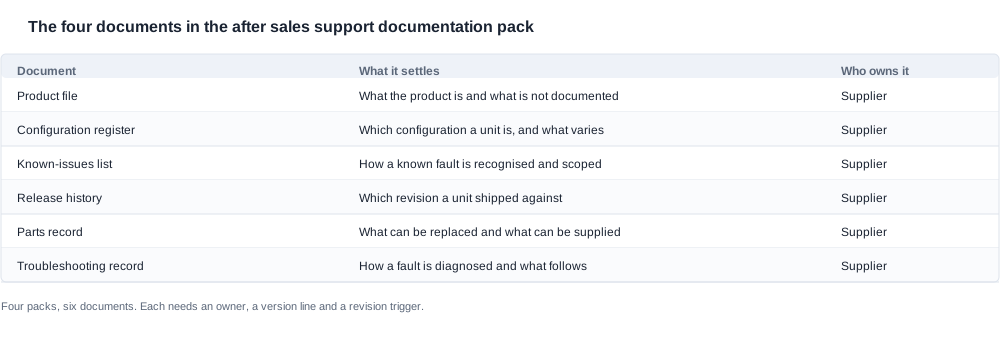
The product file. A single record of what the product is, in the configuration being bought: the published specification rows, the configuration options, the accessory set, the published markings and the limits of what is documented. It is the document that lets a support desk identify the unit in front of the customer and say what is known about it.
The configuration register. The list of the configurations that exist, what varies between them, how a unit's configuration is identified on the unit itself, and how each configuration maps to an order line and to a published row. It is the document that stops a support conversation from being conducted against the wrong object.
The known-issues list, with the release history behind it. The faults that are known, the configurations they affect, how each is recognised, and what has been done about each — together with the history of what was changed when, and which units shipped against which revision. It is the document that makes a diagnosis possible and a claim defensible.
The parts and troubleshooting records. The components that can be swapped out, the way a fault is identified, and what a supplier can still provide once a unit is open. It is the document that decides whether a unit is repaired, replaced or returned to stock.
These four are not a list of documents to file. They are the working set that a case is opened against, and each of them has a purpose that is different from the other three.
Why a pack beats a folder
A folder is a place to put documents. A pack is a set of documents with an owner, a version and a rule for what supersedes them, and the difference is worth a paragraph because it is where the two structures diverge in practice.
A folder grows. New documents are added, and the older ones stay, so the pack contains a superseded specification next to a current one, and a reader has no way of telling which is which. When a case is opened against a superseded document, the answer given to the customer is wrong and the buyer does not know it is wrong.
A pack has a version rule. Every document carries a revision, a date and an owner, and there is a stated rule for what happens when a document is revised. The rule can be simple — the newest revision applies, and the previous one is retained for reference — but it has to exist, because a rule that is understood and never written down is a rule that survives only as long as the people who understand it.
A pack has an owner. Each document has a named holder on the supplier's side, which means there is somebody to ask when a document is wrong. A folder has no holder, so a question about a document becomes a question to a general address, and the answer arrives as an opinion from whoever read it first.
The practical test of a pack is simple: can a support desk work a case from the pack alone, without a phone call? If the answer is yes, the pack is doing its job. If the answer is no, the missing item is a document, and the request for it belongs in the requirements list below rather than in the buyer's own research.

The product file and the configuration register

What the product file has to contain
Five sections, each one a line to put to the supplier.
The published specification rows for the configuration being bought. The cell capacity and count, the endurance figure, the charge bound, the charging method, the radio version, and the resolution class where the product has a camera. Ask for these as a single table for the configuration, not as a link to a general document, because a general document changes over time and the file has to be a snapshot.
What the product is, stated plainly. The form factor, the category it sits in, what it is designed for and what it is not. This is the section that stops a support desk from answering questions about a capability the product does not have.
The accessory and box contents. What ships with the unit, what the charging method requires the customer to have, and which parts, if any, can be detached. For the product lines in our range, published specification rows identify a removable inner frame on two camera models and a removable temple on one audio model, and no removable part is published for the remaining models. That is a statement about the catalogue, not about the products, and the file has to say which it is.
The published markings and their evidence status. The ingress marking appears on two camera models, and our product record states that it is a catalogue annotation with no third-party test report number behind it, and that an ingress rating requires a test report before it can be claimed externally. The file has to record the marking and the evidence status together, because the two travel together into every listing and every customs file.
The limits of the file itself. Which parts of the product are not documented, and where the documented evidence stops. This is the section most often left out and the one that prevents the most damage, because a file that lists what is documented without listing what is not will be quoted as though it were complete.
What the configuration register has to contain
Four items, and this document is the one that does the most work in a multi-configuration programme.
The list of configurations, as they are named on an order line. Not a family name, not a group name. The exact strings that appear on the purchase order, because a claim that arrives with an order reference has to be resolvable against it.
What varies between configurations. Which of the published rows change with the configuration and which do not. A programme where only the colour changes has a simple register; a programme where the configuration changes the cell, the charging method or the accessories has a register that a support desk has to consult on every call.
How a configuration is identified on the unit. Whether the identification is on the product, on the packaging, or only in the order record. If it is only in the order record, then the record has to survive the channel, and that is a condition to put into the service agreement.
The mapping between configurations and published rows. Which row set belongs to which configuration, in a form that can be checked rather than read. This mapping is also what a buyer needs for the customer-facing description, and keeping the two in step is the discipline that stops a description and a support desk from describing different products.

The known-issues list, and the release history behind it
What a known-issues list is for
A known-issues list is a diagnostic instrument first and a claim document second, and the two uses pull in slightly different directions, so it is worth separating them.
As a diagnostic instrument. It tells a support desk what a fault looks like before anyone has tried to invent a description for it. That saves the desk from asking a customer a long series of questions about a symptom the supplier already knows the answer to, and it saves the customer from having to describe a fault in terms the manufacturer chose.
As a claim document. It tells a buyer which faults were already known, which configurations were affected, and what was done. This matters because it is the document that lets a channel distinguish a manufacturing defect from a known behaviour, and it is the document that a quality analysis reads.
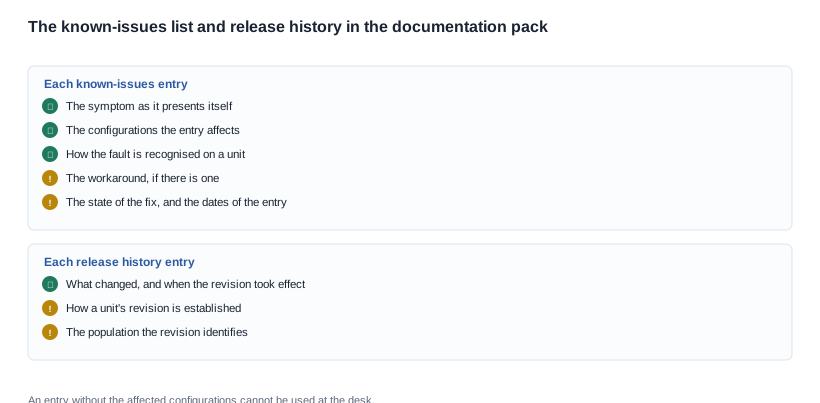
What belongs in each entry. The symptom, as it presents itself. The configurations affected. How the fault is recognised on a unit. The workaround, if there is one. The state of the fix. The date the entry was made and the date it was last changed. An entry without the configurations affected cannot be used, because the reader cannot tell whether the unit in front of them is in scope.
What must not be in it. No entry may describe a behaviour as intended without saying so explicitly. The temptation is to record an unresolved question as a settled fact, and the cost of that error is a customer support promise the supplier has never made.
The release history and what it lets a buyer trace
The release history is the list of what changed, when, and which units shipped against which revision. It is the document that lets a question be answered about a specific unit rather than about a product in general.
It places a claim in time. A fault that appeared after a change and a fault that was always present call for different responses, and the release history is what tells them apart. Without it, the only available comparison is the catalogue, which describes the product as it is now.
It links a symptom to a revision. When a symptom is recognised and a fix is released, the history records which revision carries the fix. That is what allows a channel to route a claim rather than describe it.
It identifies the population. A unit's revision, together with the order reference, identifies the population a fault belongs to, which is what makes a batch claim possible instead of a collection of individual cases.
What to ask for. The revision history for the configurations being bought, the date each revision took effect, and the rule for how a unit's revision is established — a label, a firmware build, a batch code, or a production record. The rule matters more than the list, because the list is a record and the rule is what lets a claim be matched to it.
The short form of the request
A buyer who wants one page to send to a supplier asks for six documents, each carrying the same four attributes. The list is short on purpose, because a request that names twenty documents gets twenty partial answers.
- Product file. The published rows for the configuration bought, what the product is, the accessory set, the published markings, and the stated limits of what is documented.
- Configuration register. The configuration names as they appear on an order line, what varies between them, how a unit is identified, and the mapping to published rows.
- Known-issues list. One entry per fault, each with the symptom, the configurations affected, how it is recognised, the workaround, the state of the fix and the dates.
- Release history. What changed, when the revision took effect, how a unit's revision is established, and the population the revision identifies.
- Parts record. The components that can be swapped out, listed with part numbers, split into the parts that are held and the parts that are made to order, with the supply basis for each.
- Troubleshooting record. How a fault is diagnosed, what the procedure needs, and what the outcome is when it identifies nothing.
And the four attributes that apply to all six. Each document has a named owner on the supplier's side. Each carries a version line with a revision, a date and an owner. Each has a stated trigger for revision. Each reaches the buyer through a route that somebody actually monitors.
That last attribute is the one that gets skipped. A pack that is revised and never sent is a pack the buyer cannot rely on, and the buyer finds that out at the point where a case is opened against a superseded document, which is the worst possible moment to discover it.
The pack also has to live somewhere on the buyer's side. It should sit in one place with one internal owner, so that a question about a document can be put to a person rather than to a search. A buyer who keeps the pack in a mailbox, or in a folder inside a shared drive with no owner, will find that the version it holds and the version the supplier uses have drifted apart, and it will find that out through a claim rather than through a check.
On this request, our position is deliberately narrow. What we publish for these models is a set of specification rows and a product record. No warranty period, no defect rate, no response expectation and no service scope is published for any model, so nothing here describes the arrangements of any supplier, including our own. What it sets out is what a buyer has to require, and how a buyer checks that what was supplied is what is being used.
The parts and troubleshooting records, and who keeps them current
The records that travel with a claim
Two record sets, and the second one is the one most arrangements leave undefined.
The diagnostic record. How a fault is identified, what the procedure is, what the technician needs in order to run it, and what the outcome is when the procedure finds nothing. The last part is the one worth asking for explicitly: a diagnostic procedure that has no defined negative result is a procedure that generates inconclusive cases, and inconclusive cases are the ones that consume a support arrangement without closing anything.
The parts record. Which components can be replaced individually, with part numbers. Which are replaced only as a complete unit. Which are held and which are made to order. What the supply basis is for each. Whether a last-time-buy is possible, and what that requires.
Why the two records travel together. A claim is diagnosed against one set and resolved against the other, and the records disagreeing with each other is what produces a case that is diagnosed correctly and then cannot be closed. A buyer who requires both, in the same version, with the same owner, removes a whole category of stall.
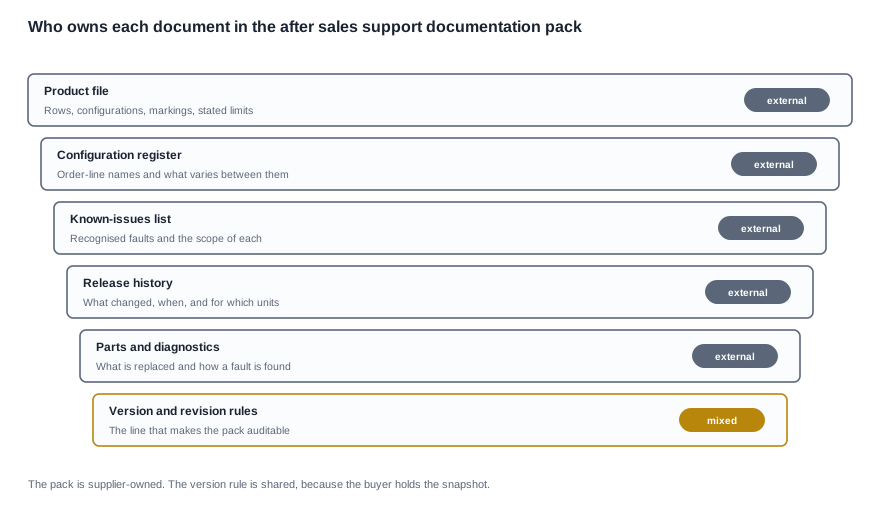
Who keeps them current, and how to verify that they are
The question is not whether the documents exist. It is whether the copy in the pack is the copy in use.
Ask who owns each document on the supplier's side. A named holder per document, and a stated route for reporting an error in it. A document with no holder cannot be corrected, so an error in it is permanent.
Ask what triggers a revision. A design change, a process change, a new configuration, a newly recognised fault, a change in the parts position. Without a trigger list, revisions happen by accident, and the ones that happen by accident are the ones that matter.
Ask how the buyer is notified. The route, the format and the address. A revision that reaches the buyer by chance is a revision that will be missed.
Verify the version rather than trusting the date. A date on a document is evidence about when it was written. The version line is evidence about what is in force. A buyer who checks one line of the pack against the supplier's own current copy has verified the pack, and that check is the cheapest form of due diligence available in a programme of this kind.
Check the pack at the points where it should change. A new configuration, a new destination market, a resolved issue, a changed parts position. A pack that has not been reviewed since the first order is a pack whose contents are unknown.
The version line that makes the pack auditable
One line at the top of each document, carrying the revision, the date, the owner, and what this revision changes relative to the previous one. That single line converts a set of files into an auditable pack, because it makes two questions answerable: which revision was in force when a claim was opened, and what changed between the revision the buyer held and the one the supplier used.
Those two questions are the ones an audit asks, and they are the ones a support arrangement is judged on long after anybody remembers the original conversation. A pack with a version line answers them. A folder does not.
How to verify a pack rather than accept it. A buyer does not have to re-read every document to know whether a pack is sound. Four checks carry most of the value, and each one is a test rather than an opinion. Take one unit that has shipped and one unit that has not, and check that the configuration register resolves both of them to a row set. Take the last claim the buyer has handled and check that the known-issues list would have recognised it. Take the last documentation revision the supplier issued and check that the buyer's copy carries the same version line. Take one part the supplier has said can be replaced and check that it appears in the parts record with a part number and a supply basis.
Those four checks are the criteria a buyer can apply to any documentation pack, whatever the supplier calls it, and they cost an afternoon rather than a negotiation. Run them before you order rather than after the first claim, because a pack that fails them cannot be repaired by good service afterwards.
The checklist a buyer can hand to a supplier is therefore short: the six documents, the four attributes each one carries, and the four checks above. Everything else in a documentation discussion is detail that those three groups will produce anyway, once somebody knows what to ask for and what to verify.
The requirement this leaves a buyer with is specific and testable: four documents, each with a named owner on the supplier's side, each with a version line, each with a stated revision trigger, and each verified against the supplier's current copy before it is relied on. That is what the after sales support documentation has to amount to for it to be more than a folder with tidier filing.