Version management in a customised product is not the same problem as version management in a software product, and treating it that way produces the two failures this article is about. Software teams tend to think of versions as a stream, where the latest is the best and the older ones are only kept for the customers who have not updated yet. In a physical product the older ones are not history, they are inventory, and they are sitting in warehouses, in distributors, and in customers' hands, and every one of them will eventually be the subject of a question. A version system for a customised physical product has to answer the same question software versions answer, plus one more: which version is this unit in my hand, and where is it written down.
That second question is the whole discipline. A version that exists in a factory's build system but cannot be read off a unit or found in a document has not solved anything. It has created an internal convenience and an external mystery, and the external mystery is what arrives at the support desk.
The reason to think about this early is that a customised product multiplies the number of things that can differ between two units that are, to any customer, identical. Two units from the same production run can carry different firmware, different artwork, different inserts, different documentation and different accessories, and each of those differences is legitimate. The version system's job is to make the differences nameable, and the buyer's job is to make sure the naming is written into the agreement.
Engineering customization version management: the seven things that need their own version
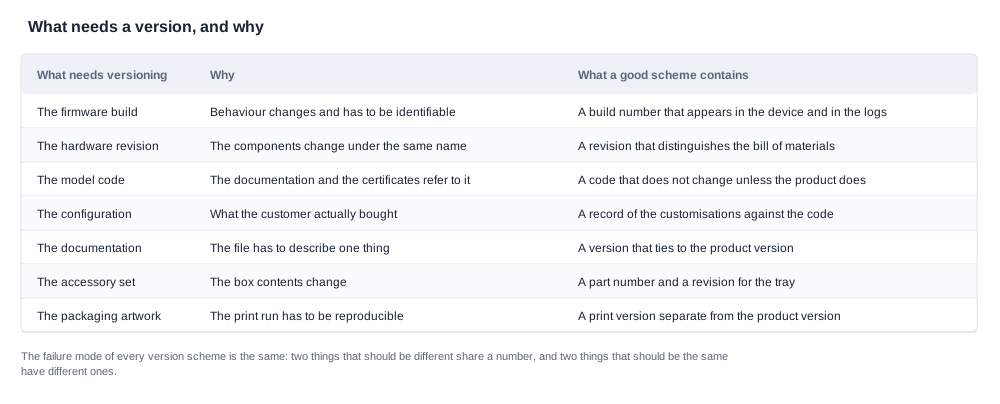
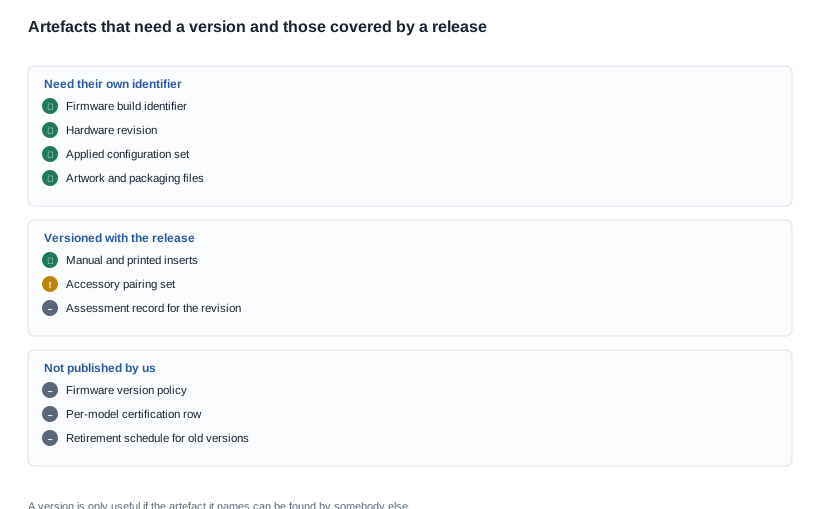
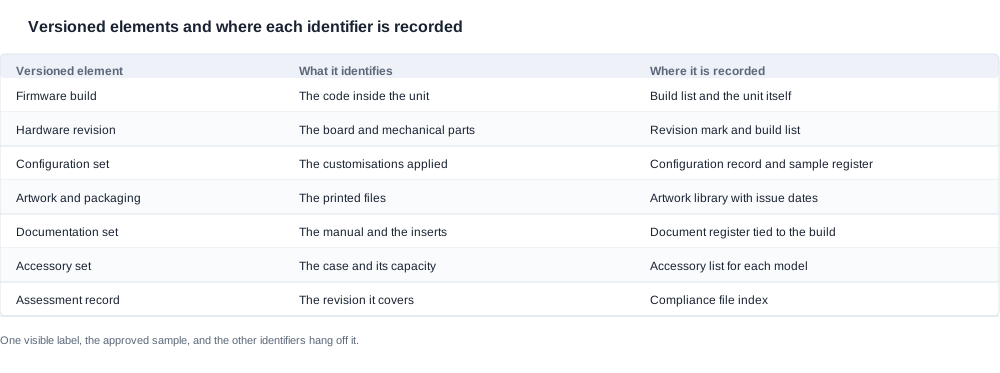
Seven elements of a customised product carry a version of their own. They are listed here because each one changes independently of the others, and a system that versions only the first two will still be unable to answer a question about the third.
- The firmware build. The code as it exists in the unit, identified by a build number that can be read back from the device. This is the version that matters most for technical support and the one most often absent from a buyer's paperwork. We publish no firmware version policy, so the scheme has to be agreed per programme.
- The hardware revision. The board, the mechanical parts and anything that changed physically. It is invisible to the customer, so it is only knowable from a mark on the unit, a build record or a supplier's memory, and it is frequently the version that explains a physical complaint.
- The configuration set. The specific combination of customisations applied to that unit: which colour, which name, which logo treatment, which interface build, which packaging. Two units of the same model with the same firmware can still be different products, and this is the version that the buyer's own order system has to be able to record.
- The artwork and packaging files. The printed side. These change more often than people expect, because a language correction, a regulatory insert for a new market or a revised legal line is a change to the packaging version even when the product is untouched.
- The documentation set. The manual, the quick start card and the inserts, tied to a specific configuration and a specific firmware build. A manual that describes a different build from the one in the box is a support cost that grows with every customer who reads it.
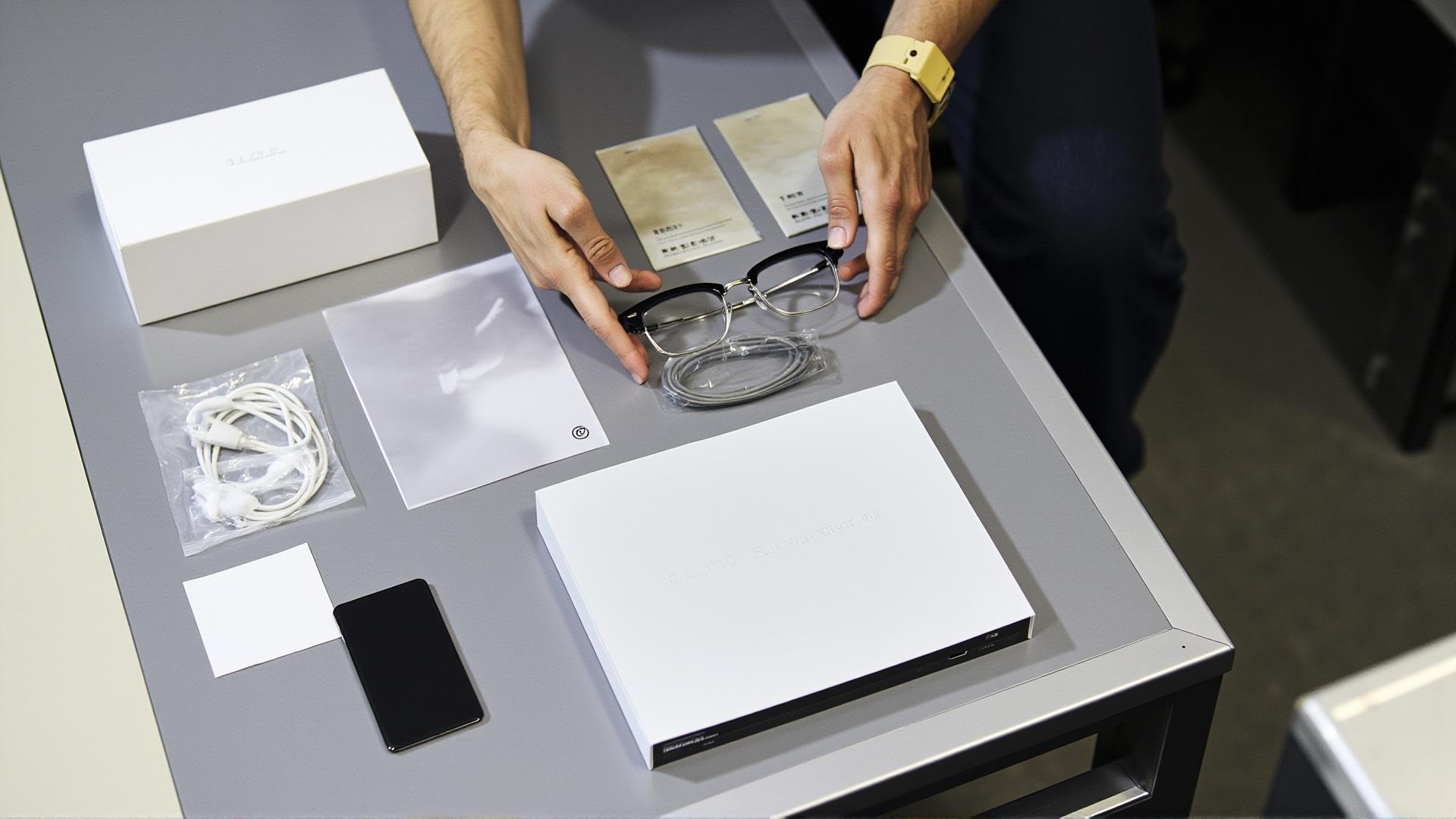
- The accessory set. Which case, and which configuration of it, ships with the unit. The published rows in our catalogue show why this needs its own version: capacity is published for five models — CY05 and CY03, and L1 Pro — each at 1400 mAh, L2 Utral at either 900 or 1400 mAh, and MT6 as a 1200 mAh foldable case. KY06 and MT5 have a case with no published capacity. V03 and V06, and S7 have no case row at all, and V03 Pro is documented as shipping without a case. L2 Utral alone is a two-configuration product, and a unit with the smaller case is not the same product as a unit with the larger one.
- The assessment record. Which regulatory assessment or evaluation covers which revision. This one is invisible to everybody except the people who keep the file, and it is the version that decides whether a unit is being shipped against an assessment that still applies.
The relationship between the seven matters as much as the seven themselves. The configuration set, the documentation set and the accessory set are usually the same version as the sample that was approved, and the firmware build and the hardware revision are usually what the sample was built from. So a good version system has one visible label — the sample, the golden unit — and the other six hang off it. That is a simpler system than the one most buyers end up with, and it is far easier to audit.

Engineering customization and the two ways a version system fails
The two failure modes are opposite, and they occur in different kinds of organisation, so buyers should know which one they are looking at.
Version silence. The identifiers exist somewhere — in a factory spreadsheet, in a build system, in a folder — and they are never recorded in a place the buyer's own team can reach. The symptom is a support question that stalls because nobody can establish what the customer is holding. The second symptom is a claim that cannot be investigated, because the unit cannot be tied to a build. The third, and the most expensive, is a request for a change that the factory believes is already the state of the product, while the buyer believes it has been asked for and not done. Version silence is a communication failure more than a technical one, and it is more common among suppliers who are small, busy and good at building.
Version explosion. Every artefact gets an identifier, and the identifiers multiply faster than the products. A buyer receives a build number, a revision number, a configuration code, a document number and a packaging code for the same unit, and cannot map them onto each other. The symptom is a specification that has been overtaken by a numbering scheme, and a supplier who cannot say which version is current without checking three systems. The cost of version explosion is paid in the places where speed matters: a defect correction takes longer to push out, a claim takes longer to assess, and a new production run takes longer to start because the starting configuration has to be reconstructed.
Both failure modes have the same root cause, which is treating the identifier as the goal rather than as a means of finding things. A version number is valuable only if someone can act on it. The test of a version system is simple: pick a serial number from a customer complaint, and see how many steps it takes to reach the build, the configuration, the documentation and the assessment that covered it. If the answer is more than a couple of minutes, the system is a filing exercise rather than a control.
There is a third, quieter pattern worth naming: versions that exist but whose meaning is ambiguous. A build number that has been reused for two different builds, or a configuration code that means different things in the factory and in the buyer's order system, produces exactly the wrong kind of confidence. It is worse than having no version, because people stop looking.
During due diligence, the version table is one of the most discriminating documents a buyer can ask for, and it is rarely requested. Most supplier assessments look at capability claims — capacity, lead time, certification, quality systems — and skip the mundane question of how the supplier knows what it shipped. A buyer that asks for a redacted version table from a recent customised programme learns something no capability claim will tell it: whether the supplier can trace a unit in a customer's hand back to the build and the documentation that went with it. A supplier that has the table has already solved the problem this article is about. A supplier that says it can look it up in a moment usually cannot.
The same test works during a shortlist comparison, and it is worth setting the criteria before the quotations arrive. The criteria that matter are simple: does each supplier name the identifiers it will use, does it say where the record will live, does it say who will hold the keys, and does it say what happens to a version once it is retired. Two suppliers can quote the same price and the same lead time and still be offering completely different support models, and the version scheme is usually the earliest place that difference becomes visible.

Engineering customization and the rules that make a version system usable
Six rules are enough to make a version system work in this category. They are simple, and the reason they are worth stating is that most systems fail on one of them rather than on anything sophisticated.
- One identifier per dimension, never a composite. The firmware build, the hardware revision and the configuration set are three separate things, and combining them into a single "product version" means that any change to any one of them invalidates the others. Composite identifiers are also the direct cause of version explosion.
- A version is immutable. Changing an artefact creates a new version. Editing a released version in place destroys the only record of what shipped, and it is the single most common cause of a documentation mismatch reaching a customer.
- A version is only meaningful if the artefact is retrievable. An identifier that points to a file in a folder nobody can find is a label, not a version. For a customised programme, the storage has to survive the person who created it.
- Every release carries a record. Who released it, when, against which baseline, what changed, and what it supersedes. This is the difference between a version number and a release note, and it is the artefact that makes an audit possible.
- The identifier must be physically reachable. A build number that can only be retrieved from the factory is not usable by a support team. The practical solutions are a visible menu item, a printed label on the unit, a code on the packaging or a serial-number lookup, and the choice should be made with the support process in mind rather than with the build process in mind.
- Keep the number of live versions small. Every version in service is a population to support. Retiring old versions is a commercial act as much as a technical one, and it should be a decision with a date and a communication, not an absence.
The sixth rule is where most programmes end up with a problem they did not anticipate. If nothing is ever retired, the number of live versions grows with every release, and the support cost of a product grows even though its hardware has not changed. The remedy is a policy with three parts: how long a version is supported, what happens to units running an expired version, and how the end customer is told. We publish no obsolescence commitment and no support service-level row, so for us this is a per-programme agreement, and it should be written as one.
Retiring a version is also a negotiation with the buyer, and it should be negotiated rather than announced. The arguments for retirement are real: every live version is a support cost, a spare-parts cost and a training cost. The argument against it is that units in the field cannot be recalled, so a retired version means a product that exists in the world and is no longer supported by the people who made it. Most buyers will accept a retirement policy that states the support horizon clearly and communicates it, and will not accept one that is discovered by their own customers. The trade-off between the cost of supporting an old version and the cost of an unsupported product in the field is a commercial decision, and it should be made while the version is current rather than when the field is full of it.
One related trap deserves a sentence, because it is common in this category: the version that is retired but still in the warehouse. Stock held by the buyer or by a distributor against a retired version cannot be sold against an active version without a re-verification, and if the artwork, the manual or the insert has changed, the stock is no longer a complete product. Deciding in advance what happens to existing stock when a version is retired is a small clause that saves a very large argument.


Engineering customization and the compliance question behind a version
The seventh version — the assessment record — is the one that connects to compliance, and it is the one most often missing. It is missing partly because the regulatory picture in this category is genuinely fragmented, and partly because nobody has asked for it.
The honest position on our own published material is this: the catalogue carries no per-model certification row, and the catalogue body does not list CE, FCC, RoHS or RED entries against individual models. The export-certification page is a picture page showing ten patent certificates, eight design patents and two utility models. Those are patents, which record what an applicant chose to protect, and they are not the same thing as a regulatory test record. A buyer who assumes the certification page settles the compliance question for a model is going to be disappointed, and a buyer who assumes the absence of a certification row means no compliance work has been done is going to be unfairly negative. Neither is right, and the way to resolve it is to ask for the assessment scope in writing, against the specific configuration being ordered.
The version-specific part of the question is this: an assessment covers a defined configuration and a defined revision. If the hardware revision changes, if the firmware changes in a way that touches the radio behaviour or the handling of personal data, or if the antenna environment changes because the frame changed, the scope of what is covered has to be re-established. This is where a firmware version scheme becomes a compliance question rather than a support question, because the radio-equipment cybersecurity requirements behind CE marking, described through the EN 18031 harmonised standards for secure communication, encryption, secure storage, user consent and the handling of identified vulnerabilities, apply to the product as it is placed on the market rather than to the product as it was first assessed.
The practical version of this rule is simple and it is worth writing into the change process: every assessment record names the revisions it covers, and any change to a covered revision triggers a review of the record. Without that clause, a product can quietly drift out of the scope of its own assessment, and nobody notices until a market authority, a distributor's compliance team or a customer's own legal adviser asks.
Engineering customization and the version record a support team needs
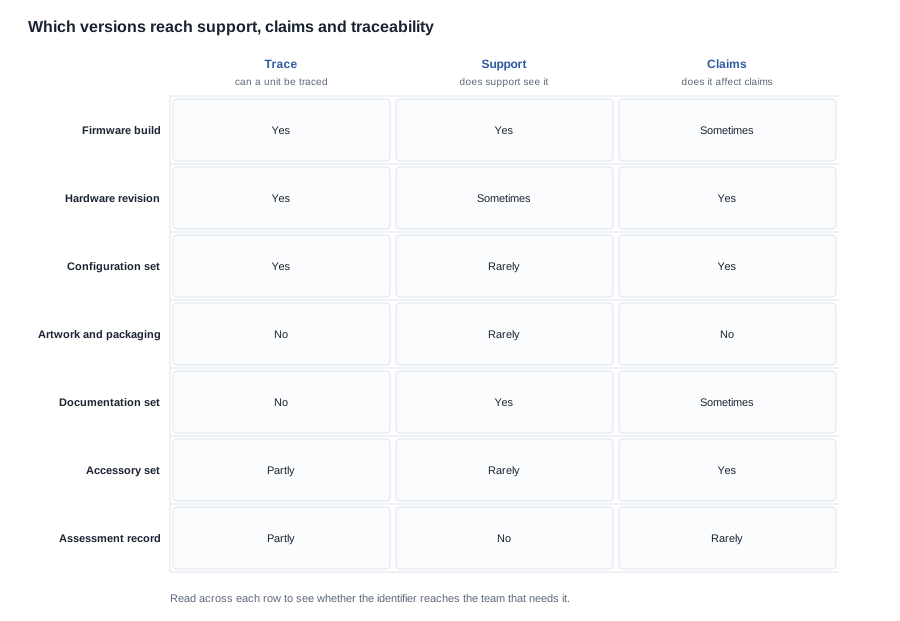
The last piece is the record itself, because a version system is only as good as the document that a support team can open at three in the afternoon when a customer is on the line.
For a customised product, that record should answer six questions without further investigation: which firmware build is in the unit, which hardware revision it is, which configuration set was applied, which documentation version was packed with it, which accessory set was supplied, and which assessment record covers that combination. In practice this is a single table keyed by the serial number or by the batch, with the identifiers linked rather than repeated, and it is kept somewhere the buyer's own team can reach.
During due diligence, a buyer can ask to see this table for a recent programme, in a redacted form. If it exists, the supplier can support a customised product. If it does not, the supplier can build products, and the support model for a customised product is something the two sides will have to invent from scratch. That is a legitimate arrangement, provided it is a conscious one rather than a surprise in the first warranty quarter.
The position is straightforward. We publish no firmware version policy, no obsolescence commitment and no support service-level row, because those are decisions about a relationship rather than properties of a product. What we will do is agree them with you in writing, per programme: the identifiers that will be used, what each one means, where the record will live, how it reaches the support team, and what happens to the versions that are retired. Send us the configuration you are planning and we will show you the version scheme we would propose for it and the record we would expect to be able to open when your first customer calls.
A note on which model to start from, since it affects the version scheme more than buyers expect. The range is broad — eight audio models, three sport models, eleven camera models, three kids models, plus AR glasses, electrochromic and bone conduction lines listed by capability — and the version questions differ sharply across it. A camera programme has to version the accessory set, because the published case rows range from a 1400 mAh case on L1 Pro and CY03, and CY05 to a documented no-case configuration on V03 Pro. A sports programme has to version the mounting and the wear profile. An audio programme for a brand launching into several languages has to version the inserts. Which model a brand picks determines which of the seven versioned elements it actually has to operate, and that is a legitimate part of the selection criteria rather than a detail to settle afterwards.
Related reading
- What a customisation request covers — engineering customization
- Where the baseline is set before production — the development process
- How a customer question is actually handled after launch — after-sales support