
The short version of the question is simple: can I use this thing with no signal? It is usually asked late and expensively, by a customer in a place with no reception, long after the product has shipped. The honest answer has two halves, and the first half is more reassuring than most suppliers will admit while the second half is more useful than most suppliers will volunteer.
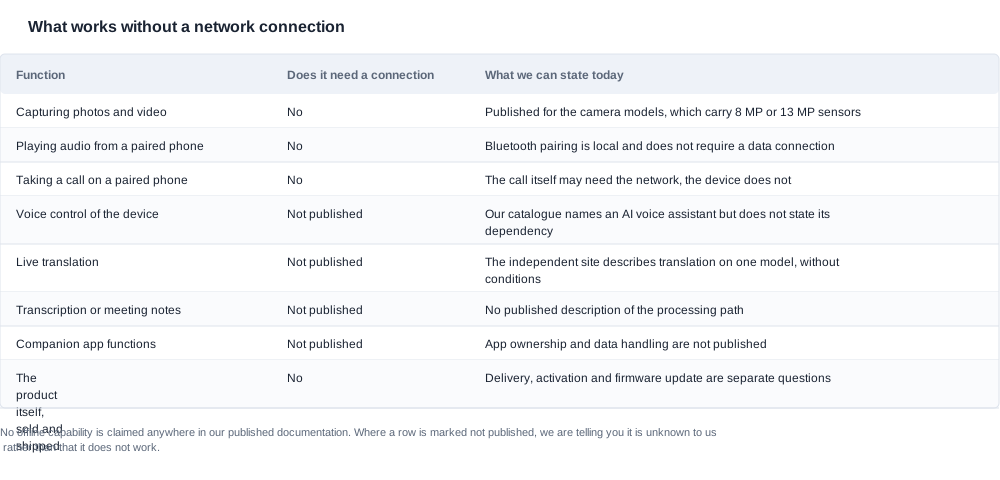
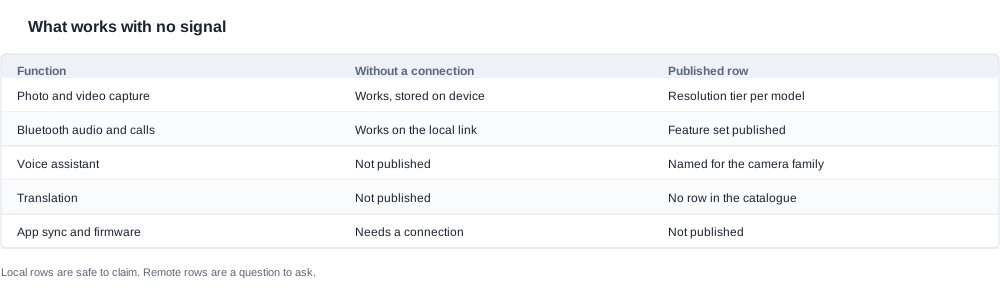
The first half is that the hardware does not stop working when the signal disappears. Capture, playback, the local Bluetooth link, the firmware and the pairing all keep working, because none of them is a network function. The second half is that the interesting features — the voice assistant, translation, transcription, anything that involves a model larger than a device can hold — are the ones where the answer genuinely matters, and for those the catalogue is silent. We publish an AI voice assistant among the key technologies for the AI camera glasses family. We publish no row anywhere in the catalogue for translation, for transcription, or for where any of that processing physically runs.
That silence is not an evasion, and it is not unusual in this product category. It is the honest description of a software stack that is still developing, and a buyer who is told a confident answer in either direction is being told something that has not been tested. The useful thing to do with the uncertainty is to design around it, and to know precisely which part of the product you are allowed to promise.
Can I use it offline: what actually needs the network
The way to think about this is to separate the product into three layers, because the three layers fail in different ways and a buyer who treats them as one thing will write a listing that cannot be defended.
The first layer is the device itself: the sensor, the camera, the microphones, the speakers, the frame, the firmware, the display if the model has one. This layer is entirely local. It captures to storage, it plays what is stored on it, it runs its own firmware, and it does not care whether there is a signal. Nothing in this layer needs a server, a data plan or an account.
The second layer is the link to the phone. The glasses pair over Bluetooth and the radio link between two devices is a local one. The catalogue publishes a Bluetooth version for fourteen of the twenty-eight models in the range, and it does not publish one for the eleven camera models, for the A05, for the A06 or for the bone conduction products. That gap is worth noting for a listing rather than for an offline question: it means a buyer cannot print a Bluetooth version for most of the camera family, and that is a copy problem rather than a connectivity problem. The link layer works offline in the same way it works online.
The third layer is everything that reaches beyond the device. The assistant, translation, transcription, cloud storage of captured footage, app configuration, firmware updates, remote management of a fleet of devices, warranty registration, and anything else that depends on a server existing somewhere. This is the layer that stops when the signal stops, and the catalogue publishes rows for almost none of it.
The practical conclusion that follows is that the network question is not really about the product. It is about which of the three layers the feature you are marketing lives in. A feature in the first layer keeps working. A feature in the third layer needs a different answer for every market it ships into, because the reachability of cloud services varies enormously — a large carrier network in one country is effectively unavailable in another, and a warehouse, a mine, a ship, a hospital basement or a rural worksite has no assumption of coverage at all.
There is one more layer that buyers forget, and it is not a technical layer at all: the documentation, the app store listing and the support material. A product that is genuinely usable offline still has an onboarding flow that assumes a connection, a setup video that assumes a connection, and a manual that tells the user to download an app first. Those are the parts of the offline experience that most often break, and they are entirely within a buyer's control because they are the buyer's copy and the buyer's packaging insert.
That last point deserves more attention than it usually gets, because in a genuinely offline use case the packaging insert is doing the work that onboarding normally does. If the customer is in a warehouse with no reception, they have the box, the device and nothing else. The insert therefore has to carry the pairing instructions in full, the meaning of the light indicators, what to do when a function does not respond, and what the customer should tell support. This is a design task rather than a translation task, and it is one of the few places where a buyer can create a genuine advantage over a competitor whose product works exactly as well and whose insert does not exist.
If the use case is genuinely offline-first — field service, industrial maintenance, logistics, warehouse picking, aviation, maritime, research — then this question should be settled before the order rather than after it, because it determines which model you shortlist, what goes in the box, and whether the app you depend on is the one that ships with the product or the one your customer already has.
The camera and the audio, and can I rely on them with no signal
The camera is the clearest case, and it is the case that decides most content and inspection use cases.
Capture is local. The camera records to storage on the device, and the files are on the device when the recording stops, whether or not a connection existed at any point during the shoot. There is no buffering to a server, no upload dependency, and no partial-record behaviour caused by a weak signal. A burst, a clip, a still photo and a timed capture all work in the same conditions.
What happens afterwards is the part worth checking, and there are two specific behaviours a buyer should not assume. The first is what the companion app does with a library that has been accumulating while offline — whether files appear when the connection returns, whether they appear immediately, whether the timestamps and the ordering are preserved, and whether a partially transferred file from a previous session is handled gracefully. The second is whether the camera behaves identically on a device that has never had a connection versus a device whose connection dropped. Those are firmware behaviours, they differ between products, and they are the kind of thing that only shows up when you deliberately test it.
The audio layer is local in the same way. Playback of stored audio, a call routed to a paired phone over the Bluetooth link, and the microphone capture that feeds a call all work without any data connection, because a call that has no cellular coverage is a call that has no cellular coverage on any device in the world. The audio glasses range is where a buyer would look for this behaviour in practice, and it is worth remembering that the audio models in our catalogue carry a Bluetooth version on some of them and not on others, which is one more reason to check the pairing behaviour on the actual unit rather than on a datasheet.
For a camera model, the published battery rows set the practical envelope for a day of offline capture. The camera models run on cells in the region of 220 to 290 mAh with a rated runtime of roughly five to eight hours, no test condition published, and the camera is the largest power consumer on the device. Offline operation does not change the battery, but it does change the pattern: a device that is out of coverage may also be out of reach of a charger, so the runtime figure and the charging method together are the rows that decide whether an offline shift is comfortable. Charging is magnetic on seventeen models and Type-C on seven, and the method is not published for the MT6 and the CY03, and the CY05 and the L1 Pro — which is a detail that matters when a field kit is built around a single cable type.
The weight row is relevant here too, because an offline field device is a device that is worn for the whole shift. Only one model in the camera family publishes a weight: the MT6 at 158 g for the glasses alone, excluding its foldable 1200 mAh case. For every other model this is a measurement the buyer has to take on the sample, and it is a measurement worth taking for a use case where the product is worn continuously rather than used occasionally.

The assistant and translation, and can I find out where the processing runs
This is the part where the honest answer is that the catalogue does not tell us, and where the three questions worth asking narrow the answer quickly.
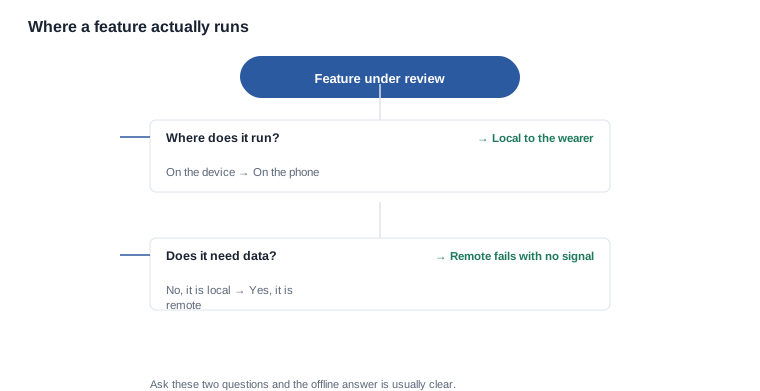
- Where does the processing run? On the device, on the paired phone, or on a server? These three answers have completely different offline behaviour, and they also have different consequences for latency, for cost at scale and for what happens in a market where the service is not offered.
- If it runs on a server, what does the user see when no server is reachable? An error message, a silent failure, a queued job that completes later, or a feature that simply does not appear in the interface.
- Is there a documented offline mode? A supplier with a genuine offline mode will have a name for it and a paragraph describing it. A supplier without one usually has a paragraph about cloud architecture instead, which is a polite way of saying no.
Applied to our own catalogue the answers are as follows. The AI camera glasses family names an AI voice assistant among its key technologies, and the AI features page sets out the capabilities we are prepared to talk about. Translation appears nowhere in the catalogue as a row for any model, so a buyer cannot currently source a translation specification from us at all, and any plan that depends on translation needs that row closed first — it is not a claim that can be made from a catalogue page today.
There is a related point about how these features are usually sold, and it is worth naming because it catches buyers who have never thought about connectivity at all. An AI feature is frequently marketed by describing the capability rather than the dependency: "voice control" rather than "voice control processed in the cloud", "live translation" rather than "live translation requiring a data connection". The buyer then ships to a market with poor coverage and discovers the failure mode is that the feature silently does nothing, which is worse than an error because the customer assumes they are being ignored.
The commercial answer is to make the dependency explicit in the copy, whatever the dependency turns out to be. A listing that says "voice commands work with your phone connected to a data network" is a weaker piece of marketing than one that says "voice commands work with no signal" — but it is a claim you can defend, and for the buyer whose customer base is a warehouse or a vessel or a field crew, a defensible weaker claim is worth more than an impressive claim that generates refunds.
For a buyer doing due diligence on this, the most efficient method is to put the model on the shortlist with a written question attached to it rather than a general request for a datasheet. Ask which models in the range have a documented offline mode, ask what it includes and excludes, and ask for a demonstration on the specific model. Suppliers answer model-specific questions far more reliably than they answer general ones, and the answer you get back is usually more precise than anything in a catalogue.
The offline test, and can I run it before the order rather than after
Fifteen minutes in a basement with the phone in airplane mode will tell you more than any specification table, and it produces evidence you can put next to your marketing claim. This is the single highest-value thing a buyer can do with a sample, and it costs almost nothing.
The procedure, in order:
- Prepare before you disconnect. Pair the glasses, complete the app setup, confirm the firmware is current and confirm the app works with a connection. Testing an offline claim on a device that was never properly set up proves nothing.
- Take the phone off the network. Airplane mode is the cleanest version of the test because it is reproducible and because it is exactly what a customer on a flight will do. Switching off the mobile data and the Wi-Fi separately is the more thorough version, because it isolates the two paths.
- Capture and verify. Take stills and video. Confirm the files exist, that they open, that they have sensible timestamps and that the duration is what you expect.
- Exercise the audio. Play stored audio, place a call to a landline, and record the microphone. All of these should behave exactly as they do online.
- Try every connected feature the listing mentions. The assistant, translation if you are considering it, any recording sync, any history or history-search feature. Note the exact behaviour — an error, a silence, a queue.
- Restore the connection and watch the recovery. Confirm the library syncs, confirm nothing was lost, and confirm no error state persists after reconnection.
- Repeat with the app closed and with the app force-stopped. Some features behave differently when the app is not running in the foreground, and that is exactly the state a customer will be in.

Two details of this procedure are worth more than the rest. The first is step seven, which catches a whole class of failures where a feature works only while the app happens to be open. The second is that the whole test should be run on more than one model from the shortlist, because offline behaviour is a software characteristic and it does not necessarily travel with the hardware tier — two models that look identical in a catalogue can behave completely differently with the network removed.
There is a further reason to run the test more than once, and it is the one that catches buyers who skip the whole exercise. Firmware updates are delivered over the network, so a device that has been offline for months may be running an older build than the one you tested in the factory. If the behaviour changes between builds, then "works offline" is not a property of the model, it is a property of the model at a particular version, and that changes how the claim has to be written and how the customer has to be supported when an update lands. Note the firmware version next to every result, and ask the supplier how updates are delivered to a fleet of devices in the field, because a customer with two hundred units spread across sites cannot be asked to visit a website to update a headset.
Two things to hold onto as you do it. A feature that does not work offline is not a defect unless the product promised that it would, so the test is about finding the boundary rather than about catching a fault. And a feature that works offline on one unit and not on another is a firmware version difference, which is why step one matters: record the firmware version alongside every result, so that a re-test three months later is comparable to the first one.
The sample evaluation process is worth reading before the unit arrives, because it sets out how to structure a sample programme so that the result is a decision rather than an impression. The AI camera glasses range is where the per-model rows you will be testing against — resolution tier, charging method, battery figures, case options — actually live, and it is the right document to have open while you run the test.
The claim boundary, and can I write copy that survives a customer test
Here is what is safe on the evidence available, and it covers most of what a retail listing needs.
Safe to claim. First-person photo and video capture on the device, with the resolution tier published per model. Bluetooth audio and calls. A product that functions as a local device without a subscription, in the sense that no subscription row is published for any model and none of the local functions above depends on one.
Safe to claim with a condition attached. Anything that depends on a phone, since a phone that is out of range, in airplane mode or on a different network changes the behaviour. Write the condition on the product page rather than in a linked policy, because the customer who reads the linked policy is the customer who already has the problem.
Not safe to claim until it is demonstrated. Offline translation, offline voice control, offline transcription, offline AI of any kind, and any wording that implies the product behaves identically on a plane, on a mountain or in a lift.
The last of those is the one that fails most often, because the marketing instinct is to describe the happy path on a beach and the happy path on a plane is identical from the outside. A line like "works anywhere, no connection needed" is a claim about every feature on the product, not about the capture function, and it will be read as such by a customer who expects the assistant to respond on a flight.
There is a version of the offline story that is genuinely strong, and it does not depend on the connected features at all. For field service, industrial, logistics, warehouse and research customers, the fact that capture, documentation and audio continue to work with no coverage is a serious operational benefit: the work does not stop when the network does, the footage is captured locally, and the sync happens when the device is back in range. That is a claim about the hardware, it is testable in an afternoon, and it is exactly the kind of claim that survives a customer test.
If you want to make a connected claim as well, the way to do it is to settle it before the order, with a written question to the supplier about a specific model and a specific feature, and to put the demonstration on the sample programme. What we can offer is to take that model and that feature and tell you whether we can demonstrate it today with the network removed, or whether the answer has to come from a test that has not been run yet. That distinction is the difference between a claim you can print and a claim you cannot.
Which model you should evaluate is a trade-off rather than a ranking, and it depends on where the customer will actually be. If they are in a covered industrial site, the connected features matter more and the offline story matters less. If they are in a warehouse with steel walls, the offline story is the product and the connected features are a convenience for the office. If they are on a vessel or a remote site, the offline story is the only story, and the buyer should be asking which models publish their battery and charging rows clearly enough to plan a shift around — and, if not, whether we will put those rows in writing.
Related reading
- The capabilities behind the connected and the local features — AI features in smart glasses
- The AI claims worth testing before you publish them — testing AI features before ordering
- The hardware that works locally by design — AI camera glasses range
- How a sample test is supposed to be run — sample evaluation
Tell us the model, the features and the places your customers take the product, and we will say which of them we can confirm work without a connection today.