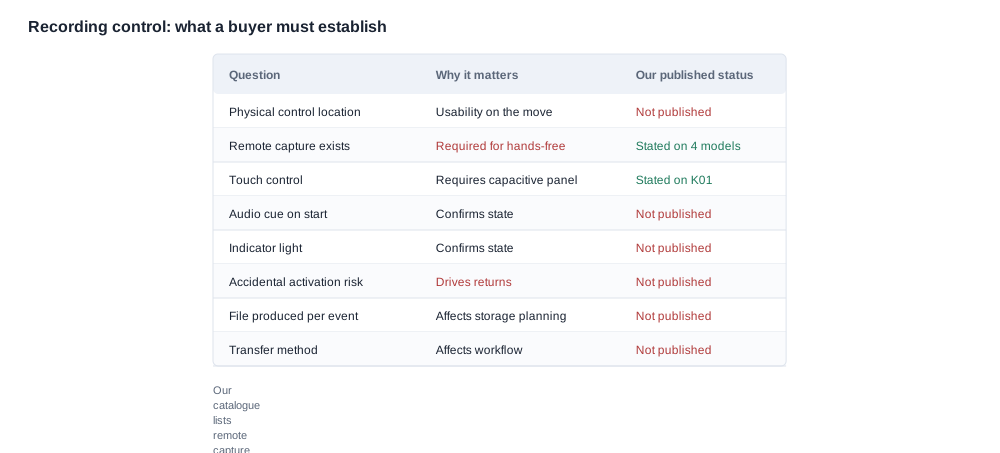
The honest answer is that we cannot describe the control interface, because how do i start and stop recording faq questions are answered by the control design of a specific model, and our catalogue describes capability rather than specifying the interface. It publishes no control location for any of the twenty-eight models in the range, no indicator behaviour and no audio cue. What it does publish is remote capture on four platforms, and that single row is the most directly useful starting point we hold.
That does not make the question unanswerable. It makes it a question with a defined method: the recording control is one of the few rows in this category that a buyer can close in five minutes on a physical unit and be confident in the answer. That is unusual, because most of the rows that decide a smart glasses purchase require documentation you often cannot get at all.
This page is written for the buyer who has to promise a recording workflow to a customer — a content creator, a sport channel, an e-commerce listing — and who will be held to that promise. It sets out the published rows first, the rows that are not published second, the five-minute test third, and the commercial consequences last.
How do I start and stop recording: the five-minute test on any sample
Before you promise a recording workflow to anyone, run these six steps on a physical unit, in this order. The order is not arbitrary: the first three steps establish that the workflow is possible, and the last three establish that it is repeatable.
- Find the control without looking. Reach for the frame by touch alone and start a capture. A control that has to be seen to be operated is not a hands-free control, whatever the listing calls it, and this is the step that most often ends a workflow plan.
- Start and stop ten times in a row. Not three. Ten is where a control that needs a retry reveals itself, and the retry is the thing a customer will notice on day three rather than day one.
- Squeeze, bump and knock the temples deliberately. This is the accidental-activation test, it takes ten seconds, and it is the single highest-value minute in the whole sample cycle.
- Confirm the state after each capture. Look for a visual indicator. Listen for an audible cue. Record what you find, including "none", because "no confirmation" is a finding and not a failure.
- Transfer one file to a computer. Not a short clip — a full-length file, because the transfer path behaves differently on a large file and the difference is exactly what makes a customer stop using the product.
- Check what one capture produced. A still, a clip, a segment, a loop. This decides your storage plan, and it decides it silently if nobody looks.
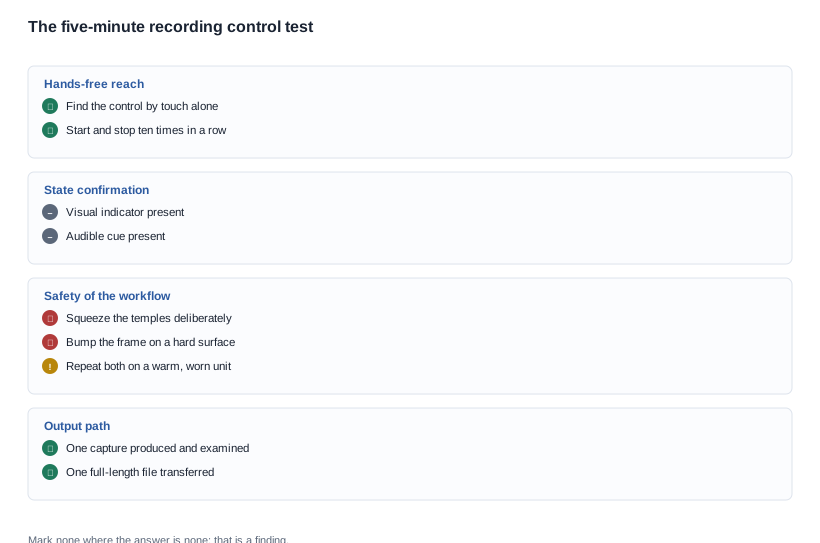
Five minutes on a physical unit answers more of the workflow questions than any datasheet in this category will, and every one of those answers is something you can put in the agreement and quote in the listing.
There is one step that is worth doing twice. Repeat steps three and four on a unit that has been worn for an hour, because a control that responds to a squeeze while the unit is cold can behave differently once the wearer is warm and the temples are damp. That is the state the product will actually be in.
How do you narrow the field with the rows we publish
The published rows narrow the field further than you would expect, and the narrowing is free — it costs a catalogue reading rather than a sample cycle.
First filter: the model has to have a camera. The recording question does not arise for the rest of the range. Eleven of our models are camera platforms: the L2 Utral and the CY05, the V03 and the MT5, the L1 Pro and the CY03, the KY06 and the V03 Pro, the MT6 and the V06, and the S7. The full range is on the ai camera glasses page.
Second filter: remote capture. Our catalogue publishes remote capture on four platforms — the V06 and the S7 among the camera models, and the D17 and the ZH12 in the sport class. If your workflow depends on starting a capture from something other than the frame itself, these four are where the published row supports the claim. For the other camera models, remote capture is not published, which means you cannot claim it and you should not write it into a listing until a supplier confirms it in writing for that exact model.
Third filter: the published rows that affect the workflow around the control. These do not answer the control question, but they decide whether the workflow is sustainable on the device at all.
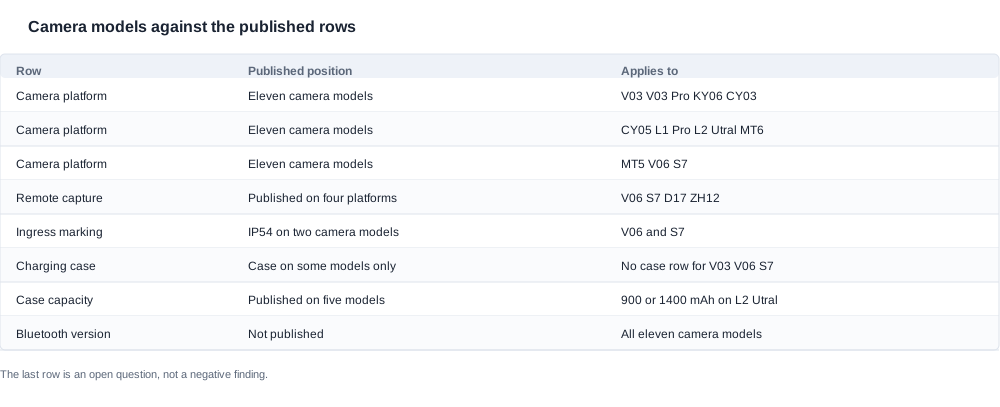
The table above sets the shortlist against the published rows. Three things in it are worth reading twice.
The runtime is published for all eleven camera models and falls in a range of roughly five to eight hours of rated use — with no test condition published alongside it. A rated runtime without a test condition is a figure, not a specification, and it cannot be used to plan a duty cycle. A workflow of twenty short captures an hour behaves nothing like continuous recording, and the published figure will not predict it in either direction.
The case configuration decides whether the workflow survives a session. The CY03 and the CY05, and the L1 Pro publish a 1400 mAh case; the L2 Utral publishes either a 900 or a 1400 mAh case; the MT6 publishes a 1200 mAh foldable case; the KY06 and the MT5 ship with a case whose capacity is not published; and the V06 and the V03, and the S7 have no case row at all. The V03 Pro publishes no charging-case row at all. If the customer is going to record for a full day away from a wall, the case configuration is part of the workflow decision and not an accessory detail.
The Bluetooth version is not published for any of the eleven camera models. If your workflow involves transferring files to a phone, the phone connection is an unclosed row, and it is worth asking whether the transfer is by cable, by radio, or by an application before you build a workflow around it.
Two more published rows sit alongside these and change what a recording workflow can produce. The resolution is 8 MP on eight of the camera models and 13 MP on three — the L1 Pro and the L2 Utral, and the S7 — and the resolution a model publishes constrains the file size, which constrains the storage plan and the transfer time. On the product side, the V03 Pro is the only camera model with photochromic lenses and three colour options, while the V06 publishes four colour options; for an outdoor content workflow, a lens that adapts to changing light is a different selling proposition from a fixed lens, and the V03 Pro is the only model in the range where that distinction is documented.
The charging interface interacts with the workflow too. Across the whole range the charging method is published as magnetic on seventeen models and Type-C on seven, and it is not published at all for the CY03 and the MT6, and the L1 Pro and the CY05. For a camera used on a long shoot, the interface determines whether the unit can be topped up from a shared cable and a power bank, and for four of the camera models that is a row to ask about rather than a row to check. On charge time, twenty-six models publish two hours or less as a ceiling, and only the D17 and the ZH12 publish about one hour — neither of which is a camera model, so a camera workflow should not be planned around a one-hour charge.
How do you read the control rows we do not publish
Here is the honest list. Each row is absent from our source material, and each row is therefore a question for the supplier rather than a fact you can quote.
- Where is the control? No control location is published for any model. A button reachable on the temple while wearing the product and an application on a phone are different products for a hands-free workflow, and the catalogue does not distinguish them.
- Is there a touch control? No capacitive touch specification is published anywhere in our range. If a listing for one of our models claims a touch panel, that claim is not one we can support, and we would rather say so than let it stand.
- Is there a visual indicator? Not published. Without one, a wearer cannot tell whether recording started, which is a workflow problem rather than a feature gap.
- Is there an audible confirmation? Not published. This is the row that matters most for a camera worn at the edge of the wearer's hearing, and it is the row a supplier answer can close in one sentence.
- What happens on accidental activation? Not published, and it is the row that drives returns. A product that starts recording when the wearer brushes a temple away records something the wearer did not intend, and the cost of that lands in your support queue for the life of the channel.
- What does one capture produce? Not published — a still, a clip, a segment or a loop. It determines your storage plan and it determines what the customer can do with the output.
- How does content get off the device? Not published. The transfer path, the format, and what happens to a large file.
- What is the storage position? Not published. Capacity, whether it is fixed or expandable, and what happens when it fills.

The eight rows above are not a list of gaps we expect you to accept. They are a list of rows a five-minute test closes — except rows six and seven, which need a supplier answer, and row eight, which needs a specification.
Ask rows six, seven and eight in a single message with the request for the sample. They take one paragraph to answer and they are the ones that, if left open, turn a sample into an evaluation that cannot conclude anything.
How do accidental activations and missing cues reach a customer
Six ways a recording workflow gets promised and then fails in the field. Each one has a symptom a customer will describe, a root cause, and a prevention that costs minutes rather than months.
The control was assumed to be a button. Symptom: a customer buys on the promise of hands-free capture and finds the workflow needs a phone. Root cause: nobody asked where the control is. Prevention: step one of the five-minute test, which takes thirty seconds.
The absence of an indicator was read as a feature gap rather than a workflow gap. Symptom: a creator records nothing, or records the same thing twice, and cannot work out which. Root cause: the state-confirmation rows were never established. Prevention: step four of the test, and the answer goes into the listing.
The accidental-activation risk was never tested. Symptom: the product records something the wearer did not intend and is returned the same week. Root cause: nobody squeezed the temple deliberately. Prevention: step three of the test. It costs ten seconds and it is the cheapest defect prevention available in this category.
The capture type was assumed. Symptom: a storage plan built on stills meets a product that produces clips, and the customer runs out of space on day two. Root cause: row six was never established. Prevention: ask, and look at one capture.
The transfer path was assumed. Symptom: the product is used once, because getting the file off it is slow, and the return comes a month later with a vague reason. Root cause: row seven was never established. Prevention: transfer a full-length file on the sample, not a short clip.
The runtime figure was used to plan the workflow. Symptom: a day of frequent short captures exhausts a unit that the rated figure said would last all day. Root cause: the duty cycle was never matched to the figure. Prevention: ask for the figure for the pattern you will actually have, or budget for the case configuration that covers it.
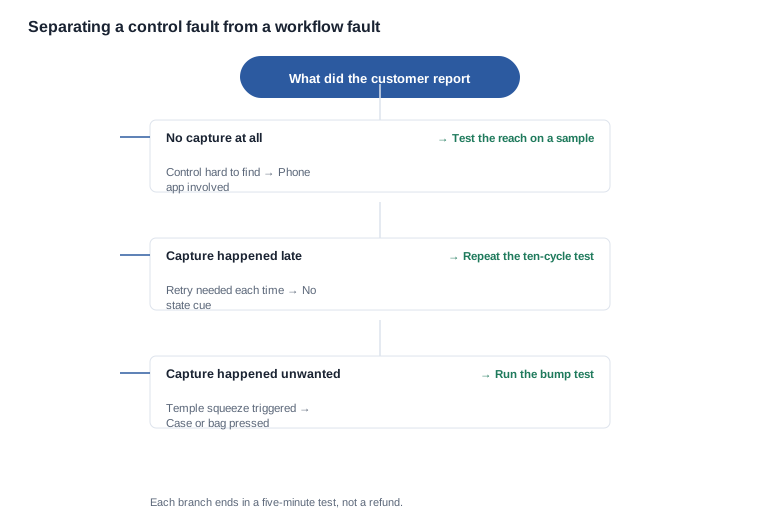
The decision tree above is a triage tool for the two questions that arrive in support most often. Read it from the top: the first branch asks whether the capture happened at all, and the second asks whether it happened when it should not have. Both branches end in a different fix, and both fixes are cheap if they are made on a sample and expensive if they are made in the field.
There is one more failure mode that is not a product failure at all. It is the listing that promises a workflow the unit does not have, and it is the one most within a buyer's control. In a content channel, the return arrives with the packaging as evidence, and the packaging is the artefact that made the promise.

How do the workflow rows translate into commercial terms
A workflow-led product is judged on the shoot rather than on the specification, and that changes which commercial terms matter. The accidental-activation row and the state-confirmation row together decide the return rate in a content channel, and both are closed by a five-minute test rather than by a document. A product that starts recording when the wearer brushes a temple away records something they did not intend, and the support cost of that is a cost per unit for the life of the channel.
The terms worth putting on the quotation, and worth negotiating for, are these:
- Unit price and volume tiers, with the break points written down.
- The accessory set and its minimum order quantities, including the case, the cable, the strap and any mount. The case configuration varies across the camera models, so the accessory line is a real line and not a formality.
- Packaging specification, including whether the accessories ship in the box or separately, and what the printed artwork must say.
- Delivery splitting, so a pilot order can be dispatched separately from the main volume.
- Payment nodes against inspection, which matters more in a content channel than in most, because the workflow has to be verified on real units before a season starts.
- The warranty period with a stated response time, and what happens to a unit that fails the workflow test on arrival rather than in the field.
- Return terms for a content channel, and specifically what the customer must do with a returned unit.
- The terms of a pilot order, so that the first run is a smaller commitment than the forecast.
Quotable rather than negotiable, because they follow a process rather than a conversation: certification cost and certification lead time, which belong to the testing body; and tooling, which is frequently amortised across the first order while certification is charged per product family. Ask which of the two you are being quoted, because the two are often bundled into a single line that hides which is which.
The trade-off to name is between a cheaper unit with an unresolved control interface and a slightly dearer unit whose control interface has been established on a sample. The first looks better in the price comparison and costs more in returns. Which model you pick for the pilot is a shortlist decision that should be made on the eight rows above and on the five-minute test, and the due diligence is worth more spent on a sample than on a second round of price negotiation.
Before the sample is ordered, run the eight rows as a checklist and mark each one with the date it was closed. Any row still open at the point of ordering is a row you are choosing to carry, and it is worth choosing knowingly.
What goes into the agreement, then, is short and specific:
- The control location for the configuration ordered, stated as an operating description rather than a marketing phrase.
- The state-confirmation behaviour, including the answer "none" if that is the answer.
- The accidental-activation behaviour as tested, and the conditions of the test.
- What one capture produces, and the storage position.
- The transfer path, and the conditions under which a file is moved off the device.
- The runtime condition for the capture pattern you intend to run, or an explicit statement that the published figure has no stated test condition.
- The warranty period with a stated response, and the return terms for the channel.
What stays out is at least as important: any control method, indicator behaviour or capture type that was not established on a sample, and any workflow claim in the listing that the five-minute test did not support.
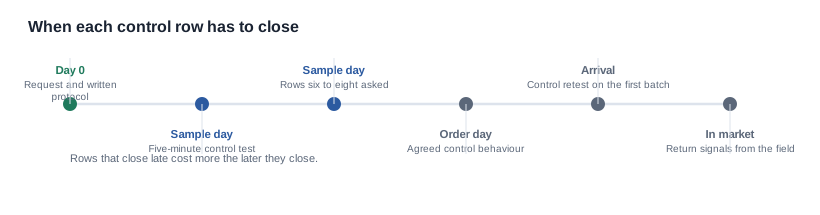
The chart above shows the shape of the trade-off rather than a number, because we publish no return rate and no support cost for this category, and we will not put a figure on the page that we cannot stand behind. The point it makes is the only one that matters: an unresolved control row is a cost that arrives after the sale, at a volume you cannot forecast, and a resolved one is a cost you can price before the sale.
How do you publish a control interface you have not specified
We can tell you which of our twenty-eight models have a camera, which four platforms list remote capture, and which published rows describe the runtime, the case configuration and the charge interface around the camera models. That is a genuine filter and it narrows the field immediately.
We cannot tell you where the control is, whether there is an indicator, whether there is an audible cue, how accidental activation behaves, what a capture produces, how content transfers, or what the storage position is. None of that is in our source material, and we will not describe a control interface we have not specified, publish an indicator behaviour that is not documented for the model in question, or convert a capability into a workflow promise.
If your product depends on a specific recording workflow, the control interface is the row to establish first — before the imaging specification, before the storage question, before the runtime. It is the one where a five-minute test produces a decisive answer, and it is the one most often left until a customer complains. The imaging gaps are covered in camera and imaging, and the sample protocol is in sample evaluation.
One drafting rule covers most of the risk. Write the listing from the test, not from the tester's impression. "Starts and stops with a single press on the right temple, confirmed by a red indicator" is a sentence the test can support. "Easy one-touch recording" is a sentence that a customer can disprove with a complaint, and the cost of disproving it falls on the channel rather than on the copywriter.
What to do next.
- Narrow the field with the published rows: the eleven camera models, then the four that list remote capture.
- Run the five-minute test on a sample, in the order given, and repeat the bump test on a warm unit.
- Ask the capture type, the transfer path and the storage position in one message with the request.
- Put the control behaviour, the state confirmation and the capture type into the agreement.
- Write the workflow into the listing copy only where the test supported it.
Related reading
- What the imaging rows omit — camera technology upgrade considerations
- Sizing storage before you know the format — ai camera glasses range
- The five-minute sample protocol — sample evaluation
Tell us the workflow you need, and we will say which models list the capability and which rows need a sample.