A camera-glasses unit is not judged on the first ten minutes. It is judged on the first full working day, because that is the span in which storage, pairing, endurance and file handling all have to hold together without a human rescuing the process. This guide describes the routine for the L1 Pro across that day, and it names the three points in the day where the published rows stop and the supplier has to take over.
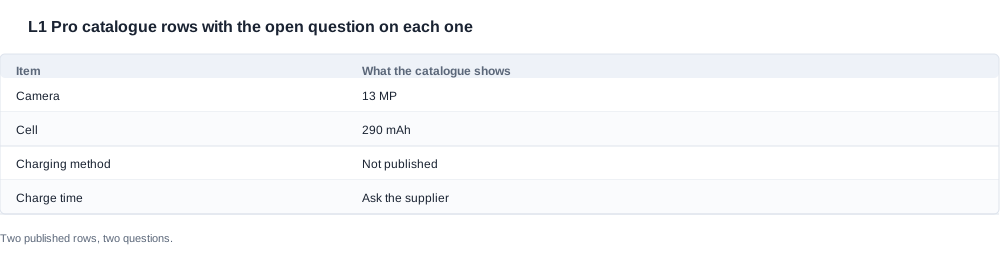
 Two rows are published for this model, and they are the ones that make a working-day routine possible at all: a camera at 13 MP, and a 290 mAh cell behind it. Everything else a buyer would normally look for is missing or uncertain, which is why the L1 Pro routine below is built around what to observe rather than around what to read.
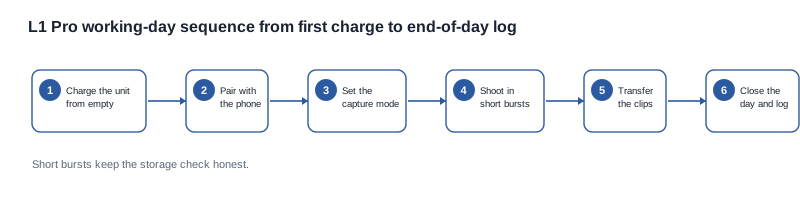
The shape of the day: charge and pair once, shoot in bursts, transfer and check the files, close the day with a written record, and keep a numbered list of everything the manual did not say.
L1 Pro first stage: charge and pair, once
The first stage is short and non-negotiable, because everything later in the day inherits its state. Four published rows set the shape of it: the 290 mAh cell, which sets how long a working day can be; the 13 MP camera, which sets how fast the storage fills; the rated endurance of about seven hours, printed without a test condition; and the 1400 mAh case capacity, which is what the accessory line can promise.
What is not published for this model is worth listing explicitly, because a buyer who assumes any of these is present will discover the gap in front of a customer:
- No charging method is published for this model, so which connector, and whether a case is involved, has to come from the supplier.
- A rated endurance of about seven hours is published, but with no test condition attached, so the endurance of an actual working day is a measurement rather than a specification.
- No Bluetooth version is published, and the camera models in this catalogue rarely carry one.
- No ingress rating and no colour row, although the case itself is present and its capacity is published at 1400 mAh.
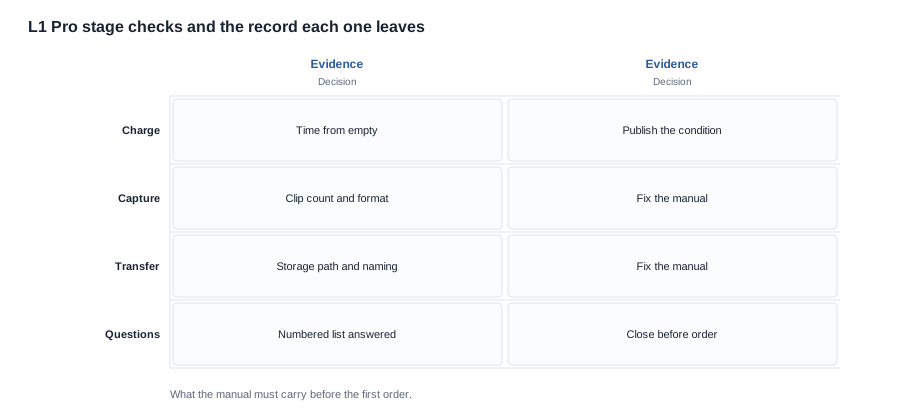
The pairing step is where a camera-glasses unit is most often mis-sold. Confirm that the phone exposes the unit as a camera accessory with its own storage path, not as a generic media device that a customer can play sound through and assume the camera is broken. Capture one clip immediately after pairing and open it before you record anything else, because a file that will not open on the first try is a problem you want to find on the bench.
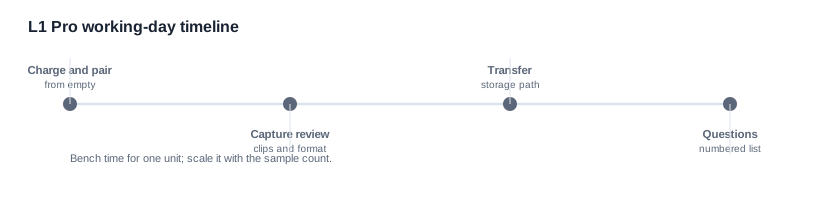
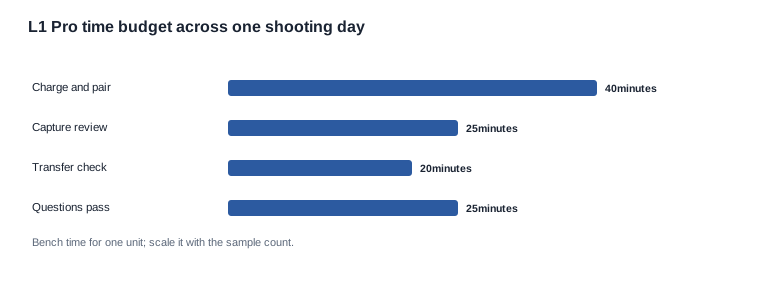
Budget about 40 minutes for the L1 Pro charge-and-pair stage including the first file check, 25 on the capture review, 20 on the transfer check, and 25 on the paperwork at the end. On a working day the same unit is reused, so the charge stage collapses into a habit after the first day; what does not collapse is the file check, because that is the step that catches a full card before it eats a recording session.
Two supplier questions belong to this stage. First, whether the charging method for this model is a direct connection or a case, since that answer determines what has to be in the box and what has to be printed on it. Second, whether the camera writes to a dedicated application folder or to the standard camera roll, because that answer determines whether the transfer step even exists as a separate task or is invisible.
L1 Pro second stage: shoot in bursts, and watch the storage
A shooting day on camera glasses is a storage-management problem before it is an imaging problem. The published camera row for this model is 13 MP, which is a sizeable file per frame relative to a phone, and the published cell row of 290 mAh sets a ceiling on how long a day can be before the unit needs to be charged mid-session.
Shoot in short bursts rather than in long continuous runs, and record three things about each burst: how many clips it produced, whether the clip counter on the unit matched the number of files that appeared, and how long the unit kept accepting new clips before anything slowed down. A unit that quietly stops recording because a card filled up is the most common camera-glasses complaint, and it is entirely invisible to anyone who shoots three clips and stops.
There is a second, subtler version of the same failure: the unit keeps recording but the files land somewhere the customer is not looking. Write down where the files went for this model specifically, and open one from the phone's own file list rather than from the application, because that is the path a customer will use when they think they have lost a recording.
The 13 MP row also raises a question that belongs in the log rather than on the product page: whether the unit records at that resolution by default, or whether 13 MP is the maximum with a lower default. A camera-glasses unit that records at a lower default by design is a perfectly reasonable product, but a product page that says 13 MP without saying so is a page that will eventually be quoted back at you by a customer comparing file sizes.
Two more observations are cheap to make and expensive to learn late. The first is how long the unit takes to reach a ready state after a power-on, because that delay sits in front of every recording the user makes. The second is whether the unit gives any audible or visible confirmation when a clip is saved, because a silent camera leaves users unsure whether they pressed the control at all, and the resulting double-presses produce duplicate files that nobody asked for.
L1 Pro third stage: transfer, and the end of the day
The transfer step is where a camera-glasses day either closes cleanly or turns into an evening of file hunting. Record it as a distinct task with its own pass or fail outcome, because it is the stage most often skipped and most often regretted.
- Record a clip, note where it landed, and confirm the file is playable.
- Check whether the transfer to the phone is immediate or deferred to a synchronization step.
- Confirm the file naming, and whether the timestamp in the name matches the timestamp on the unit.
- Fill the storage deliberately and observe the behaviour: warning, silent failure, or overwrite.
- Restore a clean state and confirm the unit still pairs and still records afterwards.
Step four is the one that takes ten minutes and saves a week. A unit that overwrites old files silently will destroy recordings a customer believes they still have, and the resulting complaint is unanswerable because the customer cannot tell you what disappeared. A unit that warns is fine. A unit that does nothing at all is a documentation item, provided you know about it in advance and can write it into the manual.
Close the day with a written record, and keep the same five fields every day so the series can be read rather than skimmed:
- Number of clips recorded and where the files were stored.
- Whether any clip failed to open or failed to transfer.
- Cell state at the start and at the end of the day.
- Whether the unit needed a mid-day charge, and how long the pause was.
- Anything a user said about the day, in the user's own words.
The thresholds for the day are what make the log usable as procurement evidence: a full day of recording with no lost clip, no failed transfer, and no unexplained interruption. Two consecutive days that meet the thresholds are a stronger basis for an order than a week of general impressions, and they take a fraction of the time.
The day also produces the material for the support article you will need later. The moment a customer cannot find a recording is the moment they contact you, and the answer you can give at that point is either the file-naming behaviour you documented in advance or an apology. Write the behaviour down while the unit is on your bench.
Screening this model before the bench time
Before any of the bench work is worth doing, a buyer has to decide whether this model is even in the running. The published rows are enough to make that call, provided the comparison is made on the rows that actually decide a purchase rather than on the ones that are easiest to print.
 The first screening question is resolution against what the customer records. The published figure here is 13 MP, and it is one of only three models in the range whose resolution is published at that level, the others being 8 MP models. For a buyer whose customer shoots short video clips on the move, that difference is the difference between a unit that is worth a second look and one that is not, and it is a difference you can quote.
The second screening question is endurance, and here the published set is silent, so the screening has to be done differently. The cell figure of 290 mAh is the largest of the two rows this model publishes, and the row is therefore a good proxy for how long a working day can be, but a proxy is not a specification. That is exactly why the daily log in this guide carries a cell state at both ends of every day: a buyer who needs a defensible endurance figure for a tender has to produce one, and the only way to produce one is to run the unit.
The third screening question is the charging method, and this is where the model is genuinely uncertain. The catalogue publishes charging methods for most models, with magnetic contact and Type-C both appearing across the range, and four models carrying no published method at all. Until the supplier confirms which applies here, a buyer cannot finalise the packing slip, the accessory list, or the shipping weight for the box.
Given those three answers, the total cost of the decision becomes visible. A unit that records at 13 MP, lasts a full working day on one charge, and charges by a method the customer already owns has a lower support cost than a cheaper unit that needs a proprietary accessory and a mid-day pause. The comparison is not between two spec sheets, it is between two support workloads, and that is the calculation a buyer should present to a channel partner.
The order in which to run the checks follows the same logic. Start with the rows you can quote, because they cost nothing and they often disqualify a model on their own. Then run the cheap observations, because an hour of bench time can close questions that would otherwise sit in a supplier queue for a week. Only then spend money on samples, and only on the models that survived the first two stages.
One thing to resist is buying a sample for every model you are considering. Two samples of the right model, plus a written answer on the rest, is a better use of a sample budget than one sample of each, because the second sample of the same model is what proves the behaviour repeats rather than being the luck of a single box.
L1 Pro when the day goes wrong: failure modes and what they cost
A working routine is only half of a procurement document. The other half is the failure list, because a buyer who has never watched a unit fail cannot tell a real defect from a bad morning. For this model the failures are worth grouping by what they cost, because that is how a supplier conversation has to be prioritised.
The first group is silent loss. A unit that stops recording because the card is full, a unit that records but writes somewhere the user will not look, and a unit that overwrites the oldest files all produce the same customer outcome: a recording that no longer exists and a customer who cannot say what disappeared. None of them generate a support ticket at the moment they happen, which is why they are found in the daily log or not at all.
The second group is interrupted work. A unit that wants charging in the middle of the day, a unit that sleeps between recording sessions, and a unit that will not surface a file on the phone unless its application is open, all break the working day into pieces. Nothing is lost; what is damaged is the user's patience and the length of time the product stays in use.
The third group is the one that shows up in returns: heat, weight and fit. A camera-glasses unit is worn on the face for hours, and the published rows for this model say nothing about weight or about how the frame behaves over a long session. That silence is the reason the comfort field in the daily log exists, and it is also why the wearer quotes have to be collected in full sentences. "Heavy" and "uncomfortable after an hour" are different problems with different fixes, and a summary that reduces them to the same word removes the information you need.
For each L1 Pro failure you find, the record has to carry four things: what the user experienced, what you observed on the unit, whether it reproduced, and what the supplier would have to change. The fourth column is the one most people skip, and it is the one that decides whether the finding is worth reporting at all. A failure with no plausible fix on the supplier side is still worth recording, but it is a different conversation from one where a firmware or packaging change would close it.
The order of escalation follows the cost. A silent file loss outranks an interrupted session, because it destroys data the customer believes they still have. An interrupted session outranks a comfort complaint, because it affects how the product is used rather than how it feels. Comfort outranks anything you can only observe on a bench, because a bench observation is an opinion until a user confirms it. Write that order down before the failures show up, because in the moment, the loudest complaint is not the most expensive one.
L1 Pro before it ships: what to check on a shipment unit
A unit that records is not a unit that can be sold, which is what this L1 Pro checklist tests. It runs on a production unit pulled from the consignment you are about to pay for, not on the sample that arrived first.
- Is the designation printed on the L1 Pro unit the same one printed in the manual and in the listing you intend to publish?
- Does the box contain what the packing list promises, including the charging accessory or case, whatever the answer to the supplier question turns out to be?
- Does the unit charge, and does the charging method on the unit match the answer the supplier gave in writing?
- Does the L1 Pro camera produce a playable file on the first attempt after pairing?
- Do the manual and the catalogue state the same camera figure and the cell figure?
- Is the L1 Pro certificate trail for your target market on file, in a form you can hand to a customer?
- Does the outer carton carry the same designation as the device?
On that last point, be exact about what the catalogue does and does not show. The export certification page carries patent certificate images, and there is no CE, FCC or RoHS text entry anywhere in the catalogue. That tells you about the visible materials rather than about certification status, and it is why the certificate trail has to be requested and filed instead of assumed. If a customer tender requires a certificate, start the request on the day the model is shortlisted, not on the day the sample arrives.
The request goes in on the day the model is shortlisted because a document owner answers it, not a production schedule.
Write the L1 Pro pass rule down before the checklist starts, and keep it short. A unit that passes function but fails paperwork is not a pass, and a rule agreed in advance stops that decision from becoming a schedule argument in the week before the goods are needed.
The three gaps, and what to ask about them
Put these questions to the supplier in a numbered list, so the reply can be answered point by point.
- Which charging method applies to this model, and is a case included in the box?
- Which endurance figure may we publish, and on what test profile was it measured?
- Does the camera record at the published 13 MP by default, or is that the maximum rather than the default?
- Where do the L1 Pro files land on the phone, and is the transfer immediate or deferred?
- What happens when the storage is full, and does the unit warn the user?
- What controls are fitted to the unit, and what does each one operate?
- Which ingress protection does this model carry, if any?
- Which colourways are in production for this model?
- What certificate documents exist for our target markets, and what is the delivery route?
Our position on this model We publish the L1 Pro 13 MP camera row and the 290 mAh cell row as published, an endurance figure only once we have measured one ourselves under a stated setting, and no charging method until the supplier has confirmed it in writing. Three gaps on an L1 Pro are normal; three unasked questions are not.
Start with the camera imaging reference, which maps how the range describes L1 Pro imaging behaviour. The AI camera glasses troubleshooting page lists the failures that most often reach support on these units, and the samples page explains what a sample request needs to include. Where the product is resold rather than manufactured, the AI camera glasses product page is the place to see where this model sits inside the wider line, and the charging case options page lists the case configurations on offer.
Charge once, shoot in bursts, check the files before the day ends, and keep the three gaps on the list until they are answered in writing.