The KY06 and the V03 are both camera models in the CYNRIN catalogue, and the rows the catalogue prints for them are close enough that a buyer can read the entire specification difference in about a minute. That narrowness is the useful part of this comparison, not a disappointing part of it. When two products differ on so little, the decision stops being a technical judgement and becomes a commercial one, which means the work you do during the quotation stage — the rows you demand in writing, the configuration you freeze, the documents you attach to the purchase order — carries more weight than any further reading of the two published lines.
What follows works strictly from the rows the catalogue publishes for these two models: cell capacity, runtime, charge time, charging method, and the case and Bluetooth entries. Where a row is published, it is stated here exactly as published. Where a row is not published, this article says so plainly and tells you what to request instead. Where a figure is a range, it stays a range. Nothing in this comparison is quietly upgraded from a blank cell into an estimate, because a blank cell that you fill in yourself becomes a dispute three months later, usually during a claim.
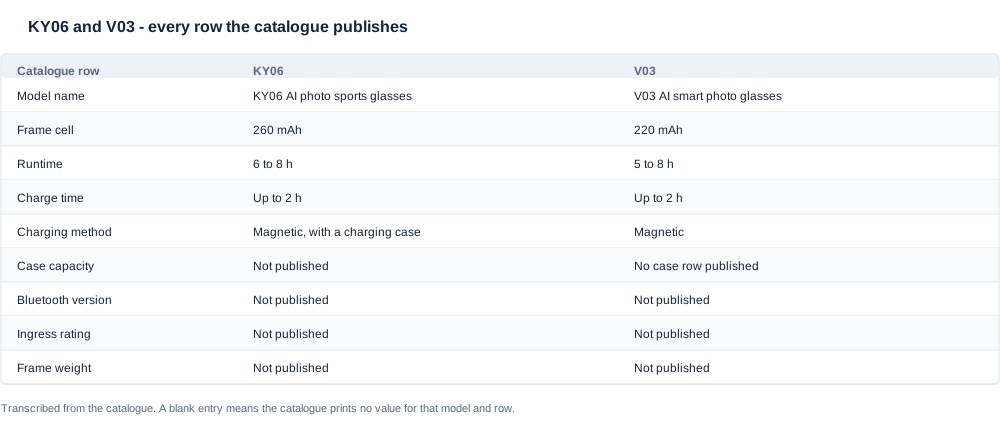
What the catalogue publishes for the KY06 and the V03
Both models sit in the camera tier of the range. The catalogue names them the KY06 AI photo sports glasses and the V03 AI smart photo glasses, and the word that follows the model number is the first thing a buyer will notice. The KY06 is framed around sport, the V03 around general smart use. That is a positioning word rather than a specification, and it should not be read as a hardware difference, but it does tell you which channel each model was written for, and channel fit is often the real reason a buyer ends up with one rather than the other.
Here is every row the catalogue prints for these two models, in one table. Nothing below it is inferred.
| Catalogue row | KY06 AI photo sports glasses | V03 AI smart photo glasses |
|---|---|---|
| Frame cell | 260 mAh | 220 mAh |
| Runtime | 6 to 8 h | 5 to 8 h |
| Charge time | Up to 2 h | Up to 2 h |
| Charging method | Magnetic, with a charging case | Magnetic |
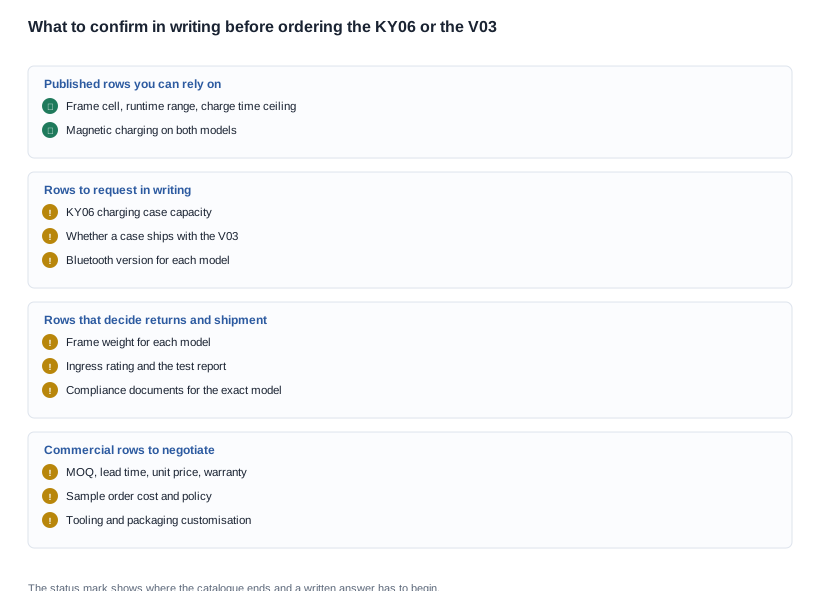
| Charging case capacity | Not published | No case row published |
| Bluetooth version | Not published | Not published |
| Ingress rating | Not published | Not published |
| Frame weight | Not published | Not published |
Cell capacity is the row with a real number on both sides: 260 mAh in the KY06, 220 mAh in the V03. The gap is 40 mAh, which puts the KY06 cell roughly eighteen percent above the smaller one. That is a genuine and checkable difference, and it is also the only capacity figure in this comparison a buyer can use directly without asking anyone a question.
Runtime is published as a range on both models, 6 to 8 h for the KY06 and 5 to 8 h for the V03. A range is not a measurement, and the two ends of a published range are not two separate claims about the same product. They are the span within which the figure sits, which means the operating conditions behind the low end and the high end are what the range is actually telling you. The catalogue does not print those conditions for either model, so the range tells you the shape of the answer but not the answer itself.
Charge time is up to two hours on both. The word doing the work is "up": this is a ceiling, not a typical figure and not an average. It tells you the longest you should ever wait at the bench before you suspect a fault, which is genuinely useful, and it tells you nothing about how long an ordinary charge takes.
Charging method is magnetic on both models, and that shared row has consequences far beyond the spec sheet. A magnetic dock is a proprietary part of the product. It is the unboxing moment, it is the item that goes missing, it is the spare you need to stock, and it is the line that decides what a customer returns after three months of use. Both models carry that same dependency, so one dock plan serves both.
The case rows are not symmetrical. The KY06 row reads magnetic charging plus a charging case, and the capacity of that case is not published. The V03 row reads magnetic charging and carries no case row at all. The honest reading is that the catalogue prints a case for one model and does not print one for the other, which is a statement about the catalogue rather than proof about what physically ships. Whether a case is included with the V03 at your quantity is a quotation question, and it is one of the highest-value questions in this comparison.
Bluetooth is not published for either model. Both sit in the camera series, and across that series the catalogue leaves the Bluetooth version blank rather than filling it in, so a version number for the KY06 or the V03 has to be obtained as a written answer. Do not accept a version number that arrives by paraphrase in a meeting note. A Bluetooth version belongs in the compliance file with the rest of the documentation, and a spoken answer has a short half-life.
Ingress rating is not published for either model. The only ingress-protected models in this range are the V06 and the S7, both at IP54. For the KY06 and the V03 the row is empty, so the correct statement is that no rating is published, not that the product is protected and not that it is unprotected. A buyer with a weather exposure requirement should ask for the test report and the model list it covers, in writing, and treat the answer as a document rather than a sentence.
Frame weight is not published for either model either. The only frame weight published anywhere in this range is the MT6 at 158 g, excluding its folding case, and that figure belongs to a different product. So when a weight number appears next to the KY06 or the V03 in a spreadsheet, a quotation or a competitor sheet, it did not come from the catalogue. It came from a measurement, an earlier project, or another manufacturer's literature. Re-confirm it against the model you are actually ordering, and put the confirmation into the technical file rather than a chat thread.
Where the two rows differ, and where they are identical
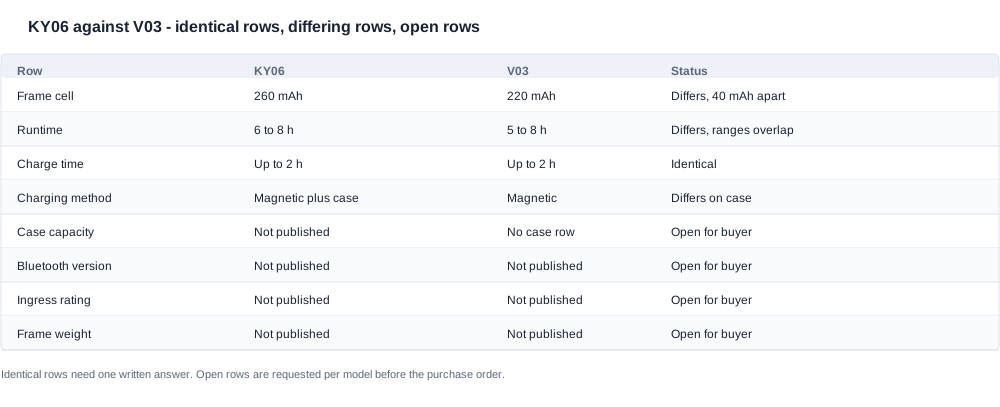
Three rows differ and five rows match. Reading the two groups separately is the fastest way to understand what this comparison can and cannot settle for a buyer.
The differences are the cell, the runtime range and the case. The KY06 carries 40 mAh more than the V03, its published runtime starts one hour higher at six hours against five, and it is the model with a charging case printed on its row. Everything else in the table is either identical on both sides or blank on both sides.
The runtime ranges overlap at the end that matters. The KY06 runs from six to eight hours, the V03 from five to eight, and both reach the same upper bound of eight hours. Two overlapping ranges that share a ceiling are not a specification advantage for anyone. You cannot take the KY06's lower bound of six hours, put it next to the V03's lower bound of five hours and conclude that the KY06 lasts an hour longer in normal use, because that assumes the low end of one range and the low end of the other describe the same operating condition. Neither range publishes its condition. The comparison between these two runtime lines does not produce a winner; it produces a question to ask, and the answer should be requested as a written line in the quotation.
The cell gap does not convert into a runtime gap. This is the most common error in a two-model comparison, and it deserves to be named. A 260 mAh cell against a 220 mAh cell is a difference in stored energy, full stop. Whether that difference appears as time on the glass depends on what the electronics do during those hours: how often the camera runs, how long each recording lasts, whether the device stays connected, how bright the display is, and what the ambient temperature is. None of those are printed for either model, so the honest chain of reasoning is short. The KY06 cell is larger by a measurable amount, and what that means in hours is not published and has to be requested. A buyer who wants to evaluate that trade-off properly should ask the supplier for the runtime test condition as part of the sample order, not after the tooling is paid for.
The shared magnetic charging row is the commercially important one. Two products that charge the same way are easier to run as a range, and that is a real advantage if you already stock the dock. The same row creates the same exposure. When the dock is proprietary, the accessory has to be available at a sensible price after the warranty period, in every market you sell into, and the failure mode where a lost or broken dock turns into a full device return has to be priced before launch rather than discovered in the returns log of the first quarter. Both models share this row, which means the dock question can be answered once and applied to whichever model you order.
The case asymmetry is the difference a buyer actually feels. A charging case in the box is a visible feature, a defensible retail story for a private label programme, and a shipping line that grows. A model with no case row keeps the carton smaller and the freight line lighter, but it also hands the customer a bare magnetic contact with no way to store or carry the device. The catalogue does not publish the KY06 case capacity, so you cannot compute what the case contributes in use. It does not print a case row for the V03, so you cannot assume a case is absent. Both of those are answered in a quotation, and both of them change the comparison more than the 40 mAh does.
The identical rows matter for a different reason: they shrink the number of things you have to check. Charge time, magnetic charging, camera series designation, no published Bluetooth version, no published ingress rating and no published weight. Two models that behave identically on all of those rows do not need six separate verification cycles. A buyer managing a ten-model shortlist needs one set of answers per row that is identical across the pair, and a separate set for the rows that differ. That is how you keep the due diligence effort proportionate instead of spending a week on questions whose answers are already on the sheet.
One catalogue-wide pattern is worth knowing. Every camera model in this range publishes a runtime figure; there is no camera model with a blank runtime row. That makes the runtime row a useful diagnostic when a supplier sheet arrives with a camera model and an empty runtime field, because it usually means the sheet was assembled from somewhere other than this catalogue. It also means the runtime row has already been used up as a differentiator across the camera tier. The remaining differentiators are the ones the catalogue does not print: the charging configuration, the case, the accessory plan, and the commercial terms.
On certification, the catalogue gives you nothing to copy. The catalogue body contains no CE, FCC, RoHS or RED wording at all, and the export certification page is an image page with no per-model certification lines. There is therefore no certificate number, no declaration reference and no test report identifier to transcribe into your file for either the KY06 or the V03. What a buyer can do is ask the supplier for the compliance documents that belong to the specific model being ordered, and ask for them by name. Put the document list in the purchase order, state which document must accompany the shipment, and treat a model-level document set as a condition of the order rather than as a courtesy. Deciding this before you order removes the most common cause of a shipment being held at customs.
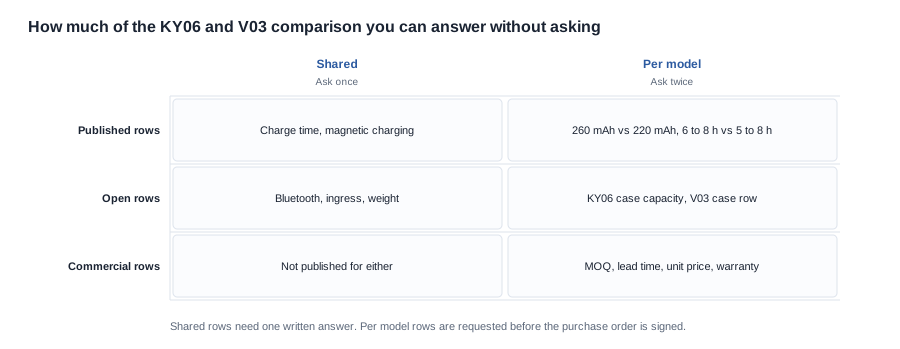

Building a comparison sheet a buyer can complete before the PO
A comparison sheet is not a summary. It is an instrument you send to a supplier and expect back, filled. If it never leaves your building it is a reading exercise. If it comes back with every open row answered against a named model, it becomes the attachment to the purchase order that closes the specification risk before the money moves. The difference between those two outcomes is entirely in how the sheet is built.
Build the sheet with six columns rather than three: the row, the KY06 answer, the V03 answer, the source of the answer, the status and the date of the written confirmation. The last three columns are what make it an instrument rather than a table. The status field should carry only three values, published, requested and confirmed, so that a row cannot be quietly marked done by a note in a spreadsheet. The source column should name the document or the message, not the person who spoke it. Anyone on your team can then audit the sheet without calling anyone.
Carry every published row into the sheet exactly as the catalogue prints it, then add the rows that are blank on both sides and are therefore still open for a buyer to close: the KY06 charging case capacity; whether a charging case ships with the V03 and what its capacity is; the frame weight of each model; the ingress rating of each model, or a written statement that the model carries no rating; the Bluetooth version of each model; the imaging detail your own technical file requires; the list of compliance documents that ship with the goods for the exact model; the minimum order quantity; the lead time; the unit price and the price break structure; the sample cost and the sample policy; the warranty period and what it covers; and the monthly production capacity you could hold.
Then work the sheet in a fixed order, because the order itself carries negotiating weight.
-
Ask for the open rows in writing, per model, in one message. Send a single list, one line per row, each line naming the model it applies to, and ask for the answers to be returned in writing against the same model names. A verbal answer to a specification question is not a specification, and a chat reply that later cannot be found is not a record. If the answer is that a row is not available, you want that sentence too, because it moves the row from requested to closed as unavailable and tells you to design around it rather than keep waiting.
-
Freeze the packing list before you freeze the price. For whichever model you order, write down the box contents line by line: the model designation, the frame, the charging method, whether the charging case is in the box, the cable, the printed manual and its language, and any printed material. If the case configuration differs between the two models, then the packing list is the difference your carton dimensions, your freight quotation and your unboxing design have to be built around. Freezing it early prevents the expensive surprise where the goods arrive in a different box from the one that was costed, which changes both the freight line and the quality control checks at your warehouse.
-
Write the configuration and the document list into the purchase order. The PO should name the model and the cell, the runtime figure as it will appear on the packaging, the charging method, the case contents, the documents that ship with the goods, and the approved sample that the production goods must match. If a figure is a range, print the range on the carton rather than a single hour that nobody can defend. Where you have asked for the model's own compliance documents, attach the document list to the PO and state which document must accompany the shipment.
-
Set up change control before the first production run. Write into the contract that no change may be made to the cell, the charging method, the case configuration, the firmware behaviour that affects the published runtime, or the packaging without a written change request from your side and a re-approval of the golden sample. Name the approver. This is a routine clause and it prevents the most expensive kind of drift, where the goods that arrive are technically inside the printed table and practically not the product you approved. A factory audit of the line, and a written record of what was checked, cost far less than a claim cycle after a launch.
-
Keep the pending list visible in the sheet. Any row still sitting at requested when the PO is signed is a row you have consciously accepted as provisional for the first run. Decide at that moment whether it is acceptable, or whether it blocks the order. Buyers who discover an open row at pre-shipment inspection have usually lost the option to act on it, because the container is already loaded and the incoterms, the payment terms and the deposit schedule have all been committed.
-
Order samples of both models and evaluate them against a written checklist. The catalogue cannot settle the rows that decide your return rate: how the device sits on a face, how it behaves under the lighting your customer actually uses, how easily the dock finds its contacts. A sample order evaluated against a fixed checklist turns impressions into findings, and it is the only practical way to compare a sports-positioned model with a general-positioned one. Write down the criteria before the samples arrive, not after, because the criteria you remember afterwards are always the ones that flattered the sample.
-
Put the commercial rows in the same request. MOQ, lead time, unit price, sample cost and policy, warranty, and monthly capacity are not published for any model in this range, and they are the rows that decide whether a comparison is worth acting on. A sheet without commercial rows is a spec sheet. A sheet with commercial rows attached to a named model, a named packaging configuration and a named incoterms basis is a decision you can sign. Price breaks, tooling costs and packaging customisation should be negotiated on the same sheet as the specification, because a lower unit price on a configuration you cannot ship is not a lower price.
Comparing the KY06 and the V03 when both are camera models
Both products are camera models, and that single fact explains most of the shape of this comparison. It is why a runtime is published for each of them when other rows are blank, it is why no Bluetooth version is printed for either, and it is why the imaging detail that would let you reason about power draw never appears in the table. If you are evaluating these two against the audio tier of the range instead, the criteria are different and the published runtime figures are less meaningful, because on an audio product the draw is dominated by a different set of components. The camera tier also changes the return profile. A camera product is judged on what it captures, and that judgement happens in the customer's hands, in their light, which is exactly why the sample order and the checklist above are not optional.
Read in that light, the comparison resolves into three practical choices and one commercial overlay. The practical choices are the runtime condition, the case configuration and the charging method. The runtime condition has to be obtained in writing for both models, because neither range publishes it and neither range can be ranked correctly without it. The case configuration has to be confirmed for both models, because one catalogue row prints a case and the other does not, and the box is where the buyer sees the difference. The charging method is already identical, so one answer serves both models and the dock plan can be built once.
The commercial overlay is the part that is usually skipped. The KY06's name and its row are written around sport and a charging case, so the natural fit is a channel that sells an action camera and where the case is part of the retail story. The V03's row is smaller on the cell and prints no case, so it fits a channel that already has a magnetic dock in its accessory plan and where a smaller carton and a lighter freight line matter to the landed cost. Neither of those is a specification advantage. Both are supply chain and channel advantages, and they are the real content of the decision once the published rows have done their work.
There is one further overlay worth pricing before launch, because it applies to both models equally and to the magnetic dock in particular. A proprietary dock that goes missing converts into a device return, and the cost of that return is a function of how easily you can supply a replacement dock, at what price, and how long you intend to support it. Decide that with the accessory plan, not after the first quarter of returns. On the shipping side, the practical detail that moves the landed cost is the dock and case volume per unit, so model the shipping weight and carton dimensions for whichever configuration you order, including the case in the KY06 box. See charging solutions for the charging configurations this range uses and how each one lands in a shipment.
The published rows between these two models are narrow enough that the specification cannot decide between them, and our position on how to read them is straightforward. We will not convert a published range into a fixed hour figure, so a buyer who needs the KY06 and the V03 separated should ask for the rows the catalogue does not print, in writing, before the sample is approved. We will not infer a charging case for the V03 from the KY06's row, and we will not attach a weight, an ingress rating or a Bluetooth version to either model because some other model in the range publishes one. We will quote the cell, the runtime range, the charge time ceiling and the charging method exactly as the catalogue prints them, and we will carry every blank row into the comparison sheet as a written request rather than closing it with an estimate.
What we can do quickly is tell you which configuration fits your channel, your carton and your price band. Send the channel, the target retail price, the quantity and the case configuration you need, and we will tell you which of the two models we would quote and which rows we will put in writing on the quotation so the comparison sheet comes back answered rather than open. Where both models sit inside the wider camera range, the full line-up is on AI camera glasses, and the imaging questions this table does not cover are handled in AI camera glasses imaging.
Related reading
- What a published row can and cannot prove — AI camera glasses imaging
- How a dock and a case change the shipping calculation — charging solutions
- The only way to close the open rows — sample evaluation
- Where both models sit in the range — AI camera glasses
Send the channel, the price, the quantity and the case configuration, and we will tell you which model fits.