Testing the Bluetooth version on a smart glasses unit takes about five minutes, and the catch is that most camera models in this catalogue do not publish their version at all — only the audio, sports, children's, lens and AR entries carry a stated 5.3 or 5.4. For a camera model, a verification test is the only route to a number. But the number is the easy part, and a buyer who treats it as a technical field is buying the wrong thing: a version is a label field, and label fields drift in four directions at once — the radio inside the unit, the certificate file, the packaging artwork, and the instruction leaflet. Each of those has a different owner and a different remedy, and the one that reaches the customer is the one on the box. So the work is not reading a version, it is building the consistency check that keeps four places agreeing, and deciding in advance which one of the four you will accept as the source of truth when they disagree.
Smart glasses Bluetooth version: where the label drifts
The buyer holding a camera model with no published version
The published rows are specific, and they are worth reading carefully because the pattern in them is the pattern that decides the programme.
- Bluetooth 5.3 appears on the K01 and K02 audio glasses.
- Bluetooth 5.4 appears on YK12 and G07, LC-105-2 and LC-105-1, and the D11 and D12 audio glasses; on the YKC02, D17 and ZH12 sports glasses; on the A07 children's model; on the electrochromic lens model; and on the AR entry.
- Not published is every model in the AI camera glasses category, which is the whole CY05 and V03, L1 Pro and MT6, CY03 and L2 Utral, and MT5 and KY06, and V03 Pro group.
That last row is the one that catches people out. The largest category in the range publishes no Bluetooth version at all, and it also contains the platform that most first-time buyers are evaluating. The omission is a reasonable one rather than a red flag — but it does mean a buyer evaluating a camera model on connectivity has to obtain the answer from a test, or from the supplier in writing, before the packaging is designed.
The specific risk of that gap is not that nobody can find the number. It is that the number is found late, after it has already been printed. A version that is discovered after the artwork is approved is not a discovery, it is a reprint, and a reprint in this category is a re-scheduling exercise rather than a design exercise, because the artwork sits at the end of the brand's own timeline and the factory cannot compress it.
Why a version number drifts at all
A version number is a string that describes a state of the radio stack. It changes when the control stack changes, when the firmware changes, when the chip or its configuration changes, and when a brand creates a new artwork or a new leaflet from a template that belonged to a sibling model. None of those four changes is unusual, and none of them announces itself to the person who owns the packaging.
That is the whole argument. A version is not a physical property of the product; it is an attribute that has to be copied from one place to another, and every copy is an opportunity for a mismatch. The firmware holds it, the certificate names it, the box prints it, and the leaflet explains it. Four copies, four owners, and no automatic mechanism keeping them aligned except a change-control process that the brand has to write.
The second reason a version drifts is that the certificate is issued for a configuration, not for a brand. A report that names a platform does not name a private-label derivative, and a unit that differs in its configuration may differ in its radio stack, in its antenna, or in the firmware image that carries the radio. A buyer who reads a version off a certificate has read a version off a different product unless the model designations match character for character.
The buying task: deciding how you will evidence the version
The three ways to read a version off a unit
Method one is the host platform's own report, and it is the most reliable source because the report comes from the phone or computer the device connects to, not from the device. On Android, the Bluetooth settings screen shows the negotiated protocol version for a paired accessory. On a desktop, a Bluetooth information panel in the system settings typically reports the same. The detail that matters is when you read it: after a successful pairing and after a transfer, not before. A panel that reports nothing has not necessarily failed, because some stacks only expose the version for the active profile and only once data has moved.
Method two is a specification query in the host's developer tools. Both Android and desktop Bluetooth stacks expose protocol version information through their developer-facing interfaces. It takes a little setup, and it returns a value rather than a label, which is preferable when the supplier's documentation is ambiguous — a label is a marketing word, and a value is a number you can check.
Method three is to ask, and require the answer in writing. If the model publishes a version, confirm it against the catalogue. If it does not, ask the supplier to state the version for the exact model code in an email that can be attached to your file. A version quoted for "the platform" rather than for your model code is not an answer, and it is the most common answer you will receive, because it is true most of the time.
The three situations when the result disagrees with the listing
The listing says 5.4 and the device reports 5.3. This is nearly always a control-stack or firmware difference between production units and an earlier build, or a listing error propagated from a sibling model. Check a second unit before concluding anything, and check the firmware version, because a mixed-firmware batch is a real and manageable issue while a listing error is not.
The device reports a version the supplier never claimed. This is more common than it sounds, and it is not a product fault. It means the specification was not tracked, which does not affect the hardware and does affect the brand's ability to support the configuration with evidence. That distinction matters at the moment you write your own product listing, because from that point on the claim is yours.
The device reports nothing. Trigger a small file transfer or a call, then re-read the panel before concluding that the information is unavailable. If it still reports nothing after a transfer, treat the version as unpublished rather than as unknown, and write it into the order as a line item with a pass condition attached.
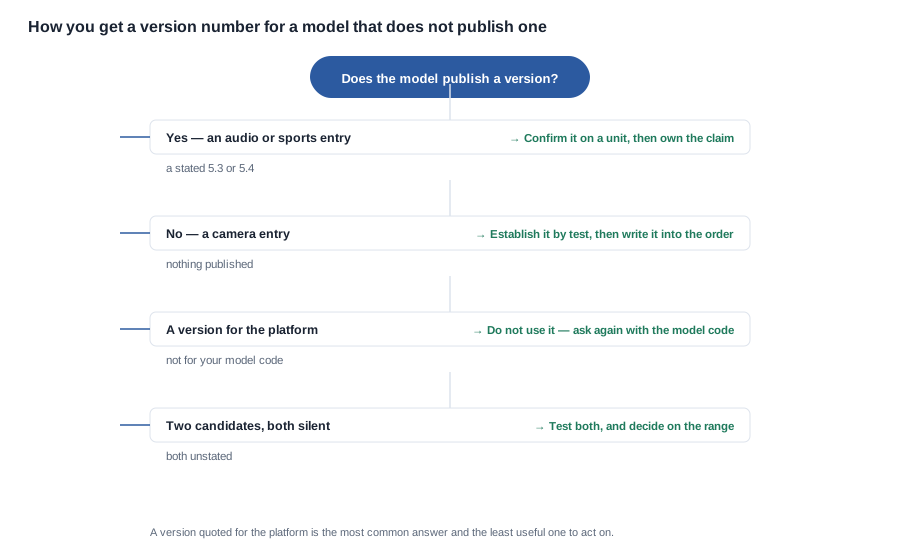
The four branches in that chart are the four decisions a buyer makes with a camera model in front of them, and the last one is the one that gets missed. When two candidate models both publish nothing, the decision is not about either model individually — it is about the range, because the version is going on packaging that covers both, and a range decision made on one unit is a decision the second unit can contradict.
What the version means commercially
Bluetooth 5.3 improves connection stability and energy efficiency relative to earlier generations, and 5.4 adds further refinements and supports encryption capabilities including AES-CCM, which is the direction the EU's EN 18031 coordinated cybersecurity requirements take for radio equipment. Two practical consequences follow, and both of them matter more to a buyer than the version number does.
First, a higher generation generally supports better idle behaviour, which matters in a product whose published rated runtime runs from about six hours on some audio models to about twenty on the children's range. Idle behaviour is one of the five variables that decide an endurance measurement, and a radio stack that sleeps differently changes the result.
Second, and more importantly for a buyer, the radio equipment cybersecurity obligations attached to CE marking in the European Union are not satisfied by a version number. They concern device security, a privacy risk assessment, testing, documentation, and a vulnerability handling process. A version number is one input to that assessment, and treating it as the assessment is a mistake that surfaces at the point where the documentation is checked rather than at the point where the decision is made. For the wider regulatory picture, the certification checklist sets out what to request, and Bluetooth connectivity overview covers the connection behaviour side.
Four places the version has to agree
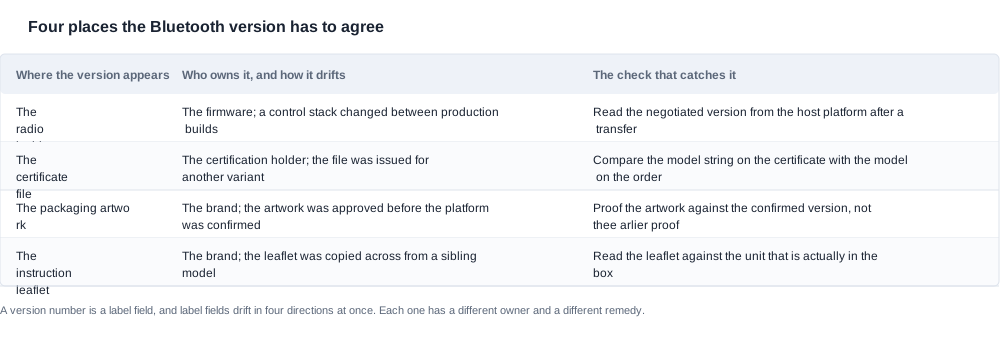
The four rows in the table above are the four copies, and each needs a check that is written down before the first sample rather than after the first mismatch.
The radio inside the unit is owned by the firmware, and it drifts when a control stack changes between production builds. The check that catches it is reading the negotiated version from the host platform after a transfer, and recording the firmware build identifier at the same time.
The certificate file is owned by the certification holder, and it drifts when the file was issued for a different variant of the platform. The check is to compare the model string on the certificate with the model on the order, character by character, and to treat a mismatch as a stop condition rather than a query.
The packaging artwork is owned by the brand, and it drifts when the artwork was approved before the platform was ever confirmed. The check is to proof the artwork against the confirmed version rather than against the earlier proof, because the earlier proof is the one that was produced from a sibling model's data.
The instruction leaflet is owned by the brand, and it drifts when the leaflet was copied across from a sibling model. The check is to read the leaflet against the unit that is actually in the box, which is a five-minute task and catches the copy-paste error that the artwork proof will not.
The order of these four matters for one practical reason: only one of them can be corrected after the fact without a reprint, and that is the leaflet. Everything else either changes the hardware's description or the box's description, and both of those are on the critical path.

Confirming a version on samples and on the first shipment
The path from an unstated version to a version you can print
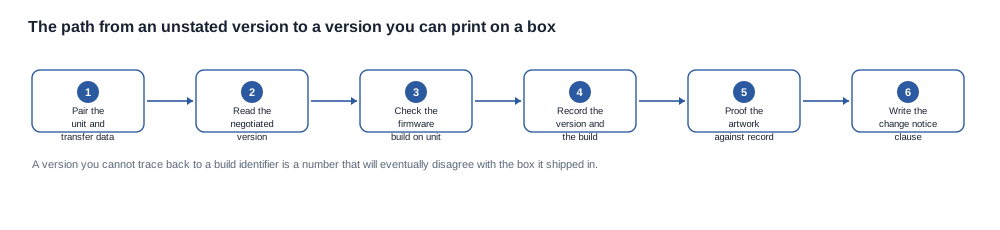
The six steps in that flow are short, and the fourth one is the step that makes the record worth keeping. A version that you cannot trace back to a build identifier is a number that will eventually disagree with the box it shipped in, and the disagreement will be found by a customer rather than by you.
Step one is to pair the unit and transfer some data, because the host panel may not report a version for a device that has only been paired.
Step two is to read the negotiated version on the host, and to write down where you read it, because the reading method matters when a dispute arrives.
Step three is to check the firmware build on the unit, which is the field that lets you compare a result from one batch with a result from another.
Step four is to record the version and the build together, on a sheet that also carries the unit's batch identity. That sheet is the reference, and it is what later deliveries are compared against.
Step five is to proof the artwork against the record, not against the earlier proof and not against a catalogue page. This is the moment where a mismatch is still free to fix.
Step six is to write the change notice clause, so that a later change in the factory does not become a silent divergence between four documents.
The evidence to hold before the deposit
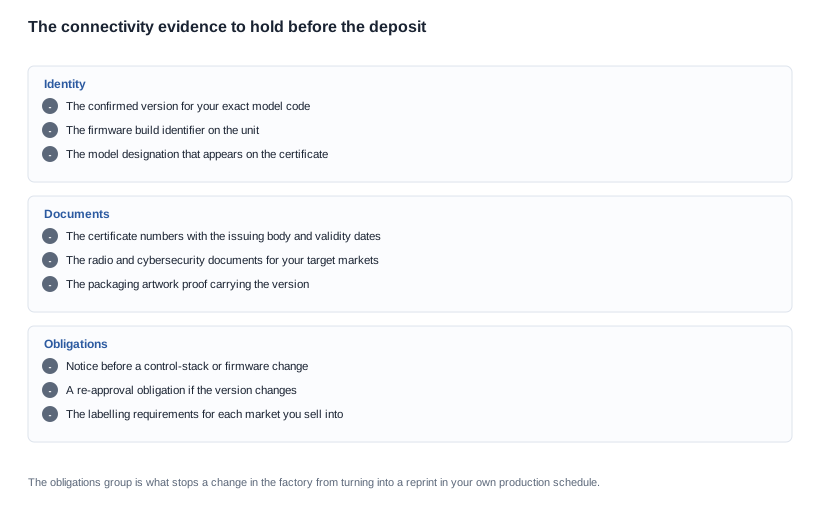
The three groups in that checklist are arranged by what they protect against. The identity group stops a claim that cannot be substantiated. The documents group stops a shipping gate that was not opened. The obligations group stops a change in the factory from turning into a reprint in the brand's own production schedule, and it is the group that is usually missing from a first order.
The obligations group has three items, and each one is worth negotiating rather than accepting:
- Notice before a control-stack or firmware change. A version change is not an ordinary component substitution. It changes what the packaging says, what the certificate says, and what the leaflet says, and the brand carries the cost of all three.
- A re-approval obligation if the version changes. A version change inside the same certification scope may not require a new certificate, and a buyer who has not asked will find out at the point where a broker or a marketplace asks.
- The labelling requirements for each market you sell into. A radio product carries market-specific labelling, and a version printed on a box that will be sold in a market with a different labelling rule is a cost the brand absorbs at the distributor's door.
A worked scenario: a brand putting a version on the box
This is a worked case rather than a client project. What matters is the order of steps.
Assume a brand launching a camera-led line into three European markets, with two colourways and a supplier that has quoted two platforms. Neither platform publishes a Bluetooth version, and the brand's packaging designer needs the number in three weeks.
The version is established before the artwork starts. The brand buys one unit of each candidate, pairs them, transfers a file, reads the negotiated version from the host, and records it with the firmware build on a one-page sheet. The two candidates turn out to report different versions, which is exactly the kind of finding that becomes expensive if it arrives after the artwork is approved.
The model designations are checked against the certificate. The brand finds that the certificate names the platform while the order names a branded derivative, and the model strings do not match character for character. That is a stop condition rather than a query, and the brand raises it while the answer is still an email.
The supplier is asked to close the gap in writing. The request is for the version for the exact model code, the model list the certificate names, and the notification obligation for a future change. The supplier answers with a version and a re-approval obligation, and declines the notification obligation, which the brand notes because that is the term that will matter at the second order.
The artwork is proofed against the record. The brand's designer proofs the box against the one-page record rather than against the catalogue page, and the leaflet is rewritten for the branded model rather than copied from the supplier's generic version. The whole step takes an afternoon.
The change obligation is renegotiated as part of the second order. Because the brand kept the record and the sample, it can demonstrate to the supplier that a version change is a four-document event, and the supplier agrees to a notice period in the second contract.
The result is a launch with a version that is substantiated and a second order with a clause that protects the packaging. The decisive decision was to establish the number three weeks before the artwork, and it cost one afternoon and two samples.

Where a connectivity programme loses its launch date
The version is requested after the artwork is approved. The symptom is a launch date that moves and a factory that says the units are ready. The root cause is that the artwork approval and the platform confirmation were scheduled as two independent tasks, when the second one is an input to the first. The prevention is to put the version confirmation in the artwork critical path rather than beside it.
The artwork was copied from a sibling model and nobody read it against the unit. The symptom is a batch of packaging that has to be destroyed. The root cause is that the proofing step was a visual check rather than a comparison against a record. The prevention is to keep the one-page record and to proof against it, every time, including for a second colourway.
A mixed-firmware batch reaches the customer. The symptom is that some units pair and some do not, and the support team cannot tell whether it is the hardware or the software. The root cause is that the build identifier was not recorded on receipt, so the units cannot be separated. The prevention is to record the build identifier for every incoming unit, which is a five-minute task on a receiving bench.
The version is treated as the cybersecurity answer. The symptom is a documentation request that the brand cannot satisfy, usually from a marketplace or a compliance reviewer. The root cause is that the radio equipment cybersecurity obligations were read as a version check. The prevention is to treat the version as one input to a documented assessment, and to ask for the assessment rather than for the number.
A version quoted for the platform is written onto the box. The symptom is a listing that says one thing and a product that does another. The root cause is that a platform-level figure was accepted as a model-level figure. The prevention is to require the model code in the question and to treat a platform-level answer as no answer at all.
What we publish about Bluetooth versions, and the gap it leaves
Stated plainly: we will state the version a model publishes and mark the ones where it does not. For the camera category, where no version is published, we will say so rather than infer it from a sibling model — the inference is tempting and frequently wrong, because platform variants within one category do not always share a radio stack.
We do not publish minimum order quantities, unit prices or lead times as fixed figures on this site; all three are confirmed per enquiry. What we will do during an evaluation is identify which of your candidate models have a published version, which do not, and what evidence you would need to close the gap for the ones that matter to you.
What we will not do is publish a version for a camera model, and we will not write a version onto a listing that we have not read off a unit with the build identifier recorded. The measurement discipline is under Bluetooth connectivity, the endurance interaction is covered in battery life and power, and the document set to request is in the certification checklist.
If your product is audio-led, the Bluetooth audio glasses range lists the 5.3 and 5.4 entries as published. If it is camera-led, the AI camera glasses range is the group where the version is unpublished and testing is the only route.
Four actions before the artwork proof is printed
Ask for the version with the model code in the email. The questions to ask are two: the version for the exact model code, and the model list the certificate names. A platform-level answer to the first question is no answer.
Buy one unit and read the version off the host. Pair it, transfer something, read the panel, and record the version with the firmware build. Five minutes now, and it is the cheapest insurance in this category.
Make the version a line item in the purchase order, with the model designation and the certificate numbers attached, and with the acceptance criterion that the unit reports the stated version after a data transfer.
Send us the models you are evaluating and your target markets. We will tell you which have a published Bluetooth version and which we cannot state without a test.
Related reading
- Bluetooth connectivity overview — pairing, range and multi-device behaviour
- Battery life specifications — where radio behaviour shows up in runtime
- Certification checklist for imported consumer electronics — radio and cybersecurity documents
Tell us the models you are evaluating and your target markets, and we will tell you which have a published Bluetooth version and which we cannot state without a test.