Matching a camera product to a workload in this category is harder than it should be, because the published data identifies product tiers while the workload depends on parameters that are not published. Resolution is the one imaging figure we hold, and it is close to the least informative for most workloads.
So smart glasses camera technology smart glasses for different use cases has to be written as a map of which workload depends on which parameter, an honest statement of where our data closes and where it stops, and the closing sequence a procurement team should follow for each one. What follows is written for the person choosing a configuration to source, not for the person using the product afterwards.
Smart glasses camera technology: where a configuration and a workload stop matching
Why the published tier is the wrong place to start
A buyer who starts from the published data starts from resolution, and resolution answers almost nothing about whether a configuration suits a workload. It does not tell you how much of the scene the camera sees, whether it records moving images, whether the footage survives movement, how long the device runs, or what happens when the storage fills. A 13 MP sensor behind a narrow lens produces a sharper image of less of the scene, which is the wrong answer for a first-person workload and the right answer for a catalogue workload.
The correct starting point is the workload written as a sentence, with the constraint attached: who is holding the device, where they are, what has to come out of it, and what happens if it does not. Once that sentence exists, exactly one parameter is usually decisive, and the rest are secondary. That is the structure this article follows, because it is the structure that makes a sourcing decision repeatable rather than a matter of who in the team has the most experience with the reference product.
The seven workloads and the one parameter each turns on
| Workload | Decisive row | What our catalogue publishes |
|---|---|---|
| First person video | Field of view, in a stated convention | Resolution tier only |
| Stills for a catalogue | Sensor model and pixel size | Resolution tier only |
| A long working day | Case capacity and rated runtime | Both, with no test condition |
| Indoor and low light capture | Sensor size, aperture and noise | Nothing |
| Walking and cycling capture | Stabilisation and shutter behaviour | Nothing |
| Footage that gets reviewed | Storage and the overwrite rule | Nothing |
| Live broadcast to a channel | Video format and transfer stability | Nothing |
Three rows of seven can be narrowed from published data. The other four are requests, and a buyer who plans on them being answered by a datasheet is planning on a delay.
Seven workloads and the single row that decides each
First person video
The decisive parameter is the field of view, and it is not published for any model in our range. A narrow view makes first-person video unusable, because the person cannot see their own hands or the edges of the scene, which is most of what makes first-person footage legible. A very wide view distorts at the periphery.
Resolution does not substitute for it. A 13 MP sensor with a narrow view produces a sharper image of less of the scene. If your workload is video, the field of view is the parameter to obtain before sampling, and it is the parameter most often absent.
Stills for a catalogue
Resolution is the decisive parameter here, and it is the one we publish: 8 MP on the V03 Pro and the CY03, the MT5 and the KY06, and the MT6 and the V06, and the CY05 and the V03, and 13 MP on the S7 and the L1 Pro, and the L2 Utral.
Treat the tier as a grouping rather than a prediction. Resolution tells you the pixel count and not the image quality — pixel size, lens and low-light behaviour determine the result, and none of the three is published. For a catalogue workload the pixel count matters more than it does elsewhere, because the file is cropped and enlarged, which is the one situation where extra pixels genuinely have somewhere to go.
A long working day
The decisive parameters are the case capacity and the rated runtime, both published and both with a caveat. Cases: 1400 mAh on the CY05 and the CY03, and the L1 Pro; a foldable 1200 mAh on the MT6; 900 or 1400 mAh on the L2 Utral. The KY06 and the MT5 are shown with a case whose capacity the catalogue does not publish. Runtime on the 290 mAh configurations is about seven hours, on the 220 mAh ones five to eight hours, six to eight hours on the KY06 and the MT5, and five to eight hours on the V06 and the S7, with no test condition attached to any of them.
For a long-session workload the case is often the more important of the two, because it changes the working day rather than the session. Four camera models — the V06 and the V03, and the S7 and the V03 Pro — ship with no case at all, which makes the case a configuration decision rather than an accessory.
Indoor and low light capture
The decisive parameter is the low-light result, and it is not published for any model. This is the row every supplier handles most loosely. Ask how it was measured and under what conditions: a light level, an aperture, a laboratory or a field, and a stated comparison method. A figure without those is not comparable to anything, and a product bought for indoor capture on the strength of a resolution number will disappoint, because indoor capture is a light-gathering problem rather than a counting problem.
Walking, cycling and live capture
Stabilisation decides whether moving footage is usable. Not published for any model.
Video output format decides whether the product is a video camera at all. Not published for any model, and a catalogue that gives resolution without stating the video format has not told you whether the product records moving images.
Shutter behaviour decides whether movement smears. Not published.
All three are worth obtaining before sampling, and all three separate manufacturers from resellers, because a manufacturer knows the part numbers and a reseller knows the catalogue page.
Footage that gets reviewed
Where the recording will be reviewed or relied on by someone else, the decisive parameters are the storage capacity and the overwrite behaviour — because storage exhaustion in the middle of a session produces exactly the failure this workload cannot tolerate.
Neither is published for any model. Storage exhaustion is also a common and entirely avoidable source of returns, which means it is worth asking about even where recording is not the product's purpose.
Live broadcast to a channel
This workload adds two parameters the others do not need. The video format decides whether the output is broadcastable at all, and the transfer stability decides whether a live session survives. Both are properties of the product in combination with a host device, and neither is published. In our catalogue the Bluetooth version is not published for the camera family either, so the radio layer of this workload is open as well.
The three workloads our published data can narrow, and the four it cannot
What the published data can do
For the catalogue workload, the resolution tier genuinely narrows the field: eight models at 8 MP, three at 13 MP, and a buyer can now discard the tier that does not meet the brief. For the long working day, the case configuration and the runtime band narrow it further, and the practical configuration set is small: the case-equipped 290 mAh models with about seven hours, and the two models with an unpublished case capacity that have to be asked about.
For first person video, the published data can narrow the shortlist by everything except the decisive parameter. The tier, the cell, the interface, the case and the runtime band all narrow the candidates, and the field of view is still an open row on every one of them.
What it cannot do, and why that is not a data problem
The honest position: our published data lets you choose a resolution tier and a case configuration, and it does not let you close a workload fit. The parameters that decide video, indoor and long-session performance — field of view, video format, stabilisation, low light, storage — are all unavailable.
That is not a defect in the catalogue. It is what a category with no published performance baseline looks like, and the practical consequence for a procurement team is that the workload mapping has to happen in the request and the sample, not in the comparison table.
The workload changes the platform before it changes the sensor
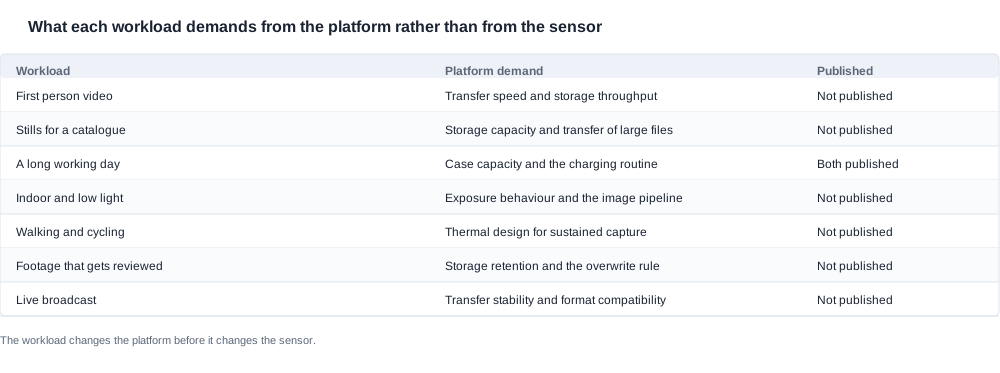
This is the part of the mapping that surprises buyers who start from the tier. A workload that produces short clips for a colleague is mostly a storage-throughput and transfer problem, and it is barely a sensor problem at all. A workload that produces stills for a catalogue is a file-size and transfer problem before it is a pixel-count problem. A workload that runs a full shift is a case and charging-routine problem. And a workload that streams live is a transfer-stability and format problem.
The consequence is that two products with the same resolution tier can be entirely unsuitable for the same workload because their platforms differ, and a buyer comparing only the tier will pick the wrong one. Only the long-working-day row has both of its platform demands published, which is why that workload is the easiest one to source in this catalogue.
The sequence that follows
Use the published data to narrow the range. Obtain the missing parameters from the manufacturer, in writing, using the same form of words for every supplier. Confirm on a sample with the customer's own workload rather than a demonstration. And write the acceptance criteria before the sample arrives, because the criteria are what turn the sample into evidence rather than confirmation.
Eight steps, in the order that keeps the schedule
- Write the workload as a sentence with its constraint attached, and get it agreed by the person who owns the customer relationship rather than by the person who owns the specification.
- Name the single parameter that workload turns on, and only that one, in the request to the supplier.
- Shortlist on the published rows: the cell capacity, the charging interface, the resolution tier, the case configuration and the runtime band.
- Ask every supplier for the same rows in the same form of words, including the method and the condition behind any figure.
- Write the acceptance criteria for those rows before the sample order, naming the measurement and the sample size.
- On the sample, run the workload in the environment it will actually be used in, and record the result as your own measurement.
- Take the workload back to the shortlist and discard any configuration that failed a decisive row, rather than negotiating around it.
- Limit the listing copy to the rows you hold, and treat the sample protocol as the source of the copy rather than the factory description.
Step seven is the one most often skipped, because it is the step where a procurement team has to give something up. A configuration that fails a decisive row is not a configuration to negotiate a discount on; it is a configuration that will generate returns, and the return cost sits with the brand.

The rows to close before you sample, in the order they matter
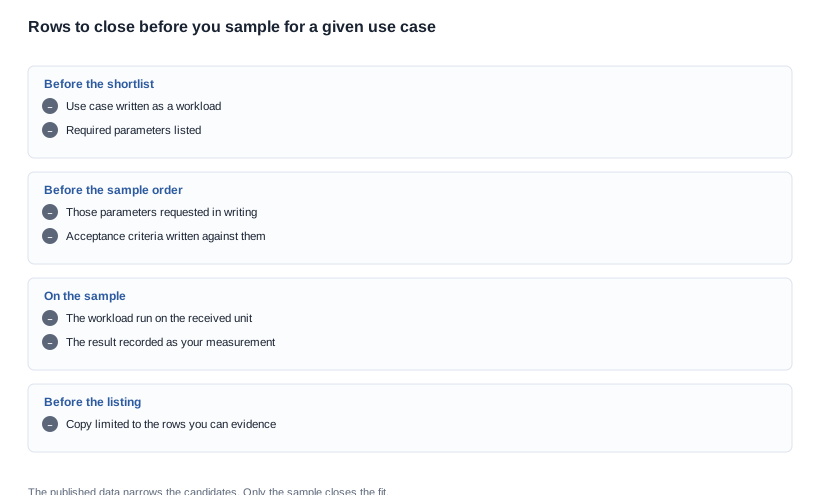
Four groups, and the order of the groups is the argument. Before the shortlist, write the workload as a sentence with its constraint attached and list the parameters it depends on. Before the sample order, request exactly those parameters in writing, and write the acceptance criteria against them. On the sample, run the workload rather than a demonstration script, and record the result as your own measurement with the protocol written down beforehand. Before the listing is published, limit the copy to the rows you can evidence.
The last group is the one most often skipped, and it is the one that determines whether a workload mismatch becomes a return. A product page that claims more than the buyer's own measurement supports will produce complaints that no factory-side fix can address.

Which route a workload takes a buyer down
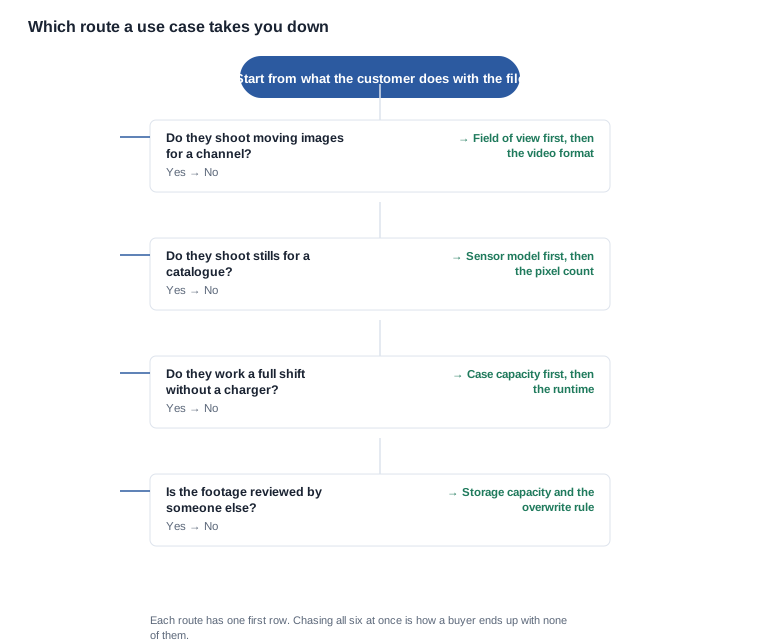
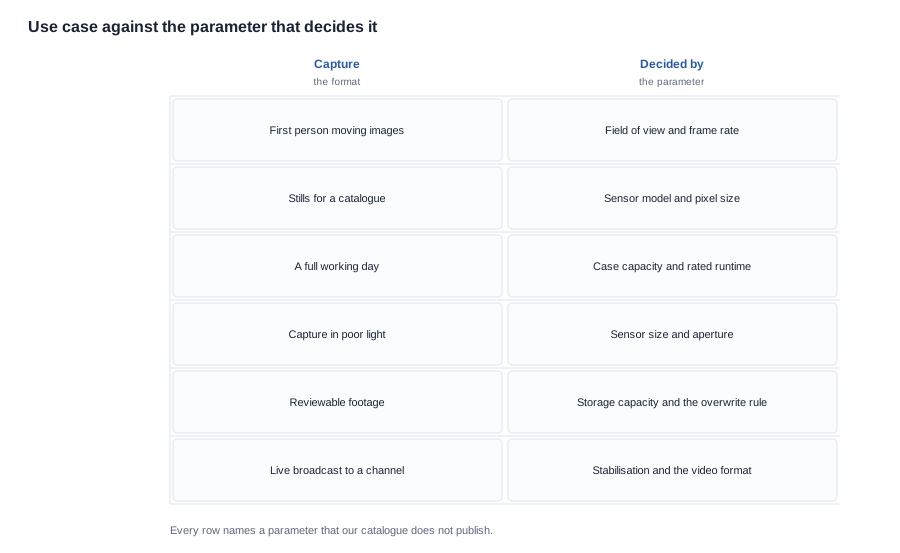
The decision chart is a routing table rather than a recommendation engine, and its value is that it prevents the six-row request from being sent at once. If the customer shoots moving images for a channel, the field of view comes first and the video format second. If they shoot stills for a catalogue, the sensor model comes first and the pixel count second. If they work a full shift without a charger, the case capacity comes first and the runtime second. And if the footage is reviewed by someone else, the storage capacity and the overwrite rule come first, ahead of anything about the image.
Chasing all six at once produces six partial answers and a longer delay than chasing two properly. The order above is not a ranking of importance; it is a ranking of dependency, because in each case the first row determines which of the others can even be interpreted.
A worked example of the routing
Assume a field-service brand with technicians who visit plant equipment and attach a short clip of a gauge panel to a job record. The clip is indoors, is short, is reviewed by a colleague, and is never published. The decisive parameters, in order, are the field of view — the technician has to see the whole panel and the label next to it — then the transfer behaviour, because a technician will not wait for a clip, and then the storage rule, because a session that stops recording loses the evidence.
For that workload the resolution tier is close to irrelevant, which means the buyer should not spend the budget on the tier comparison and should spend it on the field-of-view measurement and the transfer test. Our published rows narrow the candidate set by cell capacity, interface and case configuration, and the four case-equipped models with 290 mAh cells and about seven hours of rated runtime are the commercially sensible subset for a full-shift workload.
The commercial consequences of a workload mismatch
A mismatch is not only a performance problem. It is a cost problem, and it lands in three places.
The configuration minimum. A workload that needs a case, a specific interface and a particular tier multiplies the combination count, and each combination carries its own minimum in a supplier's quotation. A buyer who confirms the workload before placing the order can commit a combination count; a buyer who confirms it afterwards has already paid for configurations that nobody buys.
The return and warranty exposure. The published runtime bands carry no test condition, and the published tiers carry no imaging specification, so the expectation set by the listing is the only description of the product in the customer's hands. Where that expectation and the delivered behaviour differ, the return lands in the buyer's channel rather than in the factory's quality record.
The schedule. The workload determines which parameters have to be closed before sampling, and the parameters that take longest to answer are the ones a supplier has to run a measurement programme to produce. Knowing which three rows matter before the request is sent is the difference between a sample order in two weeks and a sample order in two months.
The three commercial rows a workload decision settles
Beyond the direct cost lines, a workload decision settles three commercial rows that a buyer can negotiate and that are usually left open.
The configuration count is the first. A workload that needs a case and a particular tier is a different number of configurations from a workload that does not, and the supplier's minimum is usually expressed per configuration. Committing a combination count rather than a unit count is the negotiation that pays, and it can only be made once the workload is fixed.
The market list is the second. A workload that only exists in one market does not justify a four-market compliance file, and a workload that exists in four does. The launch schedule follows the market list rather than the production schedule, so this is a schedule negotiation as much as a cost one.
The packaging line is the third. In this category the case is a published and sizeable cost, and whether the product ships with one is decided by the workload rather than by the factory. Four camera models ship with no case, seven ship with one, and two of the seven have an unpublished case capacity. That is a configuration choice with a per-configuration minimum attached, a packaging line, a freight consequence and a battery transport document behind it.
A buyer who takes the workload decision first can negotiate all three. A buyer who takes it after the quotation cannot negotiate any of them, because by then the quotation is already structured around a set of configurations the workload does not need.
We publish resolution because the manufacturer publishes it, and we will not estimate a field of view, a video format, a stabilisation status, a storage figure or a low-light result for any model. We would also rather tell you that our published data cannot close a workload fit than present a tier recommendation that the data does not support.
Pick the workload first, then read only what that case needs. The published tiers and what they do and do not settle are set out under Camera imaging technology, matching the model to the job before comparing specifications is covered in Camera technology for different use cases, and the models behind those rows are on the AI camera glasses range page.
Tell us the use case and we will say which rows you must close first.