The charging rows of a smart glasses specification sheet describe two different things at once, and the confusion between them causes most of the disappointment in this category. The first group describes the product: the interface, the charge time, the cell, the runtime, the case. The second group describes the purchase: what is actually in the box. A customer who bought from a listing that showed the first group and assumed the second will be disappointed, and the reason is usually a missing cable rather than a missing feature.
This article goes through the rows one at a time, because a row that is read correctly settles a question and a row that is misread creates one.
The reason it matters is that a specification sheet is a procurement instrument, not a marketing document. A buyer who has read the rows correctly can decide which model to shortlist, what to ask a supplier to confirm, and which claims the published material supports without further work. A buyer who has read them loosely ends up with a comparison sheet that looks complete and settles nothing, and the difference between those two outcomes is a few hours of careful reading at the start of a programme.
Smart glasses charging: the two kinds of row and the confusion
The quickest way to sort a specification sheet is to put every row into one of two piles before reading any of them carefully.
Product rows describe the hardware and are properties of the model. The charging interface is a product row. The charge time is a product row. The cell configuration is a product row. The runtime is a product row. The case capacity is a product row.
Purchase rows describe the transaction and are properties of the configuration, the market and the shipment. The cable is a purchase row. The adapter is a purchase row. The case contents are a purchase rows. The regulatory paperwork in the box is a purchase row.
The two piles are answered by different parties. Product rows come from the factory's engineering file. Purchase rows come from the configuration you order and the market you sell into. A buyer who asks a supplier for the product rows and a buyer who asks a supplier for the purchase rows are asking two different questions, and a supplier who answers one of them fully and the other one not at all has not given a poor answer — has given a partial one.
The interface row and the accessory it creates
The charging interface is a retail decision as much as a hardware one. A Type-C port means the customer can charge from a power bank they already own, which removes a purchase objection at the point of sale. A magnetic cradle is more elegant on the product and creates an accessory the customer has to be given or sold, and a cradle is a specific moulding rather than a cable.
In our range the Type-C models are the V03 Pro, the L2 Utral, the D11, the D12, the D17, the ZH12 and the bone conduction model. Magnetic charging covers seventeen models, across the audio, camera and sport tiers, and the MT6 and the L1 Pro, and the CY05 and the CY03 publish no charging interface at all. That is a description of the range rather than a preference, and it means the decision is genuinely made per model.
The row that usually goes missing is the accessory consequence. A magnetic model without a cradle in the box is not a cheaper product; it is an unusable one for anyone who has not bought a cradle.
The runtime row, and the workload it is missing
The runtime row is where most published comparisons go wrong, because a runtime is a number with the method removed. The common workloads — continuous playback, mixed use and continuous capture — produce substantially different results from the same hardware.
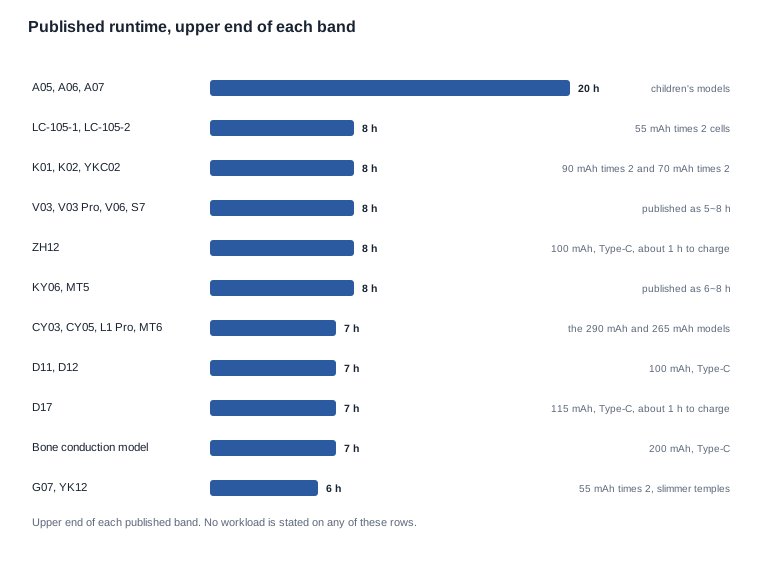
Our published runtime values are stated per model: five to eight hours on the 220 mAh camera models, six to eight hours on the KY06 and the MT5, about seven hours on the 290 mAh camera models and the MT6, five to eight hours on the V06 and the S7, about twenty hours on the children's A05, A06 and A07, about eight hours on the 90 mAh and 70 mAh audio models, about seven hours on the D11 and the D12, about six hours on the G07 and the YK12, and about seven hours on the bone conduction model.
None of those values comes with the workload behind it. A quoted runtime with no stated workload should be read as a best case.
The children's figure is the one that gets misread most often. The A05 and the A06 publish 40 mAh and the A07 publishes 70 mAh, and all three publish about twenty hours, which means the number describes a light duty cycle with a long standby rather than twenty hours of continuous operation.

The charge time row and the label that changes meaning between pages
Here is the part of the specification sheet that costs a buyer real time, and it is specific to this catalogue rather than to the category.
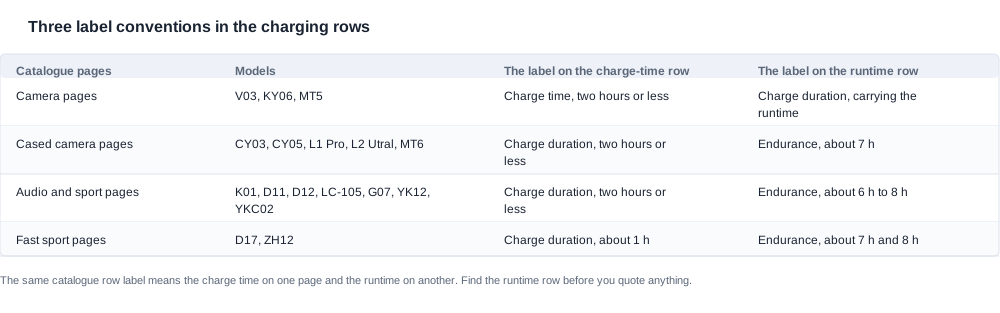
The charge-time row is labelled in three different ways across the catalogue, and on one set of pages the label that reads like a charging duration actually carries the runtime figure.
On the camera pages for the MT5 and the KY06, and the V03, one label states the charge time of two hours or less, and a second label — one that reads like a charging duration — carries the runtime of five to eight hours or six to eight hours.
On the pages for the cased camera models (the L2 Utral and the CY03, and the L1 Pro and the MT6, and the CY05), the label that reads like a charging duration carries the two-hour charge time, and the runtime sits on a separate endurance row at about seven hours.
On the audio and sport pages and on the two fastest sport models, the same arrangement holds: a charging-duration label for the charge time and an endurance row for the runtime.
The practical consequence is specific. If you read the catalogue row by row without noticing which convention that page uses, you will read a runtime of five to eight hours as a charge time on one page and as a runtime on another, and you will quote a figure that is wrong in one direction or the other. This is exactly the kind of detail that a supplier's own datasheet can get right and a buyer transcribing from a catalogue can get wrong.
How to read a charging row without guessing
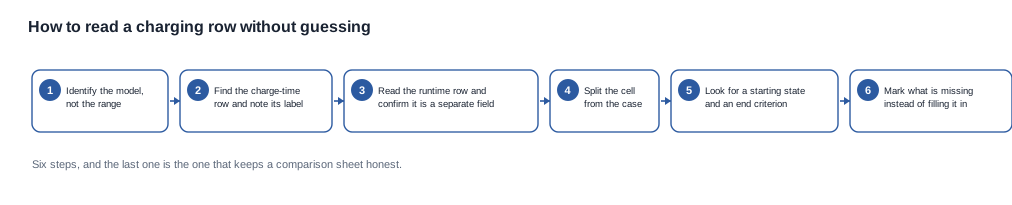
Six steps, and the last one is the one that keeps a comparison sheet honest.
- Identify the model, not the range. Range-level rows are averages and averages are not specifications.
- Find the charge-time row and note which convention that page uses. The label changes between pages.
- Read the runtime row and confirm it is a separate field. If the page puts the runtime on the same label as the charge time, the runtime is the one that looks like a duration.
- Split the cell from the case. They are different energy stores with different duties.
- Look for a starting state and an end-of-charge criterion. If they are absent, the charge time is a ceiling and must be written as one.
- Mark what is missing instead of filling it in. A blank row filled with a plausible value is the most expensive kind of blank.
What the catalogue does and does not publish
The charge time row is, against the usual expectation, completely populated. Every one of the twenty-eight catalogue entries publishes one: twenty-six at two hours or less, and the D17 and the ZH12 at about one hour. That is a better row than most categories manage.
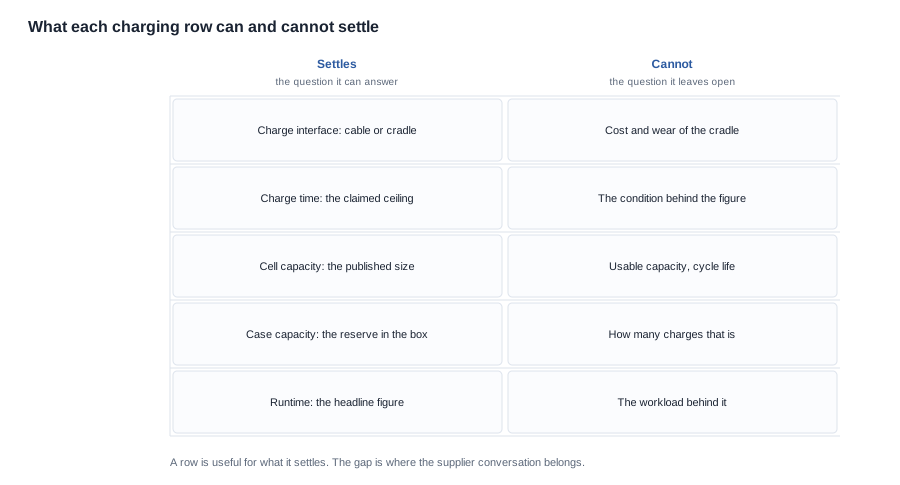
What no entry publishes is the condition behind the figure. There is no starting state, no end-of-charge criterion and no input current on any row in the range. A buyer who publishes a charge time on a product page should publish it as a maximum, and should say what the customer has to supply.
The cell row, and why 55 mAh twice is not 110 mAh on the sheet
The battery capacity row is published per model and runs from 40 mAh on the A05 and the A06 up to 290 mAh on the CY05 and the L2 Utral, and the L1 Pro and the CY03. The MT6 publishes 265 mAh, the KY06 and the V06, and the S7 publish 260 mAh, the bone conduction model publishes 200 mAh, and the MT5 and the V03, and the V03 Pro publish 220 mAh.
The detail that changes a comparison is the doubled cell. The YK12 and the LC-105-1, and the G07 and the LC-105-2 publish 55 mAh × 2. The K01 and the K02 publish 90 mAh × 2. The YKC02 publishes 70 mAh × 2.
Doubled cells, and the totals that must not appear
The catalogue publishes the cell value and the number of cells, and it does not publish a total. So a comparison table that presents "110 mAh" as though it were a published figure is stating something the source does not state, and the person who reads it will attribute it to the catalogue.
The rule is simple and worth writing into your own sheet. In the table, reproduce the published form — 55 mAh × 2, 90 mAh × 2, 70 mAh × 2. In the analysis, a total is legitimate as long as it is labelled as your own derivation. "The two cells in the LC-105 total 110 mAh, which is our calculation and not a published catalogue figure" is a defensible sentence. A row in a table headed "published capacity" that reads 110 mAh is not.
Why a published capacity is not a usable capacity
A published capacity is nominal rather than usable, because the protection circuitry takes a share, and because the operating window excludes the top and bottom of the range. How much of a published figure is actually usable is a characteristic the catalogue does not publish for any model, and it is the reason a nominal capacity cannot be turned into an operating time without a measurement.
There is a second reason not to convert capacity into runtime, and it is the more common error. Runtime is published per model, but it is published without the workload behind it, and workload is the variable that dominates it. Converting a cell figure into hours assumes a duty cycle that nobody has stated.

The case row, and the two camera models with none
The case capacity row is published for five models: 1400 mAh on the CY05 and the L1 Pro, and the CY03, 900 or 1400 mAh as a configuration option on the L2 Utral, and a foldable 1200 mAh case on the MT6.
Two further models are published as shipping with a case without a published capacity: the KY06 and the MT5. That is a real gap rather than an absence of a case, and it is a request rather than a fact.
The V03 and the V03 Pro are published with no case at all, which makes them the two camera models where the customer must bring their own cable or cradle.
What a case capacity does and does not tell you
A case capacity is a reserve of energy, not a number of operating hours. Converting one into the other requires the usable fraction of the case, the transfer efficiency into the glasses, and the draw rate of the glasses during use — and none of the three is published for any model in the range.
That is why "1400 mAh case, three extra charges" is a derivation and not a catalogue statement. It might be right, and it is exactly the kind of figure that should be measured on a sample before it appears on a product page.

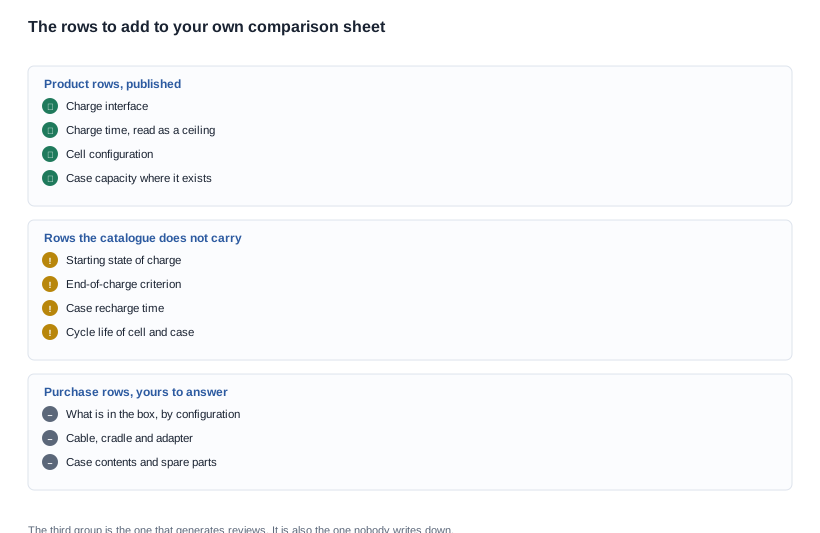
The rows you have to add to your own comparison sheet
The catalogue is complete on the product rows and silent on the purchase rows, which means the purchase rows are yours to build.
What is in the box, as a list. A short list on the product page removes a whole class of complaint, and it costs nothing but the decision to write it down.
What the customer has to supply. The adapter, the phone, the app, the account. A listing that says a recent smartphone and the free app are required sets the expectation properly and reduces the returns from customers who expected the product to work standalone.
Whether the case is in the box for this configuration. This one matters commercially, because a case changes the price, the carton and the proposition.
What the supplier is being asked to stand behind. The charge time is a catalogue figure. If you need it to be a commitment, it belongs in the purchase order as an acceptance criterion with the condition attached.
The three questions a purchase order should carry
A row that appears only on a website is a claim. A row that appears on the purchase order is an acceptance criterion, and an acceptance criterion is the thing a lot can be refused against. Three of the rows discussed above belong there, and the reason is that they are the three a buyer is most likely to need after the goods have shipped.
- The charging arrangement, named by model and configuration. Interface, case presence and case capacity, written as published, so that a unit arriving without its cradle is a mismatch with the order rather than a surprise.
- The charge time, as a ceiling, with the condition attached. If you have measured it, write your measured figure and its condition. If you have not, write the published ceiling and say so. What must not go on the order is a bare figure with no indication of which kind it is.
- The box contents, itemised. Cable, cradle, adapter, case contents and the documentation set for the destination market.
The questions to ask a supplier to complete those three are the ones already listed above, and they are worth sending as a list rather than as a question. The check to apply before you order is simple: if any row on the sheet is a number without a source, a number without a condition, or a claim without a document behind it, it is not yet a specification and it should not be on the order.
A hypothetical sheet review
The scenario below is invented for the sake of the reasoning: it is not a client project, and it shows the order of steps rather than an outcome.
Assume a brand-side product manager building a comparison sheet for four candidate models, two camera models and two audio models, from a supplier's catalogue PDF and a distributor's email.
Step one: the sort. The manager puts every row into the product pile and the purchase pile before reading the figures. Four rows — cable, adapter, case contents, paperwork — go into the purchase pile, and the manager marks them as unanswered rather than as absent.
Step two: the label check. Reading the camera pages, the manager finds the V03 page puts the runtime on the label that looks like a charging duration, and takes the 5~8 h figure as the runtime rather than as a charge time. A colleague reading the same PDF had already written "charge time: 5~8 h" into the sheet. The error is caught here rather than three weeks later.
Step three: the cell rows. The manager writes 55 mAh × 2 and 90 mAh × 2 into the table exactly as published, and adds a note in the analysis column that the totals are derived. The distributor's email, which quotes 110 mAh and 180 mAh as published values, is corrected with a request for the cell configuration rather than an argument.
Step four: the case row. The MT5 is published with a case and no capacity. The manager asks for the number, and the answer comes back with the configuration it applies to. The V03 Pro, with no case, goes into the sheet as a line item where the case column reads "none published" rather than being left blank.
Step five: the claim. The product page for the chosen model says "charges in two hours or less" and does not convert that into an operating time or a number of charges. The runtime figure appears as published, with no workload attached, because the manager has no workload to attach.
Step six: the purchase rows. The cable and adapter rows go to the supplier as a configuration question. The answer becomes the box contents list on the product page.
The sheet that comes out of this is smaller than the one the manager started with, and every row in it is one that can be defended.
What the catalogue settles and what it hands to the factory
To put it plainly — we publish the rows we hold and mark the ones we do not, and in this case the gap is systematic rather than accidental: we publish the product rows and not the box contents rows. That is not a view we hold because the box contents rows are unimportant. It is because the box contents are a configuration and logistics decision rather than a catalogue fact, and a catalogue cannot state them for every configuration without stating them wrongly for some of them.
What we will do is take a specific model and configuration, and give you the complete box contents, the charging arrangement, the published charge and runtime figures, and the rows we would put on a product page for it. The charging architectures are described under charging solutions, the battery rows and their limits are in battery life specifications, the box as a print programme is covered in customising the box for retail, and the models with their case options are in the AI camera glasses range.
Related reading
- The charging decision behind these rows — charging solutions
- The battery rows and their limits — battery life specifications
- The box as a print programme — customising the box for retail
- The models and their case options — AI camera glasses range
Send the model and the configuration, and we will give you the complete box contents and the published figures for it.