Almost every camera complaint in this category has one of six causes, and five of them are diagnosable in under ten minutes each. The sixth — the camera doing exactly what the specification said and the specification having said less than the customer expected — is not a fault at all, and it is the one that costs the most when a brand has not planned for it.
The starting point has to be honest, because it decides what a support script can begin from. No sensor model, no field of view, no video resolution and no frame rate is published for any model in our range. No storage capacity, no overwrite behaviour, no exposure behaviour, no transfer method and no durability rating is published either. A support script therefore cannot begin from a specification; it has to begin from a symptom, and the job of the script is to route the symptom to the right cause quickly enough that the customer does not escalate.
Smart glasses camera technology: six causes behind almost every complaint
Cause one: the storage is full
This is the most common complaint, and the one that is entirely predictable, because the storage capacity, the file format and the overwrite behaviour are not published for any model in the range.
The fix: confirm what is on the device, and confirm what happens when it fills. On most devices the answer is either that recording stops or that the oldest files are overwritten, and a customer who finds out which one it is after losing a shoot will not separate that from a defect, however reasonable the behaviour is in engineering terms.
The prevention is a specification, not a support script. A brand that publishes the storage capacity and the overwrite behaviour has removed the most common camera complaint in the category before it reaches a customer. Ask for it as a published row and put it in the manual.
Cause two: the frames or the application have lost their connection
A camera-glasses product is a three-part chain — frames, phone, and sometimes a remote — and every link in it can drop. The symptom is a camera that will not record, or an application that no longer sees the frames, and the customer's conclusion is that the product is faulty.
The fix is a reset sequence, and the sequence has to be written down. The order matters: power the frames down fully, clear the pairing on the phone, power the frames up, pair, and confirm the application reconnects. A support script that does not specify the order generates a second call, and a second call is the expensive kind.
The prevention is a documented reset procedure in the manual, which is a design deliverable rather than a support deliverable. It is also the reason the application question appears in the supplier questionnaire: whether the reset is the brand's job, the factory's or the application's determines who answers the call.
Cause three: the lens or the frame is damaged
A scratched lens changes the image, and a frame knocked out of alignment changes it more. The symptom is a soft corner, a dark patch, or a camera whose output shifted after an impact.
The fix: photograph the lens under a uniform light source — a sheet of white paper is enough — and look for the damage, and check the frame's alignment by opening and closing it while watching the lens. Our buyer review checklist sets out the same checks at the sample stage, because a fault caught at sample stage is a conversation and a fault caught in the field is a return.
The prevention is a durability specification, and no drop rating, no ingress rating and no frame weight is published for most models in the range. Ask for them, and if they cannot be obtained, say so in the manual rather than discovering it in a returns queue. Only the V06 and the S7 carry an IP54 marking in our range, and it appears without a published report number.
Cause four: the lighting changed and the camera did not adapt
A camera that looks fine outdoors and poor indoors, or the reverse, is an exposure and processing behaviour rather than a fault. A person walking from daylight into a shop is the most common trigger.
The fix: establish whether the camera is a fixed-exposure device or an automatic one, and how long it takes to adapt. No aperture, no exposure behaviour and no processing description is published for any model in the range, so this has to be established by observation.
The customer-facing version of the answer matters more than the technical one. "The camera needs a moment to adjust when the light changes" is a sentence a customer accepts. A product documented as having no adjustment behaviour generates complaints in exactly the situations where people use it.
Cause five: the transfer is failing, not the camera
The footage is being captured and never arrives, and the customer concludes the camera is broken. The symptom is an empty gallery, or a gallery with old files in it, and it is distinguishable from a camera fault only by checking the device.
The fix: check the device before the phone, then the transfer step, then the application. The transfer step is where this usually lives, because a local transfer, a network transfer and a cloud-mediated transfer fail in different ways and need different answers. Where the footage is stored and how it reaches the phone is not published for any model in the range, and the supplier verification page covers it as a question to ask before you order.
Cause six: the camera is doing what the specification said, and the specification said less than the customer expected
This is the expensive one, because the product is not faulty and the customer is not wrong.
An eight-megapixel camera and a thirteen-megapixel camera are numbers, not outcomes, and a customer comparing a listing to a competitor's product is comparing a number to an expectation. Nothing in the published documentation prevents that comparison, because no field of view, no video resolution and no low-light behaviour is published for any model.
The fix is a listing, not a support script. A page that says "13 megapixels" invites the comparison. A page that says "13 megapixels, tested against our 8-megapixel model on the same scene, crop by crop" does not, because it tells the customer how the number was arrived at. Our documentation is explicit that a parameter comparison advantage of this kind should not be claimed externally until it has been checked against a competitor's unit in the hand.
The diagnostic order that separates the five fast checks from the sixth
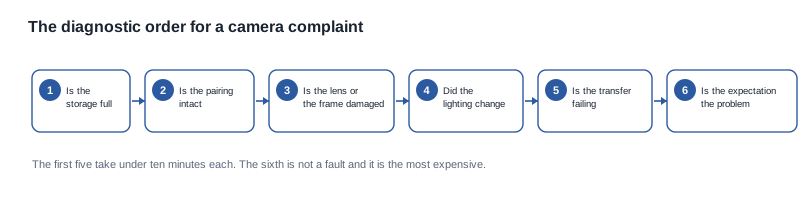
The order below is not arbitrary. Each step costs less than the one after it, and the first five are bounded by ten minutes each, so a script that runs them in sequence will reach a conclusion before the customer decides to escalate.
- Is the storage full? Two minutes, and it is the most common cause by a wide margin.
- Is the connection intact? Reset and re-pair in the documented order, and confirm the application reconnects before moving on.
- Is the lens or the frame damaged? Photograph the lens under even light, and check the alignment by opening and closing the frame.
- Did the lighting change? Establish the exposure behaviour and explain it.
- Is the transfer failing? Check the device, then the transfer, then the application, in that order.
- And if none of those is it, the product is probably working, and the expectation is the problem. That is a marketing issue, and it is the most expensive one to fix after launch.
Why the order is what makes the script cheap
A script that starts with the least likely cause will generate calls that go nowhere, and every one of those is a support cost and a customer who has been told twice. A script that starts with the most likely cause resolves most cases on the first contact and reserves the escalation path for the cases where it belongs.
There is a second reason for the order. The first five checks are diagnostic. The sixth is a conclusion, and a conclusion reached after the five checks is defensible because the customer has been through them with the agent. The same conclusion reached in the first minute is an assertion, and an assertion about a product that is behaving correctly is the fastest route to a negative review.
Prevention: what to specify before the first unit ships
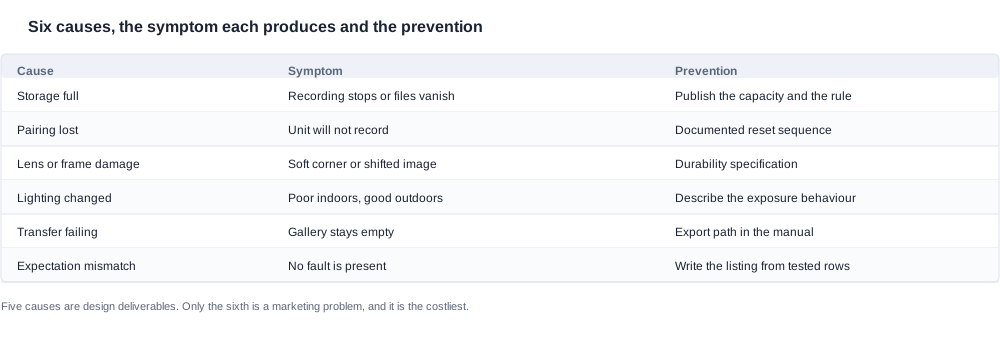
Five of the six causes are design deliverables, and a brand that treats them as design deliverables rather than as support problems removes most of the camera complaints in this category before they exist.
- The storage capacity and the overwrite rule, published. Not in a specification sheet, but in the manual and in the listing, in the customer's language. This is the single highest-value row in the list, because it is the cause of the most common complaint and because it costs nothing to publish once it is known.
- The reset sequence, written and ordered. Including who owns it, whether that is the brand, the factory or the application developer, and which party the customer is told to contact.
- The exposure behaviour, described. Whether the device is fixed or automatic, and how long the adaptation takes. A sentence in the manual converts a complaint into an expected behaviour.
- The durability rows, or an acknowledgement that they are absent. A drop rating, an ingress marking with its tested configuration, and the unit weight for the model being sold. Where they cannot be obtained, the manual should say so, because silence is what produces a returns queue.
- The transfer path and the export route, documented. What the customer has to do to get the footage off the device, and how long it takes. A customer who knows the export route does not conclude the camera is broken.
The procurement checklist for these five rows
- Ask for all five rows in one message, for every candidate, in the same format, so that the answers are comparable rather than assembled from different conversations.
- Ask which of the five the supplier will state publicly. A row that will only appear in a technical file is still a row, but it does not remove the customer complaint, because the customer never sees it.
- Ask for the ownership of each row. A row without an owner is a row that will be missing at launch.
- Put the five rows into the manual and the listing as part of the first artwork cycle, not as a later revision. The first artwork cycle is the cheap one.
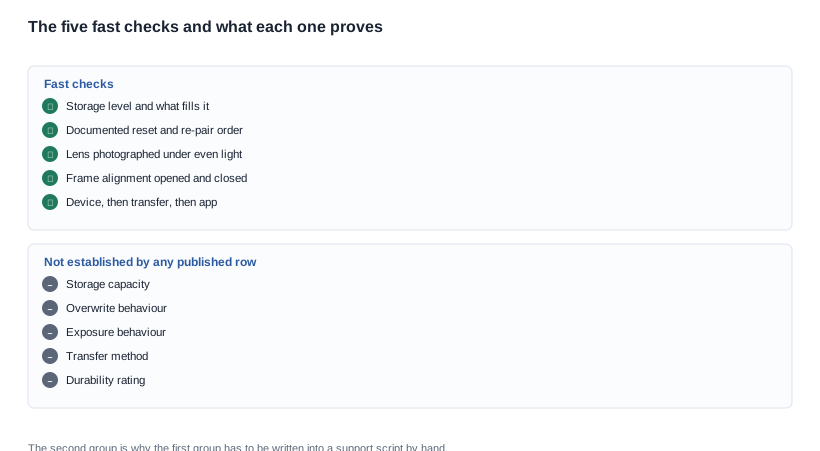
- Check the list against the five fast checks. If a check in the diagnostic order has no corresponding published row, that check will produce a support call rather than a closed case.
The cost of leaving a row unpublished
Each unpublished prevention row has a measurable commercial cost, and the cost is not the same for all five. A missing storage rule produces returns and lost footage complaints, and it is the most frequent cause in the category. A missing reset sequence produces second calls, which cost twice what a first call costs and which land on the same agent. A missing exposure behaviour produces complaints in exactly the situations where the product is used most, which is the worst possible distribution. A missing durability row produces returns that cannot be argued. A missing transfer path produces calls that the agent cannot close because the route to the answer has not been written down anywhere.
Which means the buyer who has budget for one prevention row should spend it on the storage rule, and the buyer who has budget for two should add the reset sequence.
A hypothetical support escalation on a camera product
This is a hypothetical case rather than a client project, and it shows what the escalation path looks like when the script is doing its job.
A customer contacts a brand because the camera on their camera-glasses product stopped recording midway through a customer visit. The agent runs the sequence. Storage is checked and is nearly full, which is consistent with the symptom. The customer confirms that the storage fills during a working day, which places the case in cause one.
The agent's next question is what happens when it fills. The agent knows the answer because it is written in the manual: the oldest files are overwritten. The customer did not know that, and the customer reads it as data loss.
The case is now closed with an explanation rather than a return. The order of the two questions is what closed it. Asking what happens when the storage fills before asking whether it is full would have produced the same answer in the same number of minutes, but the customer would have heard "your files were deleted" first and "that is how it works" second.
When the case does escalate
A second case starts identically and reaches a different conclusion. The customer reports that the camera stopped recording midway through a visit, storage is not full, the connection is intact, the lens is undamaged, the lighting did not change, and the transfer completed normally. Every fast check passes, which by the order above means the sixth cause is in play.
The agent now has to establish the expectation, and the way to do it is to ask what the customer expected the camera to do rather than to ask what the camera did. The answer reveals a comparison against another product, made from a listing rather than from a unit. The case becomes a copy review rather than a fault report, and it is filed as one.
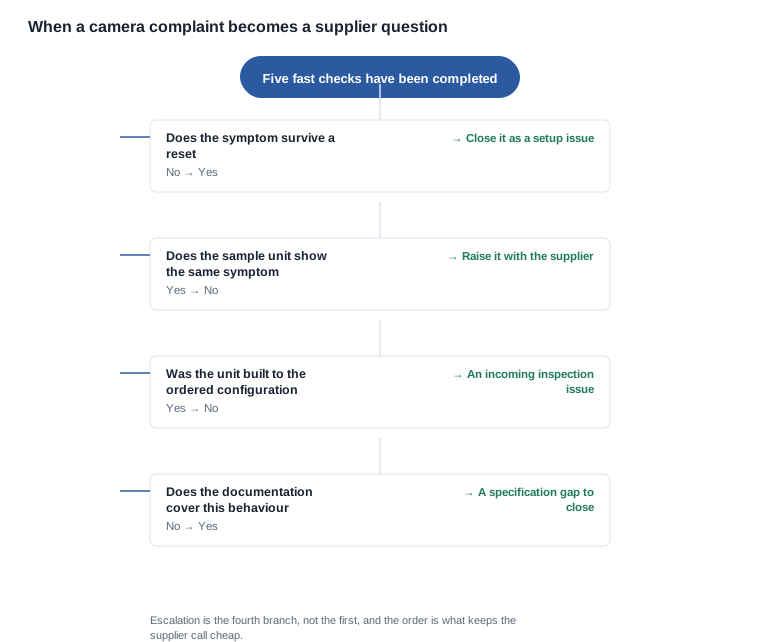
The four questions that decide where a case goes
Does the symptom survive a documented reset? If it does not, it is a setup issue and the case is closed at the first contact.
Does a second unit from the same batch show the same symptom? If it does, the case is a batch problem and it goes to incoming inspection and to the factory. If it does not, it is a unit issue and it goes to the defect log.
Is the unit built to the configuration that was ordered? A unit built to a different configuration can exhibit a behaviour the documentation says is impossible, and the mismatch is found at incoming inspection rather than in the returns queue.
Does the documentation cover this behaviour at all? If it does not, the case is a specification gap, and the fix is to publish the row rather than to compensate the customer.
The complaint that costs most because the product is not at fault
This is the one worth separating out, because it behaves differently from the other five in every way that matters to a procurement manager.
The product is working. The camera produces what the specification said, the specification was thinner than the customer's expectation, and nothing in the published record promised more. There is no defect, so there is nothing for the factory to correct, and a replacement unit behaves identically.
The cost lands in the wrong place. The cost of this complaint is not a return. It is the review, the rating, the channel relationship and the second order, because a channel that has been told the product does not do what the listing says does not reorder, and the negotiation that follows is about a claim rather than about a price.
The only prevention is upstream. A listing written from the rows that were actually measured does not create the expectation in the first place. A listing written from a tier produces a promise about quality that the tier cannot carry, and the customer will hold the brand to the promise rather than to the tier.
The honest version of the copy is narrower. A camera-glasses product that publishes the resolution tier, the runtime, the cell capacity and the format it serves, and that does not claim more, will have fewer of these complaints than a product that promises an image quality it has never established. The narrower promise is also the one that survives contact with a competitor's unit.
What we will and will not publish about camera faults
Here, a camera complaint in this category is a specification problem far more often than it is a manufacturing problem, because the published rows are so thin that the customer and the brand are working from different expectations.
We will not publish a storage capacity, an overwrite behaviour, a transfer method, an exposure behaviour or a durability rating, because none of them is published for these models, and we will not present a resolution figure as a demonstrated advantage. What we will do is tell you which rows exist for which models, and help you design the test that produces the missing ones.
Where we can help is with the two ends of the problem. At the pre-launch end, we can tell you which of the five prevention rows will remove the most complaints for the least work, and which of them are worth arguing for in the agreement. At the post-launch end, we can run the diagnostic sequence on a returned unit with you, so that the case is closed with an answer rather than with a credit. The camera family is on our AI camera glasses range page, the imaging background is at AI camera glasses imaging, and the questions to ask a supplier before the order are at supplier verification.
Tell us the models, the channel and the volume, and we will reply with the published rows and the rows we can close for you.
Related reading
- The test protocol that catches these before launch — camera imaging
- The sample-stage checks — L1 Pro buyer checklist
- The questions to ask a supplier first — supplier verification