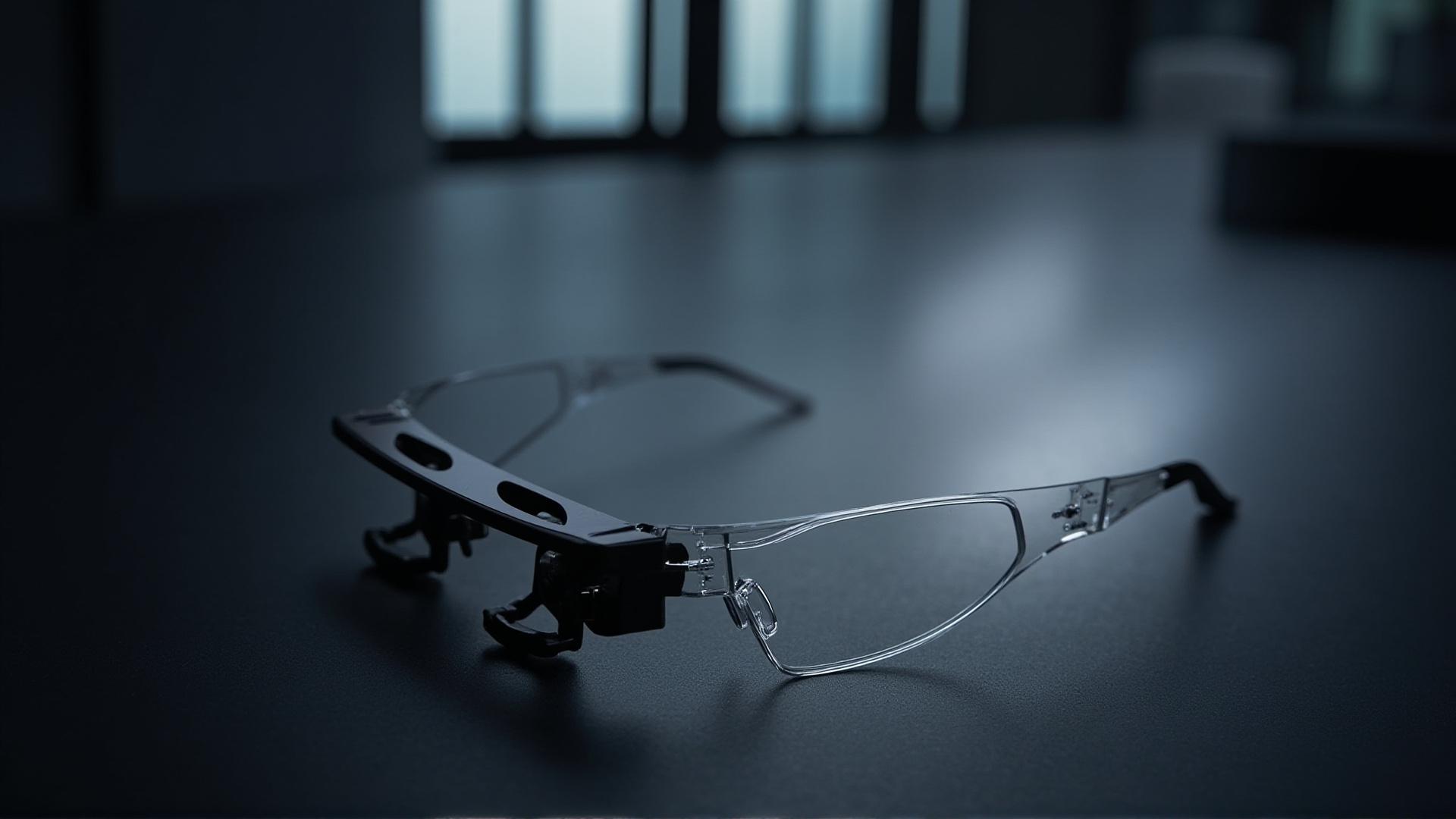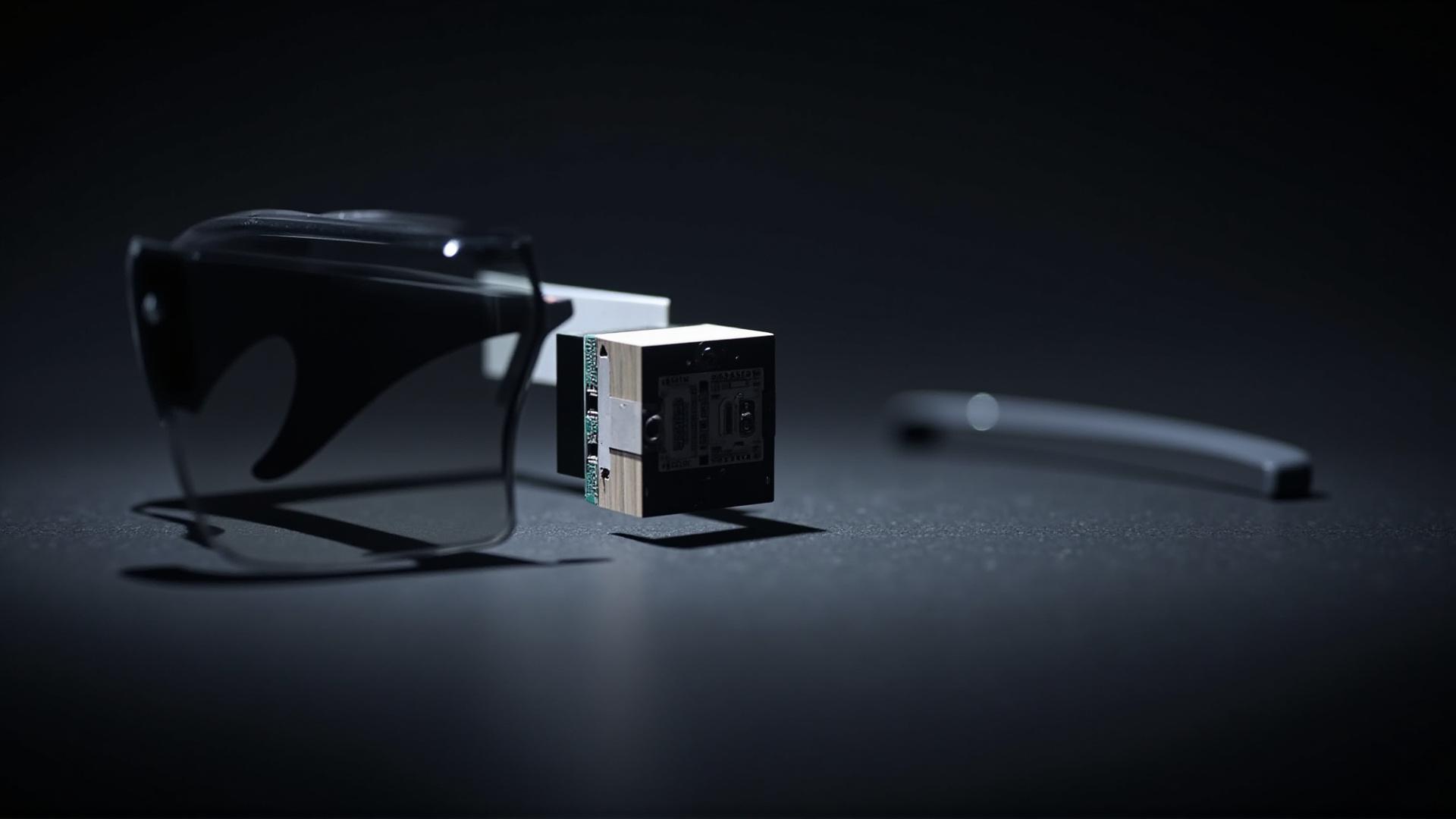
Smart glasses buying is usually decided in a spreadsheet, and most of the columns are blank on day one. The catalogue PDF for the V03 Pro prints a short, deliberate set of rows — camera resolution, cell capacity, use time, charge time, charging port, and the configuration lines for temples, lenses and colours — and leaves a second set of rows unprinted.
This guide answers the questions buyers actually send us, in the order they usually arrive, and shows which of them can be closed from published material and which need a written answer before a purchase order is signed. Every number quoted below is printed in the CYNRIN catalogue PDF; every number that is not printed is named as open rather than estimated. Where the catalogue is silent, the useful output is not a guess but a list of the exact question to put to the supplier and the form the answer has to take. The current model entry sits at AI camera glasses.
V03 Pro common questions: what a buyer asks before ordering
Buyers who are new to camera glasses tend to arrive with six questions, and they arrive in a predictable order. Writing them down makes the rest of this guide easier to use, because each of the sections below answers one cluster of them.
- What does this model actually do, and what is it not?
- Which rows are published, and can I treat them as a specification?
- How long does it run, how long does it take to charge, and what is the connector?
- Is there a charging case in the box?
- Which colours and lens options exist?
- Which rows are still open, and what do I ask the supplier to close them?
The order matters commercially, not technically. Question two decides whether you can treat the published material as a specification or only as the opening of a conversation. Question six decides how much of your purchase order still depends on an answer you do not have. A buyer who raises the open rows on day one is quoted faster and more precisely, because the supplier is not holding the quotation back while a clarification email travels.
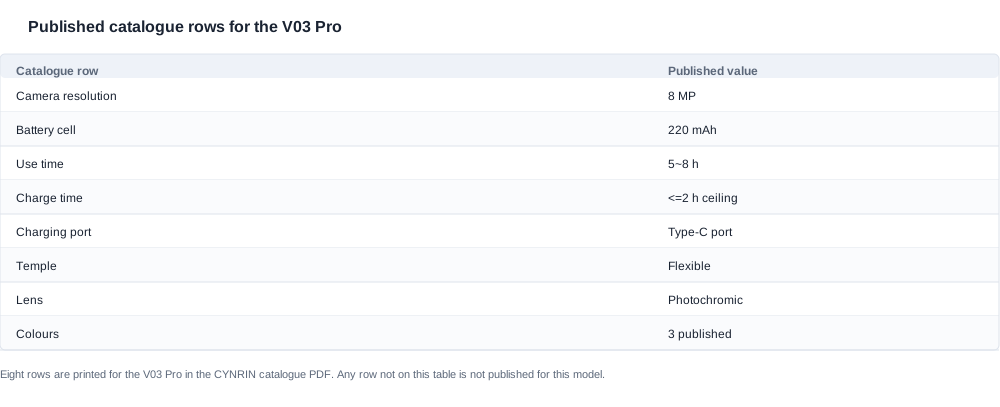
The table above is the published record for this model, transcribed row by row: 8 MP camera resolution, a 220 mAh battery cell, a 5~8 h use time, a charge time ceiling of ≤2 h, a Type C charging port, a flexible temple, photochromic lenses, and three published colours. Eight rows in total. The note under the table matters as much as the rows themselves — anything that does not appear on it is not published for this model, and no amount of inference from the eight published rows will produce it.
Two habits separate a purchase that goes smoothly from one that stalls in the confirmation stage. The first is to write the RFQ line by line from the published rows, so that every claim in your specification sheet is traceable to a row that actually exists. The second is to attach a list of open rows to the RFQ itself, rather than raising them later as if they were new requirements. Suppliers in this category are used to open rows; what they are not used to is discovering them a week after the quote was accepted, because that turns a normal question into a change order.
A useful way to frame the whole conversation is this: the catalogue tells you what this unit is, and it tells you, by omission, exactly where your own risk sits. The published rows are the part you can build a product page from. The unprinted rows are the part you have to buy information for, and the cost of that information is usually one sample unit and one written specification sheet, not a research project.

The lens, the temple and the three published colours
The configuration block is where most camera-glasses buyers first look for a differentiator, and for this model it is genuinely informative because it is specific. The catalogue prints a photochromic lens row and a flexible temple row, and then a colour row that names three options: orange, an off-white or cream tone, and black. Those three lines are the entire material story, and each of them opens a question the catalogue does not answer.
On the lens: the row reads photochromic. It does not print a tint depth, a switching time, a UV rating, or a minimum light level for darkening. Those omissions are not unusual for a catalogue entry, but they become commercial questions the moment you plan to sell the unit into an outdoor or all-day context, where lens behaviour is part of the product promise rather than a detail. The question to put to the supplier is narrow and specific: what is the measured darkening ratio and the switching time for the lens fitted to this model, and in which document will that figure appear. A figure that exists only in a conversation will not survive your own quality audit six months later, so ask which document carries it.
On the temple: the row reads flexible. That is a meaningful mechanical claim for a wear-and-carry product, and it is also the kind of row that creates its own verification problem. The catalogue does not print the hinge material, the flex range, the number of flex cycles tested, or whether a replacement temple can be ordered separately from the frame. If your business plan depends on servicing a broken temple rather than replacing a whole unit, that replacement question has to be asked before the order, not after the first batch arrives.
On colour: three published options is the widest colour line in the catalogue. Only one other model in the range carries a colour row at all, and that one lists four. This has two practical consequences for a buyer. The first is that a colour-led brief can be met without asking for a custom colour that has never been produced, which removes one common source of delay. The second is that the three published colours still do not answer the questions a brand owner actually has: which colours are available in which quantities, whether the tint across the three is identical or graded, and whether the housings share one internal specification or only one external appearance.
The configuration block publishes three facts and withholds roughly nine, and the withholding is where the specification work lives.
The disciplined way to handle this block is to treat each published configuration line as a headline and each missing detail as an explicit line item in a clarification list. Write it as a table in your own RFQ, with three columns: published value, detail required, and the supplier document that will carry it. That table becomes the checklist you use on receipt, and it becomes the document you attach to the purchase order. The alternative — a paragraph of free-text requirements — is much harder to audit and tends to lose items in the gap between the quote and the confirmation.
A colour brief is where this structure pays off fastest. Specify the colour by name exactly as the catalogue names it, one line per colour, and state the quantity band you intend to buy in each. Then add the two lines that catalogues rarely carry and buyers always need: whether the housing is identical in finish and tint across the three options, and whether the lens specification is identical across them too. If the answer is that the lens varies by colour, that variation is a product-page fact, and it has to be captured in writing before the first description is written rather than corrected afterwards. If the answer is that nothing varies, that is a strong claim to have on file, because it is what lets you build three pages from one specification.
The practical sequence for closing the configuration block:
- Confirm the lens specification in writing, with the measured figures and the document reference.
- Confirm the temple construction and whether spare temples are orderable.
- Confirm colour availability per colour, in the quantity band you intend to buy.
- Record every answer against the published row it completes, so the file stays one-to-one with the catalogue.
- Put the written answers in the order file, not only in the email thread that produced them.

Runtime, charging and the missing charging-case row
Three published rows define the power behaviour of this model: a 220 mAh battery cell, a use time of 5~8 h, and a charge time ceiling of ≤2 h over a Type C port. The charger question that follows is the one buyers most often get wrong, because the ceiling is a limit rather than a measurement.
The catalogue prints a charge time row with a value of ≤2 h. Read that as an upper bound. It is a ceiling the unit is specified to meet, not an average measured figure and not a promise of "under two hours" in everyday use. Across the whole range, only two models publish a shorter figure of roughly one hour; everything else, including this one, is printed as ≤2 h. If your product plan assumes a two-hour turnaround between an empty battery and a usable unit, you should plan on the ceiling and ask the supplier for measured charge curves on the sample you receive, because ambient temperature and how full the cell was when you started both move the real number.
The use time of 5~8 h is printed as a range, and ranges are honest but not very useful for planning. The question that makes the range actionable is the definition of the end of the range: is the 5 h end reached with the camera recording continuously, with the camera idle, or with a mixed workload? A continuous-recording test and an intermittent-capture test can sit inside the same published 5~8 h and describe completely different products for a buyer building an application on top of the unit. Ask for the test condition, not a better number.
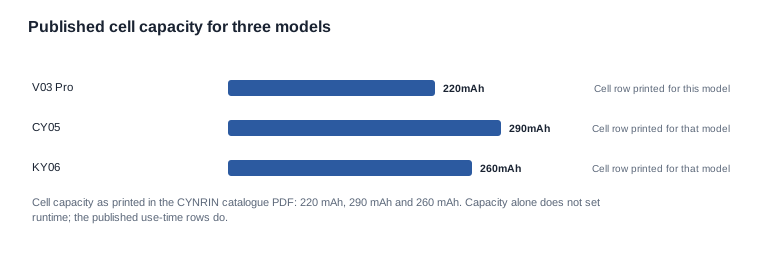
The chart compares the published cell rows of the three models most often discussed together: 220 mAh here, 290 mAh on the CY05, 260 mAh on the KY06. Two cautions apply. First, capacity alone does not determine runtime — the published use-time rows do, and each model's range is set by its own hardware. Second, all three of these models carry an 8 MP camera row, so the camera class is held constant across the comparison and the cell figure is the only variable the chart shows. That is exactly why the cell row alone cannot close the runtime question.
The charging case is where this model differs most sharply from the other two, and the difference is one of what the catalogue prints and what it leaves open. The catalogue prints no charging-case row for this model at all. This is an omission rather than a statement — the catalogue prints no charging-case row for this model at all, while five models in the same family print a capacity and two more describe a case without a figure. That single line changes several downstream decisions.
For a brand owner, the missing row means the accessory set has to be built from scratch, and the charging cable is part of what you must specify, source and describe. Ask what ships in the box — cable, adapter, instructions, cloth — because the catalogue does not print an accessory row. If your customer experience assumes a case in the pocket, that expectation has to change, or you have to source the case yourself, and the second option is a conversation about a third-party accessory that needs its own documentation.
For a channel partner, the absence of a case removes a retail display problem that case-equipped models create. A boxed unit whose catalogue page describes a case reads as a complete product on a shelf; a unit whose page says nothing about a case can read as an incomplete set. That is a merchandising decision, and it is yours to make, but it should be made deliberately rather than discovered at the shelf. It also removes the failure mode where a buyer returns a unit because the case is missing, which simply does not exist here.
There is one more consequence worth writing into the plan. With no charging-case row to read, a swap-based service model cannot be assumed, because whether a second cell travels with the unit is not something the catalogue answers. Every serviceable unit has to come back to a charging point. If your operational model depends on turning a device around in under an hour, the question to put to the supplier is whether spare cells are orderable separately from the unit, and what the process and documentation would look like if they are.
The rows the V03 Pro catalogue leaves open
Six rows that a buyer might reasonably expect to find are not printed for this model. Naming them is more useful than leaving them implicit, because an unnamed gap gets filled with an assumption somewhere in the supply chain, and assumptions are what turn a routine order into a dispute.
The six open rows are: Bluetooth version, unit weight, camera sensor model, field of view, IP rating, and certification paperwork.
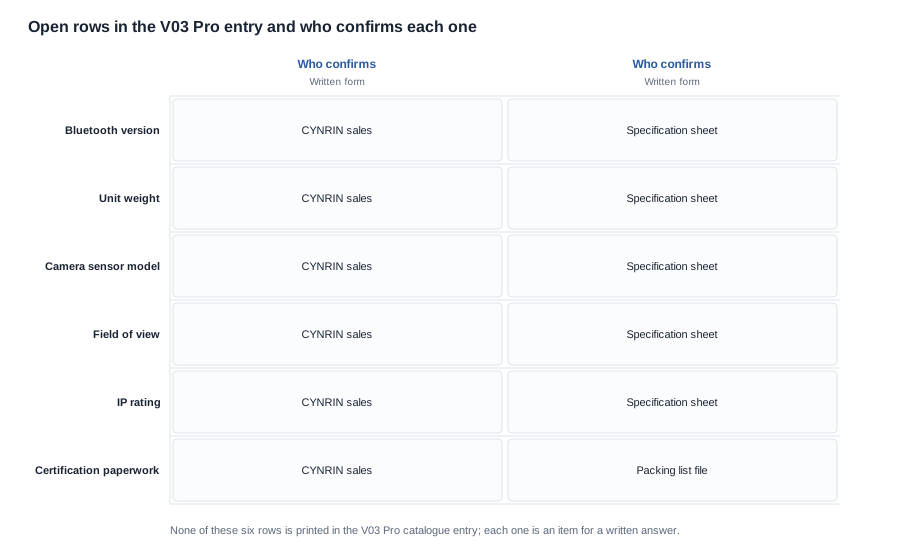
The matrix pairs each open row with the party that has to answer it and the form the answer should take. Every row is confirmed by the supplier; the difference is the document. Four of them belong on the specification sheet that accompanies the quotation, one belongs on the packing list as a shipment-document question, and one belongs in the file that goes with the order. Getting that paperwork right before the order is placed is what makes the answers survive a change of sales contact three months later.
Some context helps to prioritise them. Bluetooth version is published for fourteen models in the catalogue, but eleven camera models do not publish it, so this row is genuinely unremarkable rather than a red flag — it still needs an answer, because a buyer integrating with a phone or a headset will care. Weight is published for only one model in the entire range, so almost every model in the catalogue carries an open weight row. IP ratings appear for two models only, which makes the protection question worth asking on any model where the unit will be used outdoors, carried on a vehicle, or handled by people who are not careful with electronics.
The camera sensor model and the field of view are the two rows that most often turn into trouble late, because both affect the product description that ends up on your own page. A camera described as 8 MP in a catalogue line can be backed by different sensor families in different production batches, and a field of view that nobody writes down is a number a marketing team will later invent. The decision that protects you is simple and cheap: get the sensor model and the field of view stated on the specification sheet before the first order, and keep a photograph of the sample unit's own label or product page to match against it.
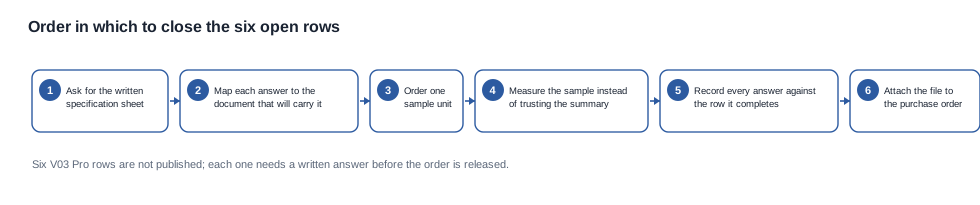
The flow chart is the order in which to close them, and the order is deliberate. Specification sheet first, because it settles four rows at once and costs nothing but a request. Document mapping next, because it tells you which file will carry the remaining answers. One sample unit after that, because a sample is what converts a written claim into a measured fact. Then the measurement, then the record, and finally the attachment to the order file. The step most buyers skip is the record, and it is the step that turns a conversation into evidence you can still use a year later.
Two warnings about the certification paperwork row. The catalogue's export documentation page is a pictorial page, and its contents are design and utility-model patent certificates rather than a printed list of conformity marks, so the catalogue itself does not print a set of standard names against this model. Do not carry a standard list from another product into this one. The certification checklist is the right instrument for this work: it tells you what to request and in what form, and it is deliberately specific enough that a supplier can answer it in writing without guessing.
The cost of leaving a row open is usually small individually and large collectively. An open Bluetooth version can cost a firmware integration weekend. An open field of view can cost a product page rewrite and a return rate. An open certification question can cost a shipment held at customs. All six are closed with one request and one sample unit, provided they are requested together.
Where CYNRIN stands on the V03 Pro questions
On these questions, our position is narrower than some buyers expect, and it is deliberate. We will not rank this model against another in our own catalogue, because the published rows do not support an order, and a ranking would be an inference presented as a fact. What we will do is publish the rows we can evidence, name the rows we cannot, and answer the open rows in writing when they are asked for in writing.
Concretely, that means the following, and it is a short list on purpose:
- The catalogue entry for this model stays in step with the PDF we publish, so the eight printed rows in this guide are the rows you will find in the document you were sent.
- Unprinted rows are named as unprinted in our own material as well, including the weight, the IP rating and the Bluetooth version.
- A request for a written specification sheet gets a written specification sheet, with the four specification rows and the field of view filled in.
- A sample order is a normal part of the process rather than a favour, and the sample is what the measured answers come from.
- Certification paperwork is handled through the checklist, which asks for documents by name and format instead of for a general statement of conformity.
For a buyer, the shortest version of the method is this: take the eight published rows as the specification, take the six open rows as the clarification list, and require that both are attached to the purchase order before it is released. A supplier who answers those six in writing has told you more about their operation than a brochure ever does, and a supplier who cannot answer them in writing has told you something useful too.
Keep the clarification list as a single controlled document rather than a thread of emails. One file, one row per open item, three columns — the question as asked, the answer as given, and the date and name of the person who gave it. When the first production order arrives, this file is what you check the shipment against, and when a customer raises a question four months later, it is what you answer from. A written answer that lives only in an inbox is functionally the same as an unanswered row, because the next person to need it will not find it.
The related reading below covers the pieces of this model that each deserve their own treatment, including the charging and runtime behaviour in detail, the limitations that the specification rows do not cover, and the published specification set in full.
Related reading