"There is a shutter button" is a question with a very short answer and a much longer tail. The short answer is that the catalogue publishes exactly two capture triggers in the whole range, and both of them are remote shutters on sport models: the D17 carries a remote control photo line, and the ZH12 carries a remote photo line alongside a stereo surround sound line. Neither of those two models is one of the eleven camera models, and neither publishes an image specification of any kind. The tail is that the eleven camera models publish no capture trigger at all — no button row, no touch row, no accessory row, no application row — which leaves the question of how a photograph is actually started as an open item on every camera in the range.
That is an unusual position to be in, and it is worth understanding why rather than just recording it. A catalogue page normally describes what the hardware does, and a shutter button is exactly the kind of hardware a page would describe. The absence here is therefore informative: it says the capture trigger is handled somewhere outside the specification the catalogue publishes, which means the buyer has to go and find it. It also means the two models that do publish a trigger are sport models rather than camera models, so a buyer looking for a camera with a documented trigger will not find one in this range.
is there a shutter button: the one published trigger in this range
Two rows in the entire catalogue describe a way to start a capture. The D17 publishes a remote control photo line and a surround sound line. The ZH12 publishes a remote photo line and a stereo surround sound line. Two models, two rows, both of them sport models, and both of them the only entries in the range whose published charge time is about one hour rather than the ceiling of two hours or less that every other model carries.
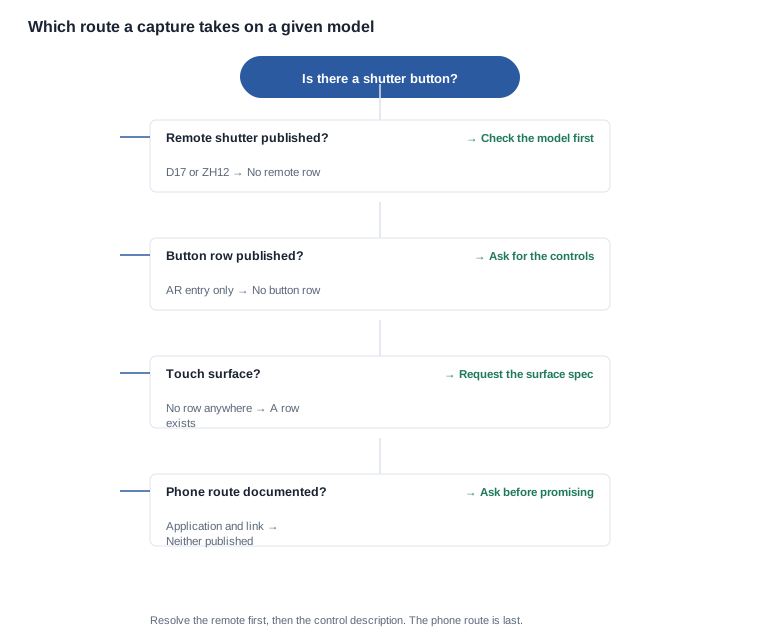
What those two rows do not say is where the remote sits, what powers it, how far it works, and whether it is bundled with the product or ordered alongside it. A remote photo line establishes that a remote exists as a published feature of that model, and it stops there. Everything a buyer would want to plan around — the transmission method, the power source, the pairing procedure, whether the control does anything besides the shutter, and whether a spare can be bought without ordering a new device — is absent from both pages. That absence is why the remote has to be asked about as a set of requests rather than answered from a row, and it is a different problem from the one a camera model raises, because a camera model raises no trigger question at all.
The interesting detail is what sits around those two rows. Both models publish a capture trigger and neither publishes a camera resolution class. The eleven camera models — the CY05 and the V03, the S7 and the KY06, the V03 Pro and the CY03, the L2 Utral and the MT6, the V06 and the L1 Pro, and the MT5 — publish a still-image resolution class and no trigger. So in this range the documented trigger and the documented image specification never appear on the same page. A buyer looking for a camera with a published shutter row does not find one, and a buyer looking for a model with an image specification does not find a trigger.
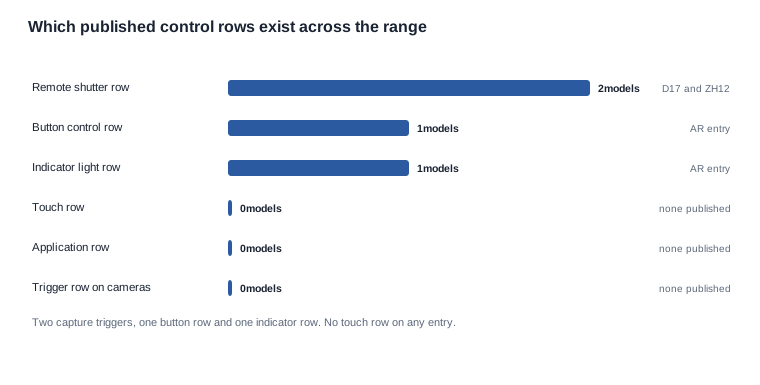
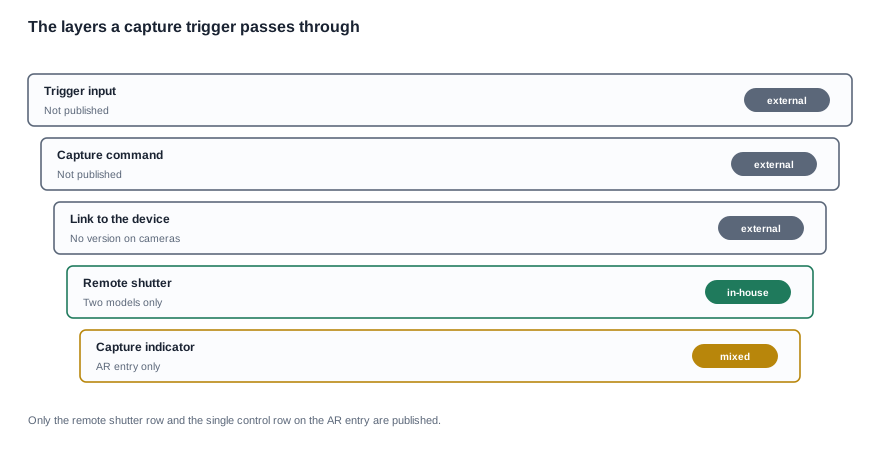
Two other published rows complete the picture of what a catalogue in this category can say about controls. We do not publish a capture trigger for any camera model, and the catalogue nowhere explains why the two published triggers sit on sport models rather than on the camera family, so the reason has to be asked rather than inferred. The AR entry publishes an indicator light line and a button control line, and those are the only indicator and button rows anywhere in the range. Nothing else publishes a button. And no model in the range publishes a touch row of any kind — the catalogue text carries no touch line on any page, so a buyer cannot assume a capacitive surface on a temple, on a front, or on a remote.
That combination produces a fairly precise answer to the question as asked. A physical shutter button on the frame of a camera model is not published for any model in this range. A remote shutter is published for two models, and both are sport models rather than camera models. A touch control is published for none. Everything else that could start a capture — a physical key somewhere else on the body, a command from a paired phone, a voice trigger, an automatic or timed start — is unpublished on every model.
What a trigger row would tell you, and where the range has none
A trigger row is a small piece of text with a lot of load on it, and it is worth knowing what it would have said so that a buyer can judge what is missing. A complete trigger description answers four things: what the control is, where it is physically, what it does when it is pressed, and whether the press is momentary or latching. A remote photo line answers the first and the fourth, by implication. It says the capture can be started from a remote, and it says nothing about how the remote is held, how far away it works, whether the press has to be held, or whether there is a second function on the same control.
The physical location matters more in this category than it might seem. A capture control on a temple is reachable without taking the device off, and a capture control that requires removing the device or picking up a phone is a different product in the hands of a person who is doing something else at the time. That matters most for exactly the use cases where hands-free capture is the reason to buy the product, which is also where the catalogue publishes the least.
The indicator row is the second half of the question, and it is unpublished for every camera model. The AR entry publishes an indicator light, and nothing else does. That means a buyer cannot determine from the catalogue whether a camera model shows a visible or audible indication that a recording is in progress. For a device that a buyer may be placing in public, on a worker, or in a home, that is a material gap rather than a detail, and it is the kind of row that is normally published because it is easy to describe and because it is used in the listing.
There is a related published row that is easy to over-read. Twenty of the twenty-eight entries carry AI feature entries. That is a statement about how the range is organised, and it is not a trigger specification. It does not say that the model responds to a spoken instruction, it does not say what the instruction would be, and it does not say whether the trigger exists at all. A buyer who wants a hands-free capture requirement has to request the trigger behaviour explicitly, in the same way as any other unpublished specification.
Six routes to start a capture, and what each one requires
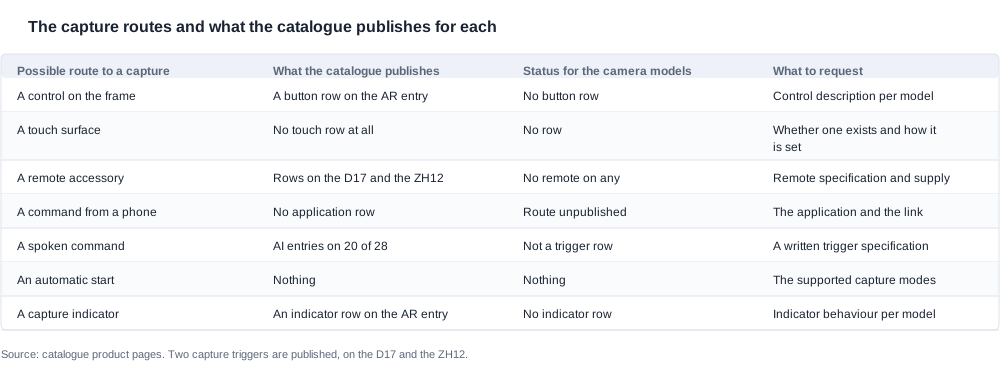
The following is the decision structure a buyer needs, because "is there a shutter button" narrows to this: a trigger has to be somewhere, and the six places it can be are all either published for a different set of models or unpublished entirely.
- A physical control on the frame. The catalogue's only button row is on the AR entry, which is not one of the eleven camera models. Request: a control description per model, stating the number of controls, their position, and the function of each one.
- A touch surface. No model publishes a touch row. Request: whether a touch surface exists, where it sits, how it is configured, and what gesture or timing it responds to.
- A remote shutter accessory. Published on the D17 and the ZH12 only. Request: whether a remote exists for the model in question, whether it is bundled or separately orderable, its own power source, and its transmission method.
- A command from a paired phone. The catalogue publishes no application row and no accessory row for any model. It also publishes no Bluetooth version for any of the eleven camera models, so even the connection route to a phone is unpublished for the camera family. Request: the application, the connection route, and the capture command it offers.
- A voice trigger. The AI feature entries are not a trigger specification. Request: whether the model accepts a spoken capture command, what the command is, whether it works without a network, and what happens when it mishears.
- An automatic or timed start. Nothing is published about capture behaviour of any kind. Request: the capture modes the device supports, whether any of them begins without an explicit command, and how the device behaves when storage or power runs short.
There are two questions worth asking before working through the six routes, and both are about criteria rather than about models. The first is whether the trigger has to work while the device is being worn, because that criterion eliminates whole configurations rather than whole models: a device that needs a phone in the hand and a device that needs a raised key are different products, and a buyer who has not decided between them will compare a trigger against a non-trigger and conclude that one supplier is missing a feature. The second is whether a capture has to be possible without any deliberate action at all, which is the criterion that separates a camera from a recorder. Neither criterion is answerable from the catalogue, and both are cheap to settle on paper.
There is also a due diligence point that is easy to miss in a shortlist. Two suppliers will often describe the same trigger differently, one in terms of the control and one in terms of the action, and the descriptions can look like different products when they are the same mechanism. The way to tell is to ask which route the model uses — and, if the answer is a route rather than a control, ask for the document that supports it. That request is what separates a claim from a description, and it is what a how to choose comparison should be built on rather than on the presence of a named feature.
The six routes, and what a buyer needs from each:
| Route to a capture | What the buyer needs to know | Where the range stands |
|---|---|---|
| A control on the frame | How many, where, and what each does | One button row, on the AR entry |
| A touch surface | Whether one exists and how it is set | No touch row anywhere |
| A remote accessory | Power, transmission, pairing, supply | Two models only |
| A command from a phone | The application and the connection route | No application row |
| A spoken command | The command, and whether it needs a network | Not covered by an AI entry |
| An automatic start | Which modes start without a command | Nothing published |
Read as a list, those six routes are also a request list, and there is a useful pattern in how much they cost to answer. Routes three and four are the two that most suppliers can describe quickly, because they describe a product decision rather than a measurement. Routes one and two are hardware questions that a specification sheet answers. Route five is a software behaviour question that needs a written answer and a network assumption. Route six is the one most often left vague, and it is the one that decides whether a recording can start by itself — which is the difference between a device a buyer can put on a stand and a device somebody has to touch.
The ordering of the routes also matters for a procurement team, because routes three and six are the two that determine whether the device is usable in the scenario the programme is actually buying it for. A buyer whose programme is hands-free capture should resolve route three and route five first, because a model that requires a phone in the hand is not a hands-free product even if it captures perfectly.
is there a shutter button: the three-part answer in brief
Published. Two capture triggers exist as published rows anywhere in the range: a remote control photo line on the D17 and a remote photo line on the ZH12, both of them sport models, both of them Type-C models, both of them the models whose charge time is about one hour. One button control row exists, on the AR entry, together with an indicator light row on the same entry. No touch row exists on any entry.
Not published. No camera model publishes any capture trigger — no button, no touch surface, no accessory row, no application row and no capture-mode description. No camera model publishes a Bluetooth version, so the connection route to a paired phone is unpublished for the eleven camera models as well. No indicator behaviour is published outside the AR entry, so whether a recording is announced at all is an open item on every camera model. No storage capacity or file format is published, so the length of a recording is unknown.
Ask. A control description per model, with the number and position of controls and the function of each; a statement of whether a touch surface exists and how it is configured; the remote accessory specification and its supply terms if a remote applies; the application, the connection route and the capture command it offers; a written answer on any spoken capture command; the supported capture modes including any automatic start; the indicator behaviour; and the storage capacity and file format.
The three blocks above are the whole of the answer, and they are deliberately in that order because a buyer who reads them in a different order tends to start with the accessory question when the accessory is the least likely to be the answer. The camera models' trigger is more likely to be a physical control on the body, a command from a paired phone or a spoken command, and the first two of those are cheap to ask about.
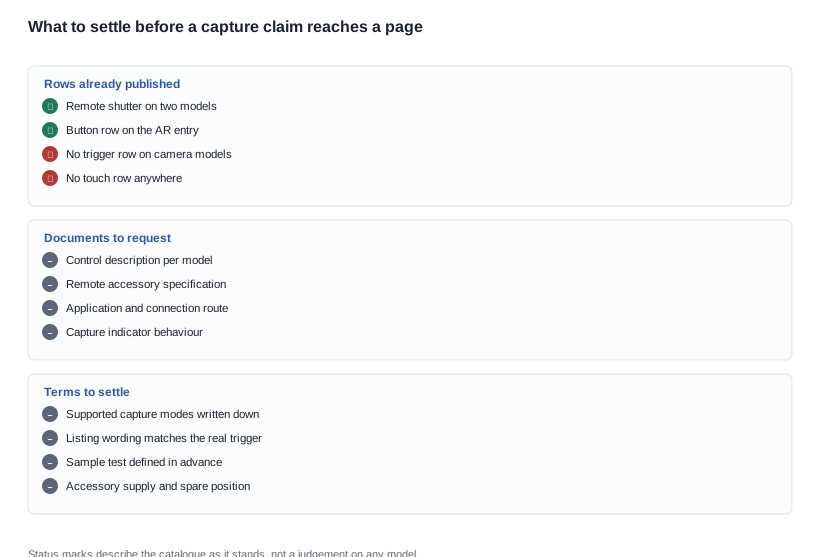
One more red flag is worth naming, because it is common in listings rather than in supplier correspondence: a page that describes a shutter button for a model whose trigger is actually a phone command. The failure mode is not that the hardware is deficient — it may be an excellent device — but that the listing describes a mechanism that does not exist, and the buyer who discovers that after the order has to withdraw the claim. A page that says instead "capture starts from the paired device" is narrower and entirely defensible, and the narrow version is usually the one that survives a channel partner's review.
Two commercial points belong with those blocks. The first is that the listing has to match whatever the answer turns out to be, and a listing that says "shutter button" for a model whose trigger is a phone command is a claim the buyer cannot support. The wording should describe the mechanism that exists, whatever it turns out to be, which is not a disadvantage — a hands-free trigger described accurately is a better selling line than a button that is not there. The second is that the remote shutter on the D17 and the ZH12 raises an accessory question of its own, and the answer to that question is a separate file: the remote's own specification, its own power source, whether it is bundled, and whether a spare can be ordered. A programme that depends on the remote has to treat it as an item with a supply chain rather than as a line in a feature list.
How to brief a trigger requirement that the catalogue does not cover
The brief is the place where this question should have been answered, and the reason it was not is that a requirement written as "shutter button" is a feature request rather than a behavioural requirement. A brief written as behaviour asks for the thing a buyer actually needs, and it can be answered by more than one design.
A behavioural brief for capture in this category states the acceptable start delay, whether the trigger has to work while the device is being worn, whether any capture must be possible with no object in the hand, how the device indicates that a capture is in progress, whether the capture must survive an interruption in the connection, and what happens when the device is interrupted or runs out of power during a recording. Every one of those is answerable by a supplier, and none of them is answered by the catalogue.
That form of brief also makes the comparison between two suppliers workable. Instead of asking whether a model has a button, a buyer asks which of the six routes it uses and asks for the supporting document for that route. A supplier who answers with a control description can be compared with another supplier who answers with a control description, and the comparison is meaningful because both are answering the same behavioural question.
There is one last piece of due diligence that belongs in the same file, and it is the one that is easiest to defer and most expensive to defer. The catalogue publishes a charge time and a runtime band for every model and publishes no storage capacity, no file format and no capture limit. A buyer who is writing a trigger requirement into a product programme is usually writing it into a workflow that records for minutes at a time, and the workflow's tolerance for a recording that stops early is a business decision. That decision has to exist before the sample round, because it determines what the sample is asked to prove, and a sample asked to prove the wrong thing passes a device that will fail in the field.
A buyer assembling a shortlist should weigh the trigger evidence against the rest of the published rows before deciding which model to evaluate, and the comparison criteria should be written down before the samples are ordered rather than reconstructed afterwards. The AI camera glasses page covers the eleven camera models, how to use the remote and buttons covers the control question and the authority of the per-model instruction card, does the camera record continuously covers the capture behaviour, how to start and stop recording covers the trigger from the other end, and what to include in the box covers the accessory question that follows from a remote.
Related reading
- Controls, remotes and the instruction card: how to use the remote and buttons.
- What the device does when it is not being touched: does the camera record continuously.
- The trigger from the user's side: how to start and stop recording.
- The accessory question a remote raises: what to include in the box.
- Listing assets and what they need: do you provide product photos for listing.
Ask what starts the capture rather than whether a button exists, and the requirement becomes answerable on any model in the range.