A Bluetooth specification sheet in this category is short enough to read in a minute, and that is exactly the problem with it. It carries a version number and four or five electrical rows, and a reader who treats the whole sheet as the Bluetooth specification will pass over everything that actually decides whether the product works in a buyer's market. This is a reading guide rather than a comparison: what each row on the sheet says, how to read it without over-reading it, how to translate it into procurement language, and which rows the sheet leaves blank for a reason nobody explained.
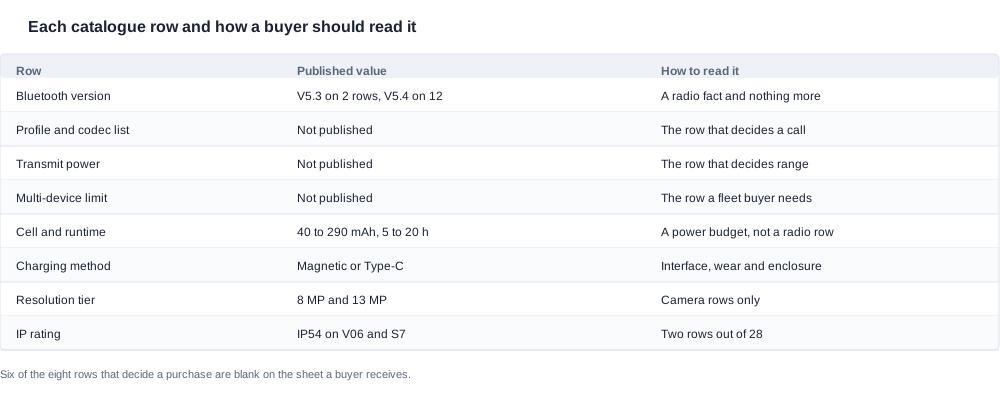
Our published position across the range is Bluetooth 5.3 on the K01 and the K02, and 5.4 on the D11, the LC-105-2, the D12, the G07, the YK12, the LC-105-1, the YKC02, the D17, the ZH12, the A07, the AR glasses entry and the AI electrochromic entry. The eleven camera models and the two lens-format rows and the bone conduction entry print no version at all. The electrical rows sit alongside: cells from 40 mAh to 290 mAh, in single and dual configurations, charge times of one or two hours, rated runtimes from about five hours to about twenty, magnetic or Type-C charging, capacitive touch control and features such as surround sound and slim detachable temples.
Smart glasses Bluetooth version: reading the version row
The version row is read in three moves, and the first move is the one people skip: check that the row belongs to the model you are evaluating. A version printed on a page whose model code you have not verified is not a fact about your model, it is a fact about a page. In our catalogue that check has teeth, because fourteen rows carry a version and fourteen print nothing, and the silent half is the eleven camera models. A camera row that has acquired a version between one document and the next has acquired it from a neighbour, not from the manufacturer.
The second move is to establish what the version identifies. It identifies the radio controller family the product was built against, and from that you can infer which feature set the platform is capable of, which is why the row is worth having even though it carries no quality ranking. What you cannot infer is anything about performance. The published rows make this concrete: V5.4 appears against a 55 mAh × 2 configuration with a rated runtime of about six hours, against a 70 mAh single cell with about twenty hours, against a 100 mAh cell with about seven hours and against a 115 mAh cell with about seven hours. One generation, four very different power budgets, no relationship between them. Reading the version as a proxy for headroom is the single most common misreading of this row, and it is the reason a buyer who wants to know how a product will behave through a working shift should be reading the cell configuration instead.
The third move is the translation, and it is where a specification sheet stops being a document and becomes a procurement tool. A version row becomes a procurement line in one of three ways. Where the version is published, it becomes a conformity input: the product carries a radio, so the radio route in the destination market applies, and in the European Union that is the Radio Equipment Directive (EU) 2014/53/EU, in the United States FCC equipment authorisation, and if the Bluetooth trademark is used, a Bluetooth SIG qualification on top of the regulatory approval. Where the version is published and the row also prints a charge time, the charge time becomes a logistics input, and it is more commercially decisive than the version more often than buyers expect: roughly one hour on the D17 and the ZH12, and no more than two hours on the rows around them. A unit that recharges within a shift is a unit that can be sold on a single-shift rotation; one that needs two hours cannot. Where the version is not published at all, the row becomes an open question with a deadline attached, and that is a legitimate procurement line rather than a failure.
Two rows that sit next to the version row deserve at least as much attention. The charging interface row separates magnetic charging from Type-C, and it decides the accessory that goes in the box, the service life of the interface, the opening in the enclosure and the cable that has to be sourced for the channel. The cell configuration row decides the power budget and, with it, how the product is scheduled, charged and warehoused. Neither of them is a Bluetooth row, and both of them decide more commercial outcomes than the version does.
The profile, codec and coexistence rows and why they stay empty
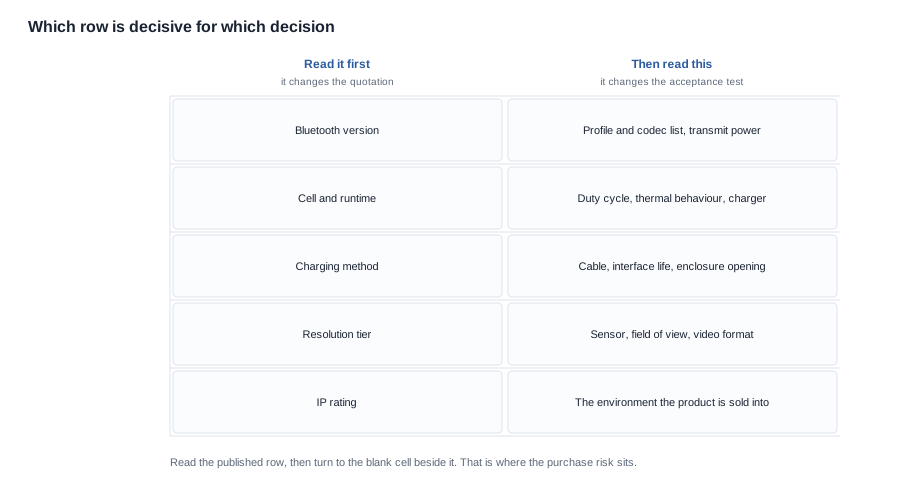
Five rows that decide real outcomes are absent from every specification sheet in this category, and the reasons they are absent are different from one another. Understanding which is which is part of reading the sheet properly.
The profile row decides the microphone path in a call. A product that supports several call profiles and negotiates the weaker one by default behaves differently in a noisy environment from one that negotiates the stronger one, and the difference is invisible until a customer makes a call from a street. It is absent because it is a firmware configuration rather than a hardware characteristic, so it is a question for the supplier's engineering team rather than for the catalogue. When you request it, the only usable answer is a list with the default marked, because "supports all profiles" is precisely the answer that hides the problem.
The codec row decides what carries the audio and whether the microphone path depends on a codec at all. It is absent for the same reason as the profile row and is requested in the same document, so the two should be asked for together and answered together.
The coexistence row decides how the product behaves next to a phone's own radios and a wireless router, which is the situation every unit is actually in. It is absent because it describes a system behaviour rather than a component, and it is the row that a version number is most often asked to stand in for. It cannot. A radio stack version tells you what the controller can do; it does not tell you what happens when three other radios are active in the same room.
The multi-device row decides how many connections a unit holds and how it switches between them. It is absent for the same reason, and it is the row a fleet buyer needs first, because a unit issued to staff has to hold a connection to a work phone and a personal phone without either of them dropping.
The transmit power and antenna rows decide range, and neither is derivable from a version. These two are closer to hardware, so they are usually obtainable if the supplier is willing to release them, and they are worth asking for as numbers rather than as a description of a configuration.
The reading skill for a blank cell is worth stating plainly, because blank cells are misread constantly. A blank is not a zero, and it is not a defect, and it does not mean the feature is absent. It means the information is not published, and the correct handling is to convert it into a question with a named form of answer and a deadline. The incorrect handling, and the one that causes most of the damage, is to leave the cell empty in the specification and let a reader interpret the silence as a deliberate statement about the product.
Six of the eight rows on the sheet that a buyer receives are blank or partial in this way, and that is the reason a sheet this short produces so many misreadings. It is not that the sheet is misleading. It is that it is short enough to appear complete.
The five blank rows translate into five questions to ask, and asking them together is more efficient than asking them one at a time:
- Which Bluetooth profiles does the delivered unit support, and which one is negotiated by default?
- Which codecs carry the audio, and does the microphone path depend on one of them?
- How many devices hold a connection at once, and how does the unit switch between them?
- What transmit power and antenna configuration does the delivered unit carry?
- How does the unit behave when a phone and a wireless router are both active in the same room?
Each of the five has a usable form of answer and a form of answer that cannot be filed. The first two need a list with the default marked, the third needs a number, the fourth needs two numbers and a note on the antenna arrangement, and the fifth needs a description of the behaviour rather than a claim about it. A supplier who answers all five in one document has given you the radio section of a technical file, and that document is worth more than the version row, the cell row and the interface row combined.
Turning each specification row into a procurement line
A specification row becomes useful when it is converted into three separate things: a requirement, a test, and a clause. The requirement states what must be true of the delivered product. The test states how you will know. The clause states what happens if the test fails. A row with only a requirement is an aspiration; a row with a requirement and a test is a specification; a row with all three is something you can actually enforce at the first delivery.
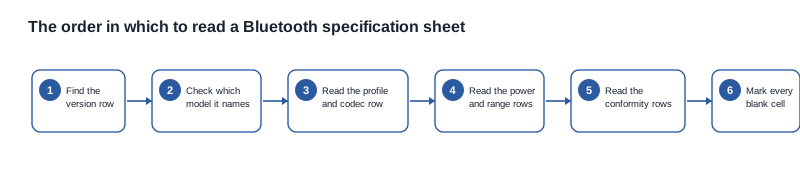
The working order above is the one we recommend, and it is deliberately not the order the sheet is printed in. Find the version row and confirm which model it names. Read the profile and codec rows, which are blank and therefore require a request. Read the power and range rows, where the cell configuration and the charge time carry the commercial weight. Read the conformity rows, which decide the route rather than the product. Then mark every blank cell, because the blanks are the specification and everything else is context.
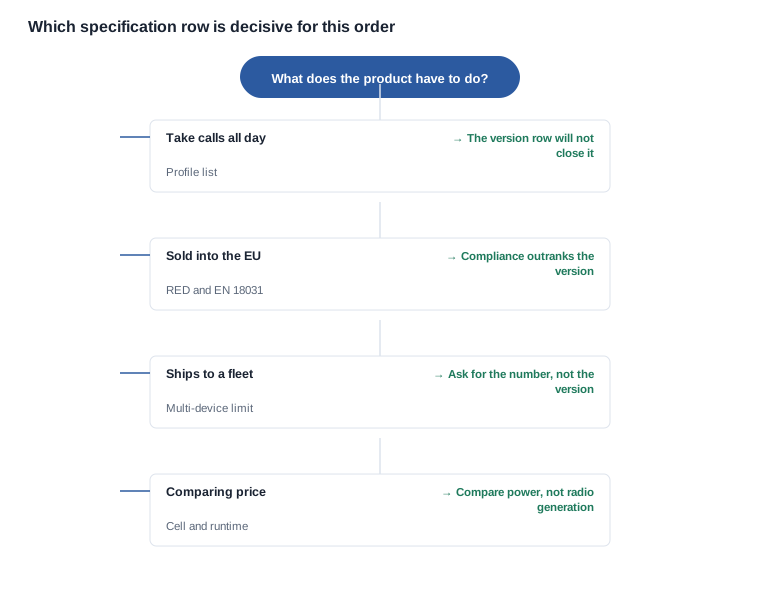
The decision chart is a way of deciding where to spend your effort, because reading every row of every candidate is not a strategy. If the product takes calls all day, the profile list is the row that decides the purchase and the version will not close it. If the product is sold into the European Union, the conformity route outranks everything else on the sheet. If units ship to a fleet, the multi-device limit is the number you need and the version is beside the point. If the actual task is a price comparison between two candidates, the cell configuration and the rated runtime are the rows to compare, because those are the only two rows that are both published and comparable within a cell class.
Two rows that do not appear on any sheet in this category are worth adding to your own template, because they are the two most frequently missing. The first is the multi-device limit as a number. The second is the firmware update duty: who owns updates, the channel they travel through, and what notice you receive before a radio-affecting change reaches the field. Both are easy to request and awkward to introduce later, and the second one determines whether the radio behaviour you evaluated is the radio behaviour your customers will get.
The discipline underneath all of this is to never let a catalogue row become a requirement without also naming the test that would show the requirement has been met. A published figure is a starting point; a figure with a test attached is something a supplier can be held to. That is the difference between reading a specification sheet and using one.
Scoring two candidates with the same sheet
When two candidates arrive with the same kind of sheet, the comparison should be run on criteria rather than on impressions, and the criteria have to be declared before the numbers are read. In practice a shortlist in this category is built on four of them: the published electrical configuration, the conformity route for the destination market, the number of blank cells that remain blank after the request, and the total cost of closing them.
The blank-cell count is the one that carries the most information and the least glamour. Two candidates with identical published rows are not equivalent candidates, because a specification sheet with three blanks and a specification sheet with seven blanks represent different amounts of unresolved work. The right way to use the count is not to score it as quality but to price it: each blank that stays blank is a request that has to be issued, an answer that has to be evaluated and a clause that has to be written, and the amount of effort is roughly the same whatever the blank happens to be about.
The total cost comparison should include the cost of the unanswered questions rather than only the unit price. A candidate that answers every row in the request has a specification cost that has already been paid; a candidate that answers nothing has a specification cost that has not been invoiced yet, and it will be invoiced later, in engineering time on your side and in schedule on the launch. This is why the cheapest quotation in a comparison is often not the lowest total cost, and it is the reason the request for the blank rows belongs in the first round of a sourcing exercise rather than after a shortlist has been decided.
There is one comparison the sheet can support on its own, and it is worth knowing which one it is: the cell configuration and the rated runtime, within a single cell class. Those two rows are printed, and they are printed consistently, so a comparison of a 220 mAh model against a 290 mAh model is meaningful once you accept that the runtime figure is a result under unstated conditions rather than a specification. Every other row on the sheet either requires a request or requires a test.
Four misreadings of a Bluetooth specification sheet
The first misreading is treating the version as the specification. It is one row, and in the published data it tracks no other product difference. The catalogue's own numbers make the point: the same V5.4 label sits on the G07 and the YK12 at about six hours, on the D17 at about seven hours and on the A07 at about twenty hours, and no buyer reading the version row alone would know that.
The second misreading is reading the rated runtime as a radio row. It is a power row, and the radio is one contributor among the workload, the environment, the temperature and the state the unit was left in. More importantly, the runtime figures in this catalogue are results rather than specifications, because the conditions behind them are not stated, and results are only comparable when the conditions match.
That last point deserves a concrete warning, because the catalogue contains a genuine trap for anyone comparing rows quickly. Four rows carry a 100 mAh cell: the AR glasses entry with about eight hours and magnetic charging, the AI electrochromic entry with about seven hours and magnetic charging, the D11 and the D12 with about seven hours and a Type-C interface, and the ZH12 with about eight hours and a Type-C interface. Same cell, four published runtimes from six to eight hours, and the difference is explained by what else the product does and how it is charged. A buyer who sees 100 mAh and picks a runtime without also reading the charging method and the tier will conclude that two of those rows are wrong. They are not; they are different products, and the number only becomes comparable when the charging method comes with it.
The third misreading is assuming the features are radio features. Capacitive touch control, surround sound and a slim detachable temple are product decisions, and they appear on the sheet because they differentiate the product rather than because they describe the radio. This matters in a specific way when the sheet is used to build a compliance argument: a feature that is not a radio feature does not need a radio qualification, and treating it as one produces a file that is larger than the product requires.
The fourth misreading is skipping the sheet because the Bluetooth question appears answered. The interface row, the cell row and the runtime row between them decide more commercial outcomes in this category than the version does, and the blank cells beside the version are the ones that decide whether the product works at all in the environment you are shipping into.
Stated plainly: we publish the Bluetooth version for each row where the catalogue states it, and we publish the empty cells beside it with the same prominence, because that is the honest description of what we hold. We will not fill a blank row with a typical figure from the industry, and we will not turn a catalogue value into a requirement on your behalf without also saying what would demonstrate it.
Name the model and what the product has to do in the field, and we will tell you which of the missing rows is decisive for that use and which you can let go. The wider treatment of radio behaviour sits under bluetooth connectivity, and the Bluetooth version common mistakes and Bluetooth version key specifications articles cover the two sides of the same question. For the longer version of this argument about what a sheet leaves out, see what the spec sheet does not tell you.
How to read the sheet
- Bluetooth connectivity and versions
- What the spec sheet omits about Bluetooth
- Bluetooth version common mistakes
- Bluetooth version key specifications
Every version row sits in front of five empty cells; ask us which of them your use actually turns on.