
How do I know which model suits me? The honest answer for this range is that the published material does not support naming one, and any article that finishes by recommending a model is doing something the catalogue cannot back up. What the catalogue publishes is enough to screen against, and screening is a different exercise from choosing. The method below takes a requirement, finds the published row that settles it, and lets the shortlist fall out of the rows rather than out of a preference.
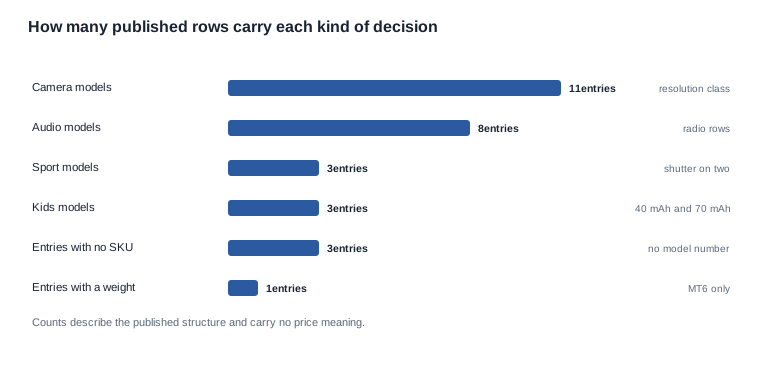
The structure a screen runs against is this. Twenty-eight entries: eleven camera models — the V06 and the V03 Pro, the V03 and the KY06, the MT6 and the MT5, the L2 Utral and the L1 Pro, the CY05 and the S7, and the CY03; eight audio models — the D12 and the D11, the K01 and the LC-105-1, the K02 and the G07, and the YK12 and the LC-105-2; three sport models — the YKC02, the D17 and the ZH12; three kids models — the A05, the A06 and the A07; and three entries published without a model number, the AR model, the electrochromic model and the bone-conduction model.
One caution belongs at the front of this article, because the grouping above invites the wrong reading. This is a structural grouping, not a price tier. The catalogue publishes no price, no price band, no price tier and no cost figure for any model, and nothing in this article should be read as one. The same caution applies to the word "tier" wherever it appears below: it describes what the catalogue publishes about a group, never what it costs.
The three-part answer follows the same shape. Published: the tier structure, the per-model specification rows and the feature rows listed below. Not published: price, minimum order quantity, lead time, warranty terms, dimensions, weights for twenty-seven of the twenty-eight entries, sensor model, field of view, video format, acoustic measurements and any per-model certification scope. Ask the supplier: the rows that would close the requirement being screened on, before the shortlist is presented to a customer.
How do I know which model suits me: the published structure to screen against
The rows that can carry a decision
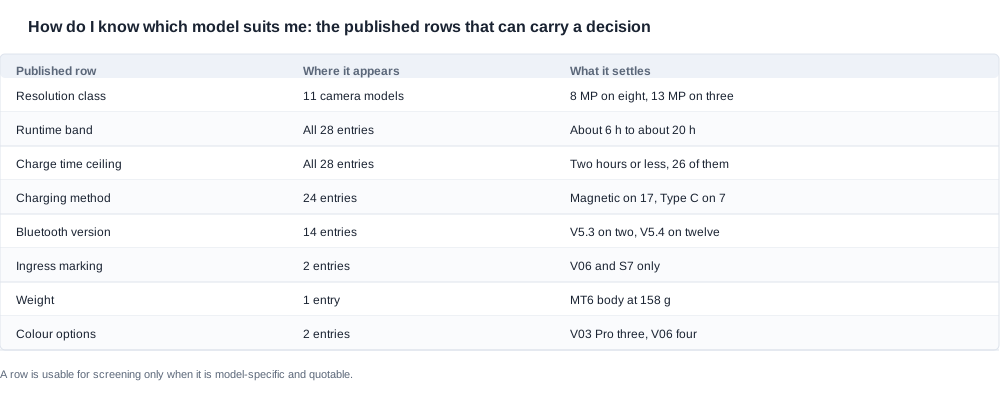
A screening exercise uses only rows that are specific to a model and that mean the same thing every time they are quoted. In this range that set is narrower than a first reading of the catalogue suggests, and naming it precisely is what makes the screen reliable.
Resolution. The eight-megapixel class covers eight camera models — the MT5 and the KY06, the V06 and the V03, and the MT6 and the CY03, and the CY05 with its Pro version — and the thirteen-megapixel class covers three: the L1 Pro and the L2 Utral, and the S7. All eleven camera models publish a resolution class; none publishes anything further about the camera, so no sensor model, field of view, frame rate or video format can be screened on.
Runtime and charge time. Every entry publishes a rated runtime and a charge-time ceiling of two hours or less, except the D17 and the ZH12, which publish about one hour. Runtime across the range runs from about six hours on the G07 and the YK12, through about seven hours on the CY05 and the D12, the MT6 and the CY03, and the D11 and the L2 Utral, and the L1 Pro and the D17, to about eight hours on the YKC02 and the LC-105-1, the K01 and the LC-105-2, and the K02 and the ZH12, and about twenty hours on the A05, the A06 and the A07.
Charging method. Published on twenty-four of the twenty-eight entries: magnetic on seventeen, Type-C on seven. It is published for no camera model — the L1 Pro and the MT6, and the CY03 and the CY05 publish a case capacity and no charging method.
Bluetooth version. Published on fourteen entries — V5.3 on the K01 and the K02, V5.4 on the other six audio models, the three sport models, the A07, the AR model and the electrochromic model. It is published for no camera model, and for the A05, the A06 and the bone-conduction model.
Ingress marking. IP54 is published on the V06 and the S7, and on those two only.
Weight. Published once in the whole range: a 158 g MT6 glasses body, that figure covering the 265 mAh battery and the camera but leaving the foldable charging case out.
Colour. Only two models publish colour — the V03 Pro with three options and the V06 with four.
Charging case. A capacity is published on five camera models: 1400 mAh for the CY05 and the CY03, and the L1 Pro, either 900 mAh or 1400 mAh for the L2 Utral, and 1200 mAh in a folding case for the MT6. The KY06 and the MT5 show a case without a figure, and the V03 Pro and the V03, and the V06 and the S7 carry no case row at all.
Feature rows. Eleven models publish a feature row: the D11 with a surround-sound line and a long-runtime line, the YK12 with surround sound and a slim temple, the YKC02 with surround sound and a long-battery line, the D17 with a remote-shutter line and surround sound, the ZH12 with a remote-shutter line and a stereo surround-sound line, the G07 with an ultra-slim construction and a detachable temple, the V03 Pro with a temple that flexes, a photochromic lens and a Type-C charging port, the V06 with an ergonomic design, a detachable inner frame and an ingress marking, the S7 with an ergonomic build and a removable inner frame, the AR model with an indicator and button control, and the bone-conduction model with an amplification gain of 35 dB.
Why the screen cannot produce a single answer
Those rows are enough to narrow a requirement to a group, and not enough to choose within it — and the reason is structural rather than a matter of missing data. The deciding variables for a purchase are who will use the product, what they will do while using it, the geometry of their face and head, and what the channel can support commercially. None of those four is a catalogue fact, and none of them is a row a supplier could publish without knowing the customer.
A screen therefore produces a shortlist plus a request list, and the request list is the part that actually determines the answer. A channel that skips the request stage is choosing from published rows and calling it a recommendation.
Six requirements and the published row that settles each
If the requirement is capture
Resolution class is the only published row that separates the camera tier, and it is a structural grouping rather than a quality ranking: eight of the camera models at eight megapixel and three at thirteen, those three being the S7 and the L2 Utral, and the L1 Pro. Two further rows narrow a capture requirement without ranking it. The ingress marking separates the V06 and the S7 from the other nine camera models, and the remote-shutter line exists only on the D17 and the ZH12 — both of which are sport models, not camera models, so the camera tier publishes no shutter row at all.
If the requirement is audio
Eight models publish the audio standard rows, the radio reading V5.3 for the K01 and the K02 and V5.4 for the remaining six. Five publish a surround-sound line — the D17 and the D11, the ZH12 and the YK12, and the YKC02. The D12 publishes no surround-sound line, which is the only published difference between it and the D11 — both publish 100 mAh, V5.4, Type-C charging and about seven hours.
If the requirement is ingress protection
There is one answer here and it is narrow: IP54 is published IP54 on the V06 and the S7, and on no other entry in the range. Both of them also publish a detachable inner frame, so a requirement that combines ingress protection with a removable part has exactly two candidates and one open question about what the marking covers.
If the requirement is endurance
Two rows settle it, and they have to be read together. The rated runtime band separates the models, from about six hours on the G07 and the YK12 to a rated twenty hours on each of the A05, the A06 and the A07. The charge-time ceiling is two hours or less everywhere except the D17 and the ZH12, which publish about one hour — a genuine difference in the recharge interval, and the only published one of its kind in the range.
If the requirement is a named feature
Three feature rows exist that a customer may ask for by name: colour options on the V03 Pro and the V06, the remote shutter on the D17 and the ZH12, and the photochromic lens on the V03 Pro. Note that the product name of the V03 Pro carries no mention of the photochromic lens; it appears only on the feature row. A requirement expressed as a feature is therefore satisfied by a feature row and by nothing else.
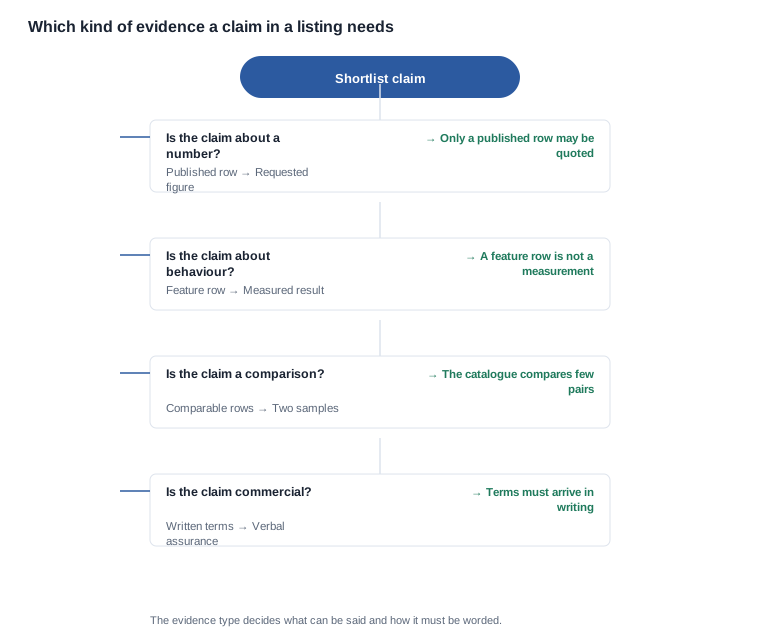
A requirement expressed as a feature has one further consequence: it has to be confirmed against a specification rather than against a page, because the catalogue publishes the feature and nothing measurable behind it. The photochromic lens on the V03 Pro is the clearest case — the product name does not mention it, the feature row does, and no transition specification accompanies it. A buyer who needs that feature confirmed should ask for the transition specification and for the observed sample behaviour, and should note at the same time that the V03 Pro is one of the four camera models carrying no charging-case row.
If the requirement is weight
The published answer is a single model, and it is a partial answer even for that model: 158 g for the MT6 glasses body, with the foldable case unweighed and the bare frame weight unpublished across the range. Weight therefore functions as a filter that eliminates rather than as a ranking that orders, and the method for judging a balance is set out separately, adding to the sizing programme rather than replacing it.

The screening worksheet
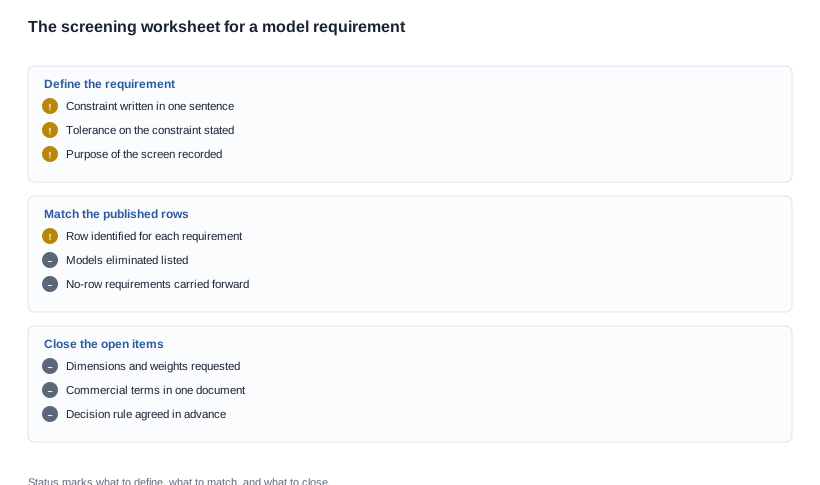
The worksheet below is the operational form of the screen. It is written to be filled in by a buyer before any request goes out, because the value of a screen comes entirely from the fact that it was defined before the answers started arriving.
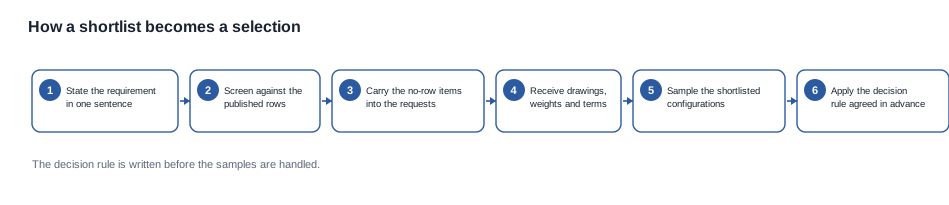
Each requirement is reduced to one sentence naming the constraint that matters, then matched against the published row that can settle it, then carried forward as either a group or an open item. A requirement with no published row does not disappear — it becomes a request, and the request goes into the same schedule as the specification questions. That is the mechanism that keeps a shortlist honest: every open item is visible, and every open item has an owner and a date.
The last two rows of the worksheet are the ones that get skipped and the ones that matter most in practice. A shortlist that contains models the supplier cannot confirm, and a shortlist with no stated purpose for the request, are both shortlists that will be argued about later — the first because a model that cannot be confirmed is not a candidate, and the second because the request schedule cannot be prioritised without it.
What the screen deliberately leaves open
A screen that leaves nothing open is not a screen; it is a decision already taken. Three things are supposed to remain open after the published rows have been applied, and naming them keeps a buyer honest about what the exercise actually produced.
The first is the specification of every feature that appears only as a feature row. The second is the geometry: without a drawing and a weight, two models inside the same group cannot be compared on anything a customer will notice. The third is the commercial position, which for this range is unpublished in its entirety — no price, no minimum order quantity, no lead time, no warranty term — and which therefore has to arrive as a document rather than as a conversation.
Leaving these three open is not a weakness of the method. It is the method working: each open item has a named request, an owner and a place in the schedule, and a shortlist built this way can be defended in front of a customer who asks why one model was chosen over another.

The three ways a model choice goes wrong
Choosing on the label
AI appears in the product name of twenty of the twenty-eight entries, and an AI in a name is a label rather than a feature row. It does not say which models accept a voice command, which language set is recognised, or what happens without a wide-area connection — and the catalogue publishes none of those either. A shortlist built on the name is a shortlist built on the label, which is the same as a shortlist built on the resolution class if the resolution class is treated as a camera specification.
Choosing on a feature published without a measurable
A feature row is a description, and a description is not a number. The surround-sound line on five models does not carry a sound pressure level, a frequency response or a volume at which the description still holds; the detachable temple on the G07 does not carry a joint rating or a cycle count; the photochromic lens on the V03 Pro carries no transition specification. A requirement that depends on the feature still has to be specified, and the specification has to be requested.
Choosing on a comparison the catalogue cannot support
This is the most common failure and the easiest to spot once it is named. A comparison requires two comparable quantities, and the catalogue publishes them for very few pairs. The G07 and the YK12 publish identical standard rows and different feature rows, so they look identical on a datasheet and are not identical objects. The D11 and the D12 publish the same four standard rows and differ only by the surround-sound line. A comparison built on those rows compares the datasheet rather than the product, and a buyer who repeats the comparison in a listing repeats the error.
Turning the screen into a shortlist and a request schedule
The requests below turn a screen into a decision. Each one asks for a row, a figure or a written position, and each one is written so that the answer can be compared with another supplier's answer for the same requirement.
- The requirement itself. Ask the customer channel to state the requirement in one sentence, with the constraint that matters and the tolerance on it, before any model is discussed. Without this step the screen has no input and the shortlist is a guess.
- The published rows that narrow it. Name the published row for each requirement — resolution class, runtime band, ingress marking, feature line, charging method — and record which models it eliminates. A requirement with no published row is recorded as an open item rather than dropped.
- The dimensions, weights and tolerances that are not published. Ask for the drawing and the weight for each shortlisted model, and for the tolerance on both, because the screen cannot rank two products whose geometry is unknown. The geometry method is in how to find your size.
- The commercial position. Ask for the price, the minimum order quantity, the lead time and the warranty terms in the same document, so that the shortlist can be judged on the same basis for every candidate rather than on a partial comparison. None of these are published in the catalogue, and a shortlist built without them is a shortlist built on incomplete data.
- The certification scope. Ask for the compliance position of the exact configuration for each shortlisted model, in writing. The catalogue carries holds no per-model compliance row, and its text never names CE, FCC or RoHS, so this cannot be screened from published material. The verification method is in how do I check an FCC ID online.
- The samples, and what they are for. Ask for a sample of each shortlisted configuration, with the sample programme's purpose stated in advance and a written record kept for each unit. A sample order without a stated purpose produces impressions rather than evidence, and the purpose should name the open items the sample is meant to close.
- The decision rule, agreed before the samples arrive. Write down in advance what result on which measurement will move a model from the shortlist to the selection, and what result would move it out. A decision rule written after the samples have been handled is not a rule; it is a rationalisation.
The category comparisons across the range are collected in smart eyewear range category comparison, and the camera tier's own guide is in AI camera glasses use case guide. The audio tier is in bluetooth audio glasses and the camera tier in AI camera glasses, with the full range behind this article at products. For a channel building several lines rather than one, the category-selection method is in how to choose the right category smart eyewear range and the line-building method in how to build a product line smart eyewear range.
Related reading
- The category comparison across the whole range — smart eyewear range category comparison
- The camera tier by application — AI camera glasses use case guide
- Choosing between categories rather than models — how to choose the right category smart eyewear range
- Building a range rather than a single line — how to build a product line smart eyewear range
- The geometry a screen cannot settle — how to find my size
- The measurement a weight screen needs — how to know if the weight is distributed well
- The verification step for the shortlisted configuration — how do I check an FCC ID online
- The camera tier as a collection — AI camera glasses
- The eight audio entries gathered together — the bluetooth audio glasses page
- The full range behind this article — products
Send the requirement in one sentence and the range you are covering, and we will tell you which published rows narrow it and which questions have to come back in writing before a model can be chosen.